Here’s a number that should make you pause: 73% of developers now run large language models locally instead of relying solely on cloud APIs. In 2026, local LLMs aren’t just a privacy play—they’re a performance and cost optimization strategy that serious developers can’t ignore.
I’ve spent the last year testing local LLM setups for our development workflow at Fungies. The landscape has changed dramatically. What required a $10,000 server in 2024 now runs smoothly on a $1,600 consumer GPU. The tools have matured. The models have gotten smaller and smarter. And the economic case has become undeniable.
This guide cuts through the noise. I’ll show you the 10 best local LLM tools and models for developers in 2026, with real benchmarks, hardware requirements, and cost analysis. No fluff. Just data you can act on.
What Are Local LLMs and Why They Matter in 2026
Local LLMs are large language models that run entirely on your own hardware—no API calls, no data leaving your machine, no subscription fees per token. You download the model weights, load them into memory, and interact with them through a local interface.
Why this matters now:
- Privacy: Your code, prompts, and data never touch a third-party server. Critical for proprietary work.
- Latency: Local inference eliminates network round trips. Sub-100ms responses versus 500ms+ for cloud APIs.
- Cost: Break-even on hardware in 7 months versus $80/month API subscriptions.
- Reliability: No rate limits, no downtime, no vendor lock-in.
- Customization: Fine-tune on your own data without permission or extra fees.
The trade-off? You need the right hardware. But as you’ll see, the barrier to entry has dropped significantly.
The 10 Best Local LLM Tools and Models for Developers
I’ve organized this into two categories: tools (the software that runs models) and models (the actual AI weights). You need both to build a working local LLM setup.
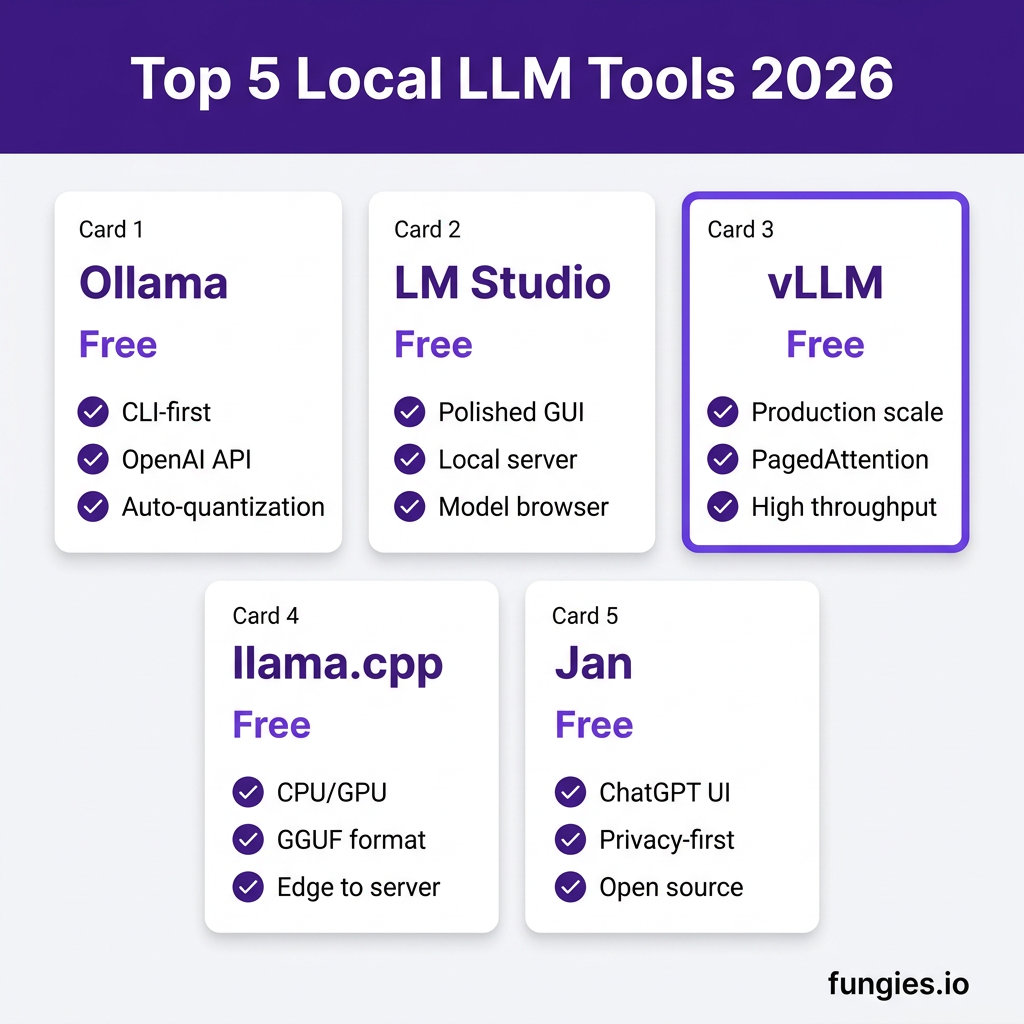
1. Ollama — The CLI-First Powerhouse
Ollama is the most popular local LLM tool for a reason. It’s dead simple to use, handles model management automatically, and exposes an OpenAI-compatible API that drops into existing workflows.
Key features:
- One-command model installation:
ollama run llama3 - Automatic quantization—no manual GGUF conversion needed
- Built-in OpenAI API compatibility on
localhost:11434 - Model library with 100+ pre-configured models
- Cross-platform: macOS, Linux, Windows
Best for: Developers who want a CLI-first experience and easy integration with existing tools.
2. LM Studio — The GUI Champion
If you prefer a graphical interface, LM Studio is unmatched. It’s polished, intuitive, and hides complexity without sacrificing power. The local server mode on port 1234 makes it trivial to connect from your code.
Key features:
- Beautiful desktop app with model browser
- One-click downloads from Hugging Face
- Built-in chat interface for testing
- Local server mode with OpenAI-compatible endpoints
- GPU acceleration with automatic detection
Best for: Developers who want a polished GUI and quick experimentation without terminal commands.
3. vLLM — Production-Grade Inference
When you need to serve models at scale, vLLM is the industry standard. Developed at Berkeley, it uses PagedAttention to achieve throughput that rivals commercial APIs.
Key features:
- PagedAttention for 2-4x higher throughput
- Continuous batching for efficient GPU utilization
- OpenAI-compatible server with streaming support
- Tensor parallelism for multi-GPU setups
- Production-ready with Prometheus metrics
Best for: Teams running local LLMs in production or serving multiple developers from shared hardware.
4. llama.cpp — The Universal Workhorse
llama.cpp is the foundation most other tools build on. It runs on everything from Raspberry Pi to enterprise GPUs, using the efficient GGUF format. If you need maximum compatibility across hardware, this is it.
Key features:
- CPU and GPU inference (CUDA, Metal, Vulkan, ROCm)
- GGUF quantization format (industry standard)
- Works on ARM, x86, Apple Silicon
- Minimal dependencies, easy to compile
- Supports 100+ model architectures
Best for: Edge deployments, older hardware, or maximum portability across platforms.
5. Jan — The Open Source ChatGPT Alternative
Jan is a local-first, privacy-focused ChatGPT alternative that’s fully open source. It offers a familiar chat interface while keeping everything on your machine.
Key features:
- ChatGPT-style interface with conversation history
- Local-first architecture—no cloud dependencies
- Built-in model management and downloads
- Extensible with plugins
- Active open source community
Best for: Developers who want a ChatGPT-like experience without the privacy trade-offs.
6. Llama 3.3 8B — The Efficiency King
Meta’s Llama 3.3 8B delivers 73.0 MMLU at Q4_K_M quantization, making it one of the most capable small models available. At ~5GB VRAM, it runs comfortably on mid-range GPUs.
Specs:
- 8 billion parameters
- 73.0 MMLU (Q4_K_M)
- ~5GB VRAM requirement
- 25 tokens/second on RTX 3060
- Apache 2.0 license
Best for: General coding tasks, documentation, and chat applications where efficiency matters.
7. Qwen 3 7B — The Coding Specialist
Alibaba’s Qwen 3 7B punches above its weight class. With 72.8 MMLU and an impressive 76.0 HumanEval score, it outperforms many larger models on coding benchmarks.
Specs:
- 7 billion parameters
- 72.8 MMLU, 76.0 HumanEval
- ~5.5GB VRAM requirement
- 38 tokens/second on 16GB tier GPUs
- Strong multilingual support
Best for: Code generation, debugging, and technical writing where accuracy is critical.
8. Mistral Small 3 7B — The Speed Demon
Mistral’s Small 3 7B prioritizes inference speed without sacrificing capability. The 68.2 HumanEval score is competitive, and the fast iteration makes it ideal for interactive use.
Specs:
- 7 billion parameters
- 68.2 HumanEval
- ~5.5GB VRAM requirement
- 30+ tokens/second on modern GPUs
- Apache 2.0 license
Best for: Real-time applications, chatbots, and scenarios where low latency is essential.
9. Phi-4-mini 3.8B — The Edge Device Hero
Microsoft’s Phi-4-mini proves that bigger isn’t always better. At just 3.8B parameters, it achieves 68.5 MMLU and runs on minimal hardware—including edge devices and older laptops.
Specs:
- 3.8 billion parameters
- 68.5 MMLU
- ~3.5GB VRAM requirement
- ~18 tokens/second on integrated graphics
- MIT license
Best for: Edge deployments, laptops without dedicated GPUs, and resource-constrained environments.
10. DeepSeek R1 — The Reasoning Powerhouse
DeepSeek R1 is the most capable open-source reasoning model available. With 671B total parameters (37B active per token via Mixture of Experts), it rivals GPT-4 on complex reasoning tasks.
Specs:
- 671B parameters (37B active)
- Mixture of Experts architecture
- 40GB+ VRAM requirement (or CPU offloading)
- MIT license (fully open)
- Chain-of-thought reasoning
Best for: Complex problem-solving, research, math, and scenarios where reasoning quality trumps speed.
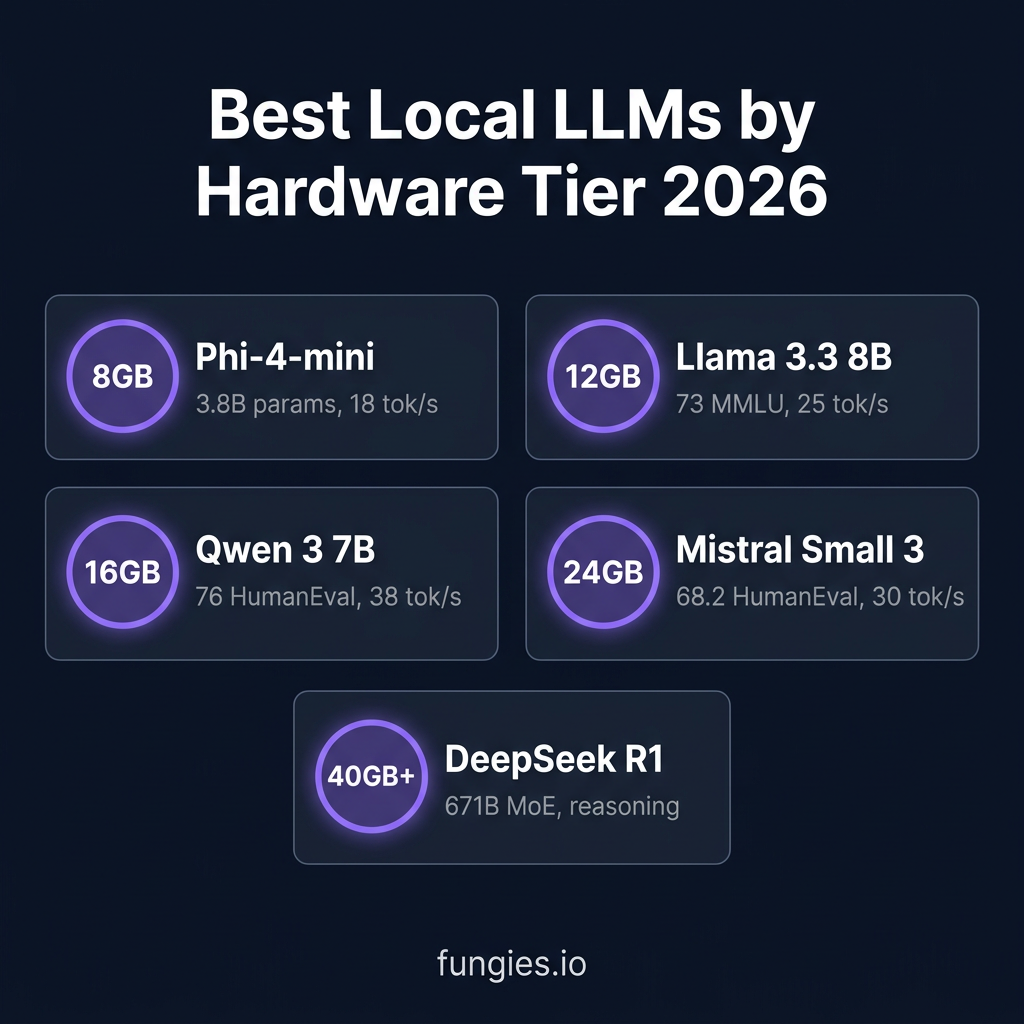
Local LLM Comparison Table
| Model | Parameters | MMLU | HumanEval | VRAM | Speed* |
|---|---|---|---|---|---|
| Phi-4-mini | 3.8B | 68.5 | — | 3.5GB | 18 tok/s |
| Llama 3.3 8B | 8B | 73.0 | — | 5GB | 25 tok/s |
| Qwen 3 7B | 7B | 72.8 | 76.0 | 5.5GB | 38 tok/s |
| Mistral Small 3 | 7B | — | 68.2 | 5.5GB | 30 tok/s |
| DeepSeek R1 | 671B (37B active) | — | — | 40GB+ | 5-10 tok/s |
Hardware Requirements Breakdown
Choosing the right hardware depends on which models you want to run. Here’s the breakdown by VRAM tier:
8GB VRAM — Entry Level
GPUs: RTX 3060, RTX 5060 Ti, Apple M2
Capable models: Phi-4-mini, Llama 3.3 8B (Q4), Qwen 3 7B (Q4)
This tier handles most coding assistance and chat tasks comfortably. You’ll need quantization (Q4_K_M) for the 7-8B models, but quality remains excellent.
12GB VRAM — Sweet Spot
GPUs: RTX 3060 Ti, RTX 4070, RTX 5070
Capable models: All 7-8B models at Q8, 14B models at Q4
The 12GB tier unlocks larger models like Qwen 14B or Llama 3.3 70B (with aggressive quantization). Best balance of cost and capability.
16GB VRAM — Power User
GPUs: RTX 4080, RTX 5080, Apple M3 Max
Capable models: 24B models at Q4, 32B models with CPU offloading
Run Qwen 32B or Llama 3.3 70B (Q4) for near-frontier capabilities. This tier handles complex reasoning and long-context tasks.
24GB VRAM — Enthusiast
GPUs: RTX 3090, RTX 4090, RTX 5090
Capable models: 32B models at Q4, 70B models at Q4_K_M
The RTX 4090 is the gold standard for local LLMs. Run 32B models at 30-40 tok/s or 70B models at 15-25 tok/s. Used RTX 3090s at $700-900 offer exceptional value.
40GB+ VRAM — Professional
GPUs: A100 40GB, RTX 6000 Ada, multiple 24GB cards
Capable models: DeepSeek R1, Llama 3.3 405B (Q4)
For frontier-level capabilities, you need serious hardware. DeepSeek R1 requires 40GB+ but delivers GPT-4 class reasoning.
Cost Analysis: Local vs Cloud
Let’s talk numbers. A solo developer spending $80/month on API calls breaks even on local hardware in about 7 months.
| Setup | Upfront Cost | Monthly Cost | Break-even |
|---|---|---|---|
| Cloud API (Claude/GPT-4) | $0 | $80-200 | — |
| RTX 3060 12GB | $300 | $15 | 4 months |
| RTX 4070 12GB | $550 | $20 | 7 months |
| RTX 3090 24GB (used) | $800 | $25 | 10 months |
| RTX 4090 24GB | $1,600 | $30 | 20 months |
Electricity costs: ~$15-30/month for 24/7 operation, depending on your GPU and local rates. A 350W GPU running full tilt costs roughly $25/month at $0.10/kWh.
The hidden benefit: Once you own the hardware, marginal usage is free. Experiment freely. Run batch jobs. Fine-tune models. No meter running.
Frequently Asked Questions
Can I run local LLMs without a GPU?
Yes, but with limitations. llama.cpp runs on CPU, and Apple Silicon Macs handle smaller models well via Neural Engine. Expect 2-5 tokens/second for 7B models on modern CPUs. For serious development work, a GPU is strongly recommended.
Which local LLM is best for coding?
Qwen 3 7B leads on HumanEval (76.0), followed by DeepSeek R1 for complex reasoning tasks. For day-to-day coding assistance, Llama 3.3 8B offers the best balance of capability and speed. Test with your specific codebase—performance varies by language and task.
Are local LLMs as good as GPT-4?
For many tasks, yes. A 70B model at Q4 quantization matches or exceeds GPT-3.5 on most benchmarks. DeepSeek R1 competes with GPT-4 on reasoning. The gap is narrowing fast—what required 175B parameters in 2023 now needs 70B or less.
How do I get started with local LLMs?
Download LM Studio for the easiest start. It handles installation, model downloads, and provides a chat interface immediately. Once comfortable, migrate to Ollama for CLI workflows or vLLM for production serving.
Is my data really private with local LLMs?
Completely. Your prompts, code, and model outputs never leave your machine. No logging, no training data collection, no API calls. For maximum privacy, download models directly from Hugging Face rather than through tool-specific repositories.
Conclusion
Local LLMs have crossed the threshold from hobbyist curiosity to professional tool. The combination of capable open-source models, mature tooling, and affordable hardware makes self-hosting viable for individual developers and teams alike.
Start with Ollama or LM Studio. Pick a 7-8B model like Qwen 3 or Llama 3.3. Test it against your current cloud API workflow. Measure the latency difference. Calculate the cost savings.
The future of AI development isn’t just cloud-based. It’s hybrid. It’s local-first. And it’s here now.
Ready to build with AI-powered tools? At Fungies, we help developers monetize their creations with a no-code checkout that handles global tax compliance automatically. Start free today and focus on building—not billing infrastructure.