Creating a game website isn’t just about showing off your screenshots anymore. In 2026, your game’s website is your storefront, your marketing hub, and your direct connection to players. Whether you’re an indie developer launching your first title or a studio looking to own your player relationships, knowing how to create a game website that actually converts visitors into paying customers is essential.
I’ve seen too many developers pour months into building an amazing game, only to slap together a basic website that does nothing for their sales. The difference between a hobby project and a sustainable game business often comes down to how you present and monetize your work online.
In this guide, I’ll walk you through the exact process I recommend for creating a game website that not only looks professional but actually drives revenue. From platform selection to monetization setup, you’ll learn how to build a site that works as hard as you do.
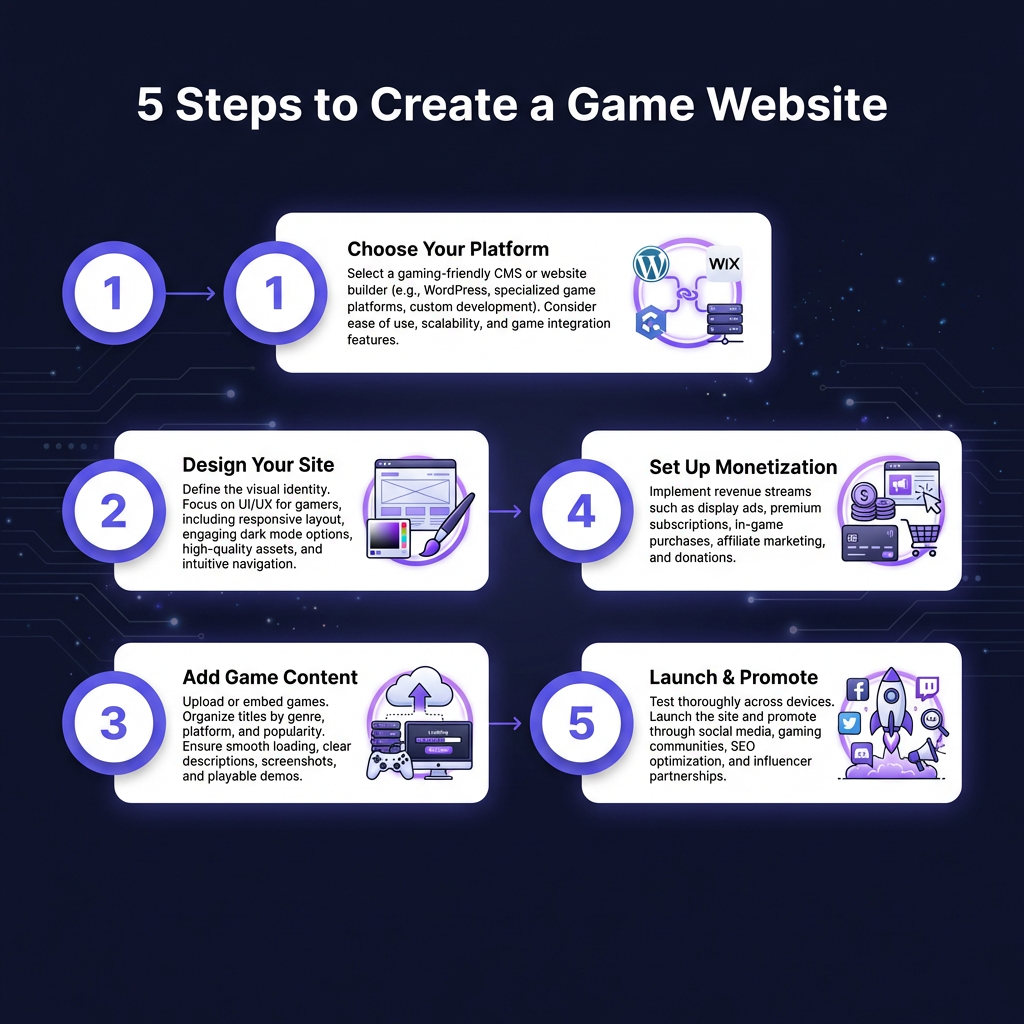
Step 1: Choose the Right Platform for Your Game Website
Before you start designing, you need to decide where your game website will live. This choice affects everything from your ongoing costs to how easily you can integrate monetization features. The platform you choose will determine your technical overhead, payment capabilities, and how much control you have over the player experience.
WordPress: Best for Flexibility
WordPress powers over 40% of the web for good reason. With plugins like WooCommerce or Easy Digital Downloads, you can sell your game directly. The downside? You’re responsible for security, updates, and finding your own payment processing solution. Expect to spend $10-50/month on hosting plus transaction fees. You’ll also need to handle SSL certificates, backups, and plugin maintenance.
For developers comfortable with some technical setup, WordPress offers unmatched flexibility. You can customize every aspect of your site and integrate with virtually any third-party service. Just be prepared for ongoing maintenance.
Website Builders: Fast but Limited
Platforms like Wix, Squarespace, and Webflow let you build beautiful sites without coding. They’re perfect if you want something live today. However, most lack built-in digital product delivery, meaning you’ll need to integrate third-party tools for selling your game.
Webflow offers the most design flexibility among builders, while Squarespace has the most polished templates. Wix is the easiest for beginners but can feel limiting as you scale. All three will cost $15-40/month for the features you’ll need.
Merchant of Record Platforms: All-in-One Solution
This is where platforms like Fungies.io shine. Instead of piecing together hosting, payment processing, tax compliance, and download delivery, you get everything in one place. Your game website becomes a complete storefront that handles global payments, VAT/sales tax, and fraud protection automatically.
The major advantage is that you don’t need to register for tax collection in dozens of jurisdictions. When a player from Germany buys your game, VAT is calculated, collected, and remitted automatically. You just focus on making great games.
Step 2: Design Your Game Website for Conversion
Your game’s website has one job: convince visitors to buy (or download) your game. Every design decision should support that goal. I’ve analyzed hundreds of indie game websites, and the ones that convert follow consistent patterns.
The Hero Section: First Impressions Matter
Above the fold, visitors should immediately understand what your game is and why they should care. Include a compelling headline that captures your game’s unique hook, a high-quality trailer or gameplay video, a clear call-to-action button (“Buy Now,” “Download Demo,” “Wishlist on Steam”), and social proof (review scores, player counts, or testimonials).
Your headline should answer “what is this game and why should I care?” in under 10 words. “A roguelike deckbuilder where you play as a sentient houseplant” is infinitely better than “Plant Game – Coming Soon.”
Essential Pages Every Game Website Needs
Don’t overcomplicate your site structure. These six pages cover everything players need:
- Home: Your elevator pitch with clear CTAs and your best trailer
- About the Game: Features, story, and what makes it special—focus on benefits
- Media: Screenshots, GIFs, trailers, and a downloadable press kit
- Buy/Download: Pricing, editions, and purchase options—make this impossible to miss
- Support: FAQ, contact info, and troubleshooting—reduces refund requests
- Blog/News: Updates, dev logs, and community engagement—great for SEO
Step 3: Add Your Game Content
Content is what separates amateur game websites from professional ones. Here’s what to include to maximize conversions and minimize confusion.
Visual Assets That Sell
Invest in high-quality screenshots that show your game at its best. Action shots beat menu screens every time. Show combat, exploration, or whatever makes your game exciting. Avoid UI-heavy shots unless you’re specifically showcasing interface features.
Create GIFs for key gameplay moments—they load faster than videos and autoplay everywhere. Your trailer should be 60-90 seconds and front-load the most exciting footage. Hook viewers in the first 5 seconds or lose them.
Copy That Converts
Write for your target player, not other developers. Instead of “procedural generation with dynamic difficulty scaling,” say “every playthrough is different, and the game adapts to your skill level.” Focus on benefits, not features. Tell players how they’ll feel playing your game, not just what systems it has.
System Requirements
Be honest about what players need to run your game. List minimum and recommended specs clearly. Nothing generates refunds faster than players buying a game their system can’t handle. Include OS version, processor, memory, graphics, and storage requirements.
Step 4: Set Up Monetization
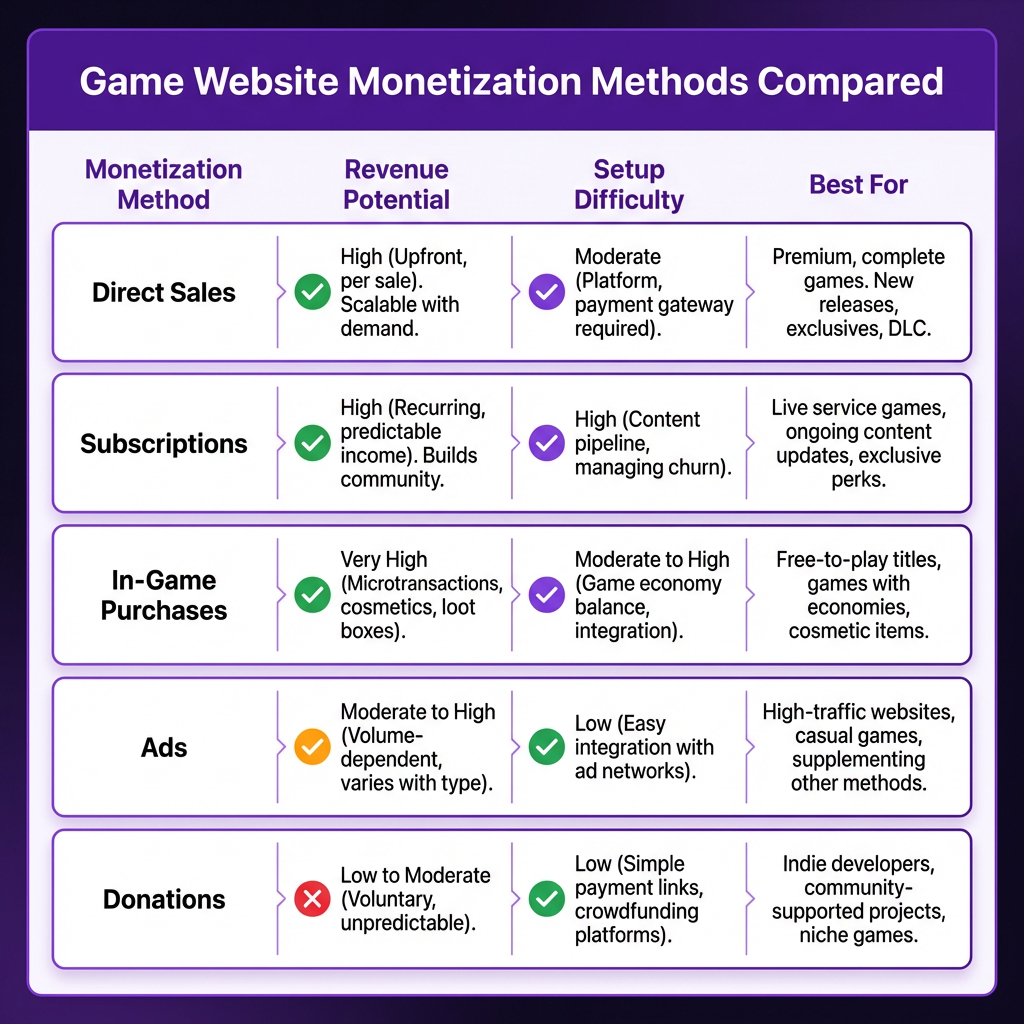
This is where your game website becomes a business. You have several options, and the right choice depends on your game type and audience. Most successful indies use a combination of these approaches.
Direct Sales (Highest Revenue Per Sale)
Selling directly through your website keeps the most money in your pocket. Instead of giving Steam 30%, you pay payment processing fees (typically 2.9% + $0.30) plus any platform fees. For a $20 game, that’s $19.12 vs $14 going to you—a 37% increase in revenue per sale.
The challenge? You’re responsible for global tax compliance. When you sell to customers in the EU, you need to collect and remit VAT. US states have sales tax. Canada has GST/HST. This is where Merchant of Record services become invaluable—they handle all tax compliance for you.
Subscriptions and Early Access
For games with ongoing development, consider a subscription model or early access program. Patreon, Ko-fi, or built-in subscription billing let fans support development and get exclusive builds, behind-the-scenes content, or in-game perks. This creates predictable recurring revenue.
In-Game Purchases and DLC
If your game supports it, offer cosmetic items, expansion packs, or premium currency directly through your website. This creates recurring revenue from existing players. Many successful indies make more from DLC than initial sales.
Platform Integration
Don’t abandon Steam, Epic, or console stores entirely. Instead, use your website as the primary marketing destination that directs players to their preferred platform. Include platform badges and direct links to wishlist pages. Let players choose where to buy.
Ready to Monetize Your Game?
Fungies.io helps indie developers sell games globally with built-in tax compliance, 50+ payment methods, and zero monthly fees.
No credit card required • 5% + $0.50 per transaction
Step 5: Launch and Promote Your Game Website
Building the website is only half the battle. You need to drive traffic to it consistently. Here’s what actually works for indie developers in 2026.
SEO for Game Developers
Optimize your site for search engines. Target keywords like “[your game genre] games,” “indie [game type],” and “games like [popular similar title].” Write blog posts about your development process—these rank well and build an audience before launch.
Long-tail keywords are your friend. Instead of competing for “indie game,” target “cozy farming sim with crafting” or “fast-paced roguelike shooter.” Less competition, higher intent.
Social Media and Community
Share development updates on Twitter/X, Reddit (r/gamedev, r/indiegaming), and Discord. Build a mailing list—email converts better than any social platform. Post GIFs and short videos regularly to stay visible.
Discord communities are particularly valuable. They create superfans who will evangelize your game. Start your server early and engage genuinely with members.
Press and Influencers
Create a press kit with high-res screenshots, logos, and a fact sheet. Reach out to gaming journalists and YouTubers who cover your genre. A single video from the right creator can drive thousands of visitors to your website.
Personalize your outreach. Mention specific videos they’ve made and explain why your game fits their audience. Mass emails get deleted; personalized pitches get coverage.
Common Mistakes to Avoid
I’ve seen developers make the same errors repeatedly. Avoid these pitfalls:
- No clear CTA: Don’t make visitors hunt for the buy button. It should be visible within seconds of landing.
- Slow loading times: Compress images and videos—mobile users won’t wait for a 10MB hero image to load.
- Ignoring mobile: Half your traffic will be on phones. Test your site on actual devices, not just browser dev tools.
- No email capture: Build your list before you need it. Offer a newsletter, dev log updates, or exclusive content.
- Hiding pricing: Be transparent about costs. Mystery pricing kills conversions.
- Neglecting analytics: Install Google Analytics or privacy-focused alternatives to understand your traffic sources.
- Forgetting about accessibility: Ensure sufficient contrast, alt text for images, and keyboard navigation.
FAQ
How much does it cost to create a game website?
Costs range from $5/month for basic hosting with WordPress to $50+/month for premium builders. If you use a Merchant of Record platform like Fungies, hosting is often included, and you only pay per transaction (typically 5-10% + fixed fee). For most indies, all-in-one platforms offer the best value when you factor in payment processing and tax compliance costs.
Do I need a game website if I’m selling on Steam?
Yes. Your website is the one platform you control completely. Steam could change its algorithm or policies at any time. Your website lets you build direct relationships with players, capture emails, and keep more revenue from direct sales. Think of Steam as a retail partner, not your entire business.
What’s the best platform for selling games directly?
For indie developers, Merchant of Record platforms offer the best balance. They handle payments, tax compliance, and fraud protection so you can focus on making games. Traditional payment processors like Stripe or PayPal leave you responsible for global tax obligations, which becomes complex quickly.
How do I handle taxes when selling games globally?
You have three options: register for VAT/GST in every jurisdiction where you have customers (complex and expensive), use tax calculation software (requires integration and ongoing monitoring), or use a Merchant of Record that handles all tax compliance automatically. For most indies, the MoR route is the only practical choice.
Should I offer a free demo on my game website?
Absolutely. Demos are one of the most effective conversion tools for indie games. They let players experience your game risk-free and significantly increase purchase likelihood. Make your demo easy to find and download. Time-limited trials work well too.
When should I launch my game website?
Launch your website as early as possible, ideally when you have something visual to show. Use it to build a mailing list and community around your game. You don’t need to enable purchases immediately—start with a “coming soon” page and dev log.
Conclusion
Creating a game website that drives sales isn’t rocket science, but it does require strategic thinking. Focus on clear messaging, easy purchasing, and building direct relationships with your players. The developers who treat their website as a business asset—not just a portfolio piece—are the ones who build sustainable indie game careers.
Start with a platform that supports your goals, design for conversion, and never underestimate the power of owning your player relationships. Your game’s website is your most valuable marketing tool—treat it that way from day one.
The indie game market is more competitive than ever, but the developers who master direct sales and community building will thrive. Your website is the foundation of that strategy. Build it right, and it will work for you 24/7, turning curious visitors into paying players while you focus on what you do best: making great games.
Ready to Monetize Your Game?
Fungies.io helps indie developers sell games globally with built-in tax compliance, 50+ payment methods, and zero monthly fees.
No credit card required • 5% + $0.50 per transaction