Steam remains the dominant platform for PC game distribution, with over 120 million monthly active users and a library exceeding 70,000 games. For indie developers, getting your game on Steam isn’t just about visibility—it’s about accessing the largest gaming marketplace on Earth. But the process isn’t as simple as uploading a file and watching the sales roll in.
In this comprehensive guide, I’ll walk you through exactly how to sell a game on Steam in 2026, from the initial $100 Steam Direct fee to optimizing your store page for maximum conversions. Whether you’re launching your first indie title or expanding your existing catalog, this guide covers everything you need to know.
Why Steam Still Matters for Indie Developers
Despite the rise of alternative platforms like Epic Games Store, itch.io, and console marketplaces, Steam continues to dominate the PC gaming landscape. Here’s why it should be part of your distribution strategy:
- Massive user base: 120+ million monthly active users as of 2026
- Discovery features: Steam’s recommendation algorithm can surface indie games to interested players
- Built-in community: Forums, reviews, and wishlists create organic marketing opportunities
- Global reach: Automatic localization and regional pricing support
- Trust factor: Gamers trust Steam with their payment information
However, Steam isn’t perfect. The 30% revenue share is steep compared to competitors, and discoverability remains a challenge with thousands of games releasing monthly. That’s why many successful developers treat Steam as one channel in a multi-platform strategy.
Steam Revenue Share: What You Actually Keep
Before diving into the publishing process, let’s talk numbers. Steam’s revenue split has evolved over the years, and understanding the economics is crucial for pricing your game appropriately.
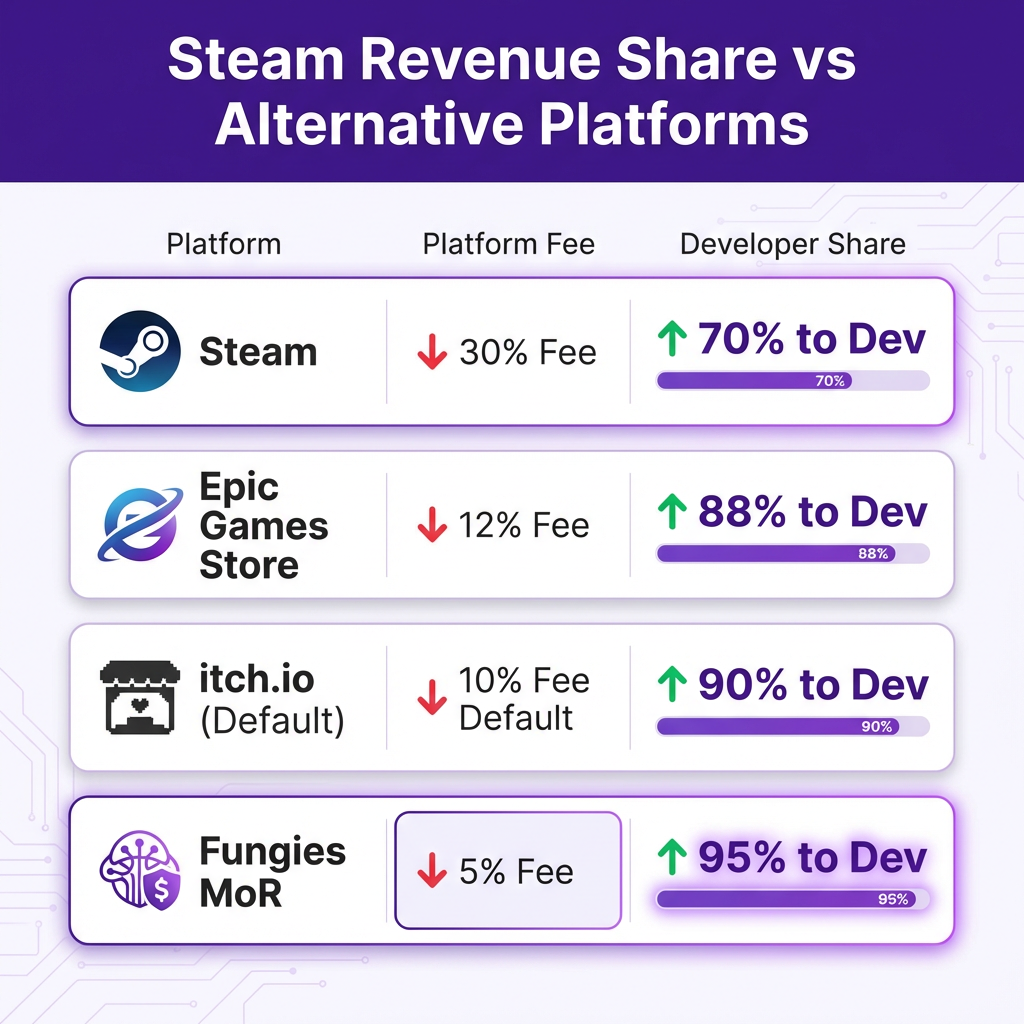
Steam takes a 30% cut of all sales by default. This drops to 25% once your game earns $10 million, and 20% after $50 million. For most indie developers, you’ll be paying the full 30%.
Here’s how that breaks down on a $20 game:
- Steam fee: $6.00 (30%)
- You receive: $14.00 (70%)
- Minus any refunds, chargebacks, and taxes
Compare this to Epic Games Store’s 12% fee or itch.io’s flexible revenue share (default 10%), and Steam starts looking expensive. However, Steam’s user base often justifies the higher cut—many developers report 5-10x more sales on Steam compared to other platforms.
The 5 Steps to Publishing on Steam
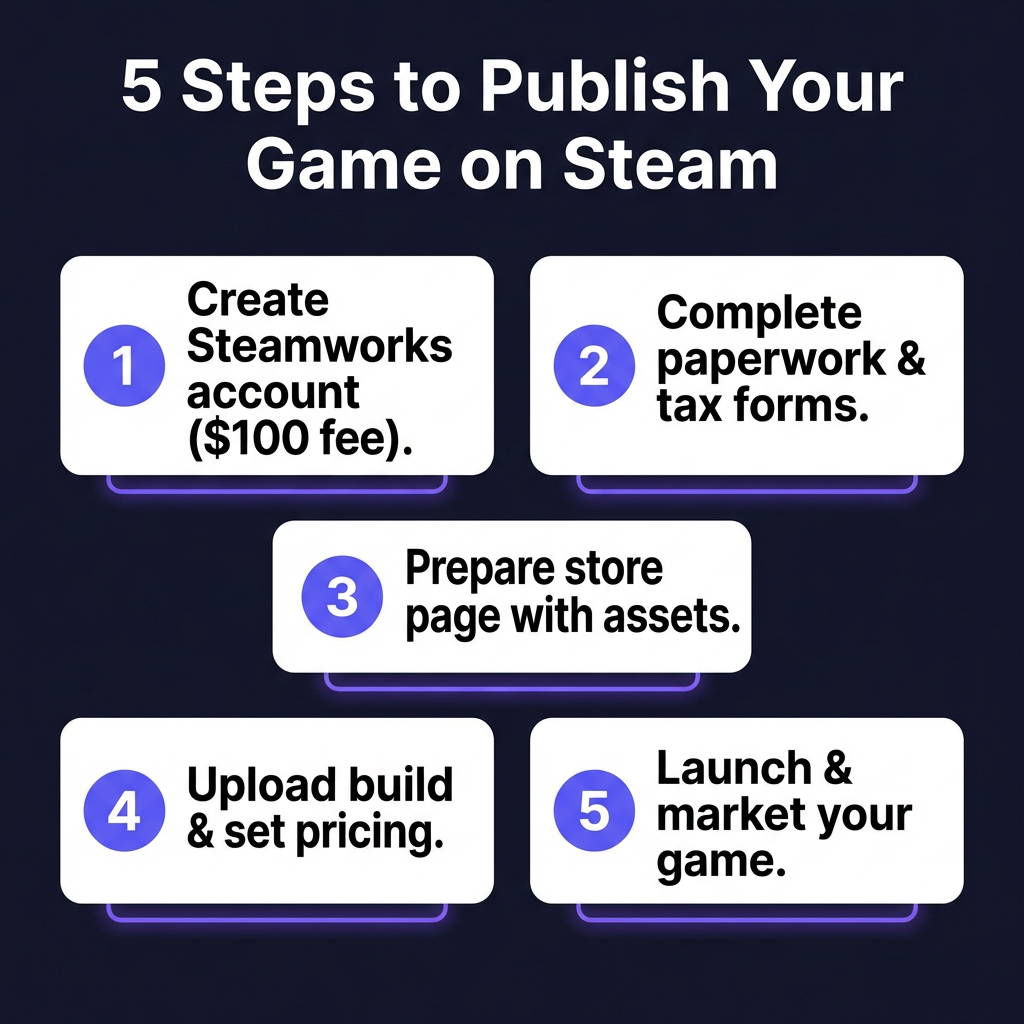
Step 1: Create Your Steamworks Account
First, you’ll need to set up a Steamworks account. This is Valve’s developer portal where you’ll manage everything related to your game.
- Visit partner.steamgames.com and sign in with a Steam account
- Complete the Steam Direct registration ($100 USD fee per game)
- This fee is recoupable after your game earns $1,000 in revenue
- You’ll need to provide tax information and bank account details
The $100 fee is a barrier to entry that helps reduce spam and low-effort releases. Consider it an investment in your game’s legitimacy.
Step 2: Complete Tax and Legal Paperwork
Steam requires tax documentation before you can receive payments. This includes:
- Tax interview: Complete the online tax questionnaire in Steamworks
- W-8BEN or W-9: US tax forms for individuals
- W-8BEN-E: For non-US entities
- VAT/GST registration: If selling in EU or other regions with digital VAT
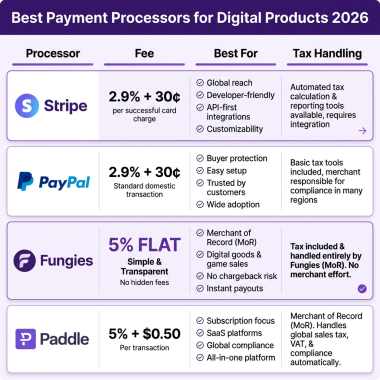
This is where many indie developers get stuck. Tax compliance across multiple jurisdictions is complex—US sales tax, EU VAT, and other regional requirements all apply to digital game sales. If this feels overwhelming, consider using a Merchant of Record service like Fungies that handles tax compliance automatically.
Step 3: Prepare Your Store Page
Your store page is your sales pitch. Steam reports that players spend an average of 30 seconds deciding whether to wishlist or purchase a game. Make those seconds count.
Required assets:
- Capsule images: 231×87, 467×181, and 616×353 pixel variants
- Hero graphic: 1920×620 pixels
- Trailers: At least one, ideally under 2 minutes
- Screenshots: 5-10 high-quality images showing gameplay
- Description: Compelling copy with key features highlighted
Store page optimization tips:
- Front-load your description with your game’s hook
- Use Steam’s tagging system strategically (aim for relevant, popular tags)
- Include system requirements that are accurate but not exclusionary
- Add support links and community hub information
Step 4: Upload Your Build
Steam uses SteamPipe for content delivery. You’ll upload your game through SteamCMD or the Steamworks web interface.
- Create depots for each platform (Windows, Mac, Linux)
- Configure launch options and executable paths
- Set up build branches (default, beta, demo, etc.)
- Test thoroughly using Steam’s testing environment
Pro tip: Always test your game through Steam itself, not just the standalone build. Steam overlay, cloud saves, and other features need verification before launch.
Step 5: Set Pricing and Launch
Pricing strategy can make or break your game’s success. Steam supports regional pricing, and you’ll need to decide on your approach:
- Base price: Your home currency price (typically USD)
- Regional pricing: Steam can auto-convert, but manual adjustments often perform better
- Launch discount: 10-20% is standard for new releases
- Future sales: Plan your discount calendar (Steam sales happen quarterly)
Once everything is ready, hit “Publish” and your game goes live. But the work doesn’t stop there—marketing your Steam release is a topic worthy of its own guide.
Ready to Sell Your Game Globally?
Fungies.io handles payments, tax compliance, and checkout for indie game developers. Accept 50+ payment methods worldwide with our Merchant of Record solution.
No credit card required • 5% transaction fee only
Steam vs. Selling Direct: The Multi-Channel Approach
While Steam offers unmatched reach, smart developers don’t put all their eggs in one basket. Selling directly through your own website provides significant advantages:
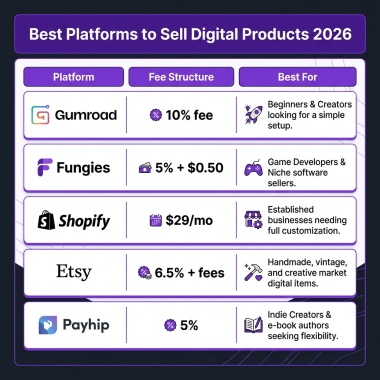
- Higher margins: Keep 95% instead of 70% using a Merchant of Record
- Customer relationships: Own your player data and email list
- Flexibility: Run your own promotions without Steam’s restrictions
- Instant payouts: No 30-day payment delays
- Bundle control: Create your own bundles and special editions
The best strategy? Do both. Use Steam for discovery and wishlist building, while driving direct sales through your website for higher margins. Many successful indies report that 20-40% of their revenue comes from direct sales despite Steam’s larger volume.
Common Mistakes to Avoid
After analyzing hundreds of Steam launches, here are the most common pitfalls:
- Rushing the store page: Poor capsule art and weak descriptions kill conversions
- Ignoring regional pricing: $20 USD is expensive in some markets, cheap in others
- No marketing before launch: Build your wishlist for months before release
- Neglecting reviews: Early negative reviews can sink a game—have a plan for feedback
- Underpricing: Race-to-the-bottom pricing hurts the entire indie ecosystem
FAQ: Selling Games on Steam
How much does it cost to sell a game on Steam?
The Steam Direct fee is $100 per game, which is recoupable after earning $1,000 in revenue. Steam then takes 30% of all sales (25% after $10M, 20% after $50M).
Can anyone publish a game on Steam?
Yes, through Steam Direct. However, your game must pass a brief review process to ensure it functions properly and doesn’t violate Steam’s content guidelines.
How long does it take to get a game on Steam?
The technical setup can take a few days. The review process typically takes 3-5 business days after you submit your build. Plan for at least 2 weeks from account creation to launch.
Do I need a company to sell on Steam?
No, individuals can publish games on Steam. However, you’ll need to handle tax compliance yourself, which can be complex for international sales.
What’s better: Steam or selling direct?
Steam offers reach and discovery; direct sales offer higher margins. Most successful developers use both channels. Steam for visibility, direct sales for profitability.
Conclusion: Your Steam Strategy
Selling a game on Steam in 2026 requires more than just a great game—it demands strategic planning, professional presentation, and ongoing marketing effort. The platform’s 30% cut is significant, but for many indie developers, the access to 120 million potential customers justifies the cost.
Remember: Steam should be part of your distribution strategy, not your entire strategy. Combine Steam’s reach with direct sales for maximum revenue, and consider using a Merchant of Record service to handle the tax complexity that comes with global game sales.
Ready to launch? Start building your wishlist today, polish that store page, and prepare for the exciting (and exhausting) journey of releasing your game to the world.
Ready to Sell Your Game Globally?
Fungies.io handles payments, tax compliance, and checkout for indie game developers. Accept 50+ payment methods worldwide with our Merchant of Record solution.
No credit card required • 5% transaction fee only