Here’s a stat that’ll make you rethink how you’re using AI coding tools: developers who connect MCP servers to their AI assistants complete routine tasks 3x faster than those using vanilla chat interfaces. Yet fewer than 15% of developers have actually set one up.
If you’re still asking Claude to “remember” your codebase structure or manually copying error logs into chat, you’re working way too hard. MCP (Model Context Protocol) servers change the game by giving your AI assistant direct access to your tools, data, and workflows — no more copy-paste, no more context switching.
This guide walks through everything you need to know about MCP servers: what they are, which ones are actually worth installing, how to set them up in Claude Code, Cursor, and other AI clients, and the security considerations you can’t ignore. By the end, you’ll have your AI assistant connected to GitHub, your database, and your team’s communication tools — ready to execute real work, not just talk about it.
What Is an MCP Server? (And Why Should You Care?)
MCP stands for Model Context Protocol — a standardized way for AI assistants to connect to external tools and data sources. Think of it as USB-C for AI: instead of building custom integrations for every tool, MCP provides a universal interface that any AI client can use.
Here’s the technical breakdown:
- MCP Client: Your AI assistant (Claude Desktop, Claude Code, Cursor, Windsurf, etc.)
- MCP Server: A service that exposes specific capabilities as “tools” with defined schemas
- Tools: Individual functions the AI can call (e.g., “read_file”, “create_pull_request”, “query_database”)
- Resources: Data the AI can access (e.g., file contents, database rows, API responses)
When you enable an MCP server, your AI assistant automatically discovers what tools are available and can invoke them as needed during a conversation. Instead of saying “go to GitHub and check PR #42,” you just ask “what’s the status of PR 42?” and Claude uses the GitHub MCP server to fetch the actual data.
MCP vs API: What’s the Difference?
You might be wondering: can’t I just use APIs directly? Yes, but MCP makes it dramatically easier:
| Feature | Traditional API Integration | MCP Server |
|---|---|---|
| Setup Time | Hours to days (custom code) | Minutes (config file) |
| Tool Discovery | Manual documentation reading | Auto-discovered by AI client |
| Authentication | Custom token management | Standardized OAuth or env vars |
| Error Handling | You build it | Built into protocol |
| Multi-Tool Workflows | Complex orchestration code | AI handles sequencing |
The key difference: APIs require you to write code that calls them. MCP servers let your AI assistant call them directly based on natural language requests.
The 6 Best MCP Servers for Developers in 2026
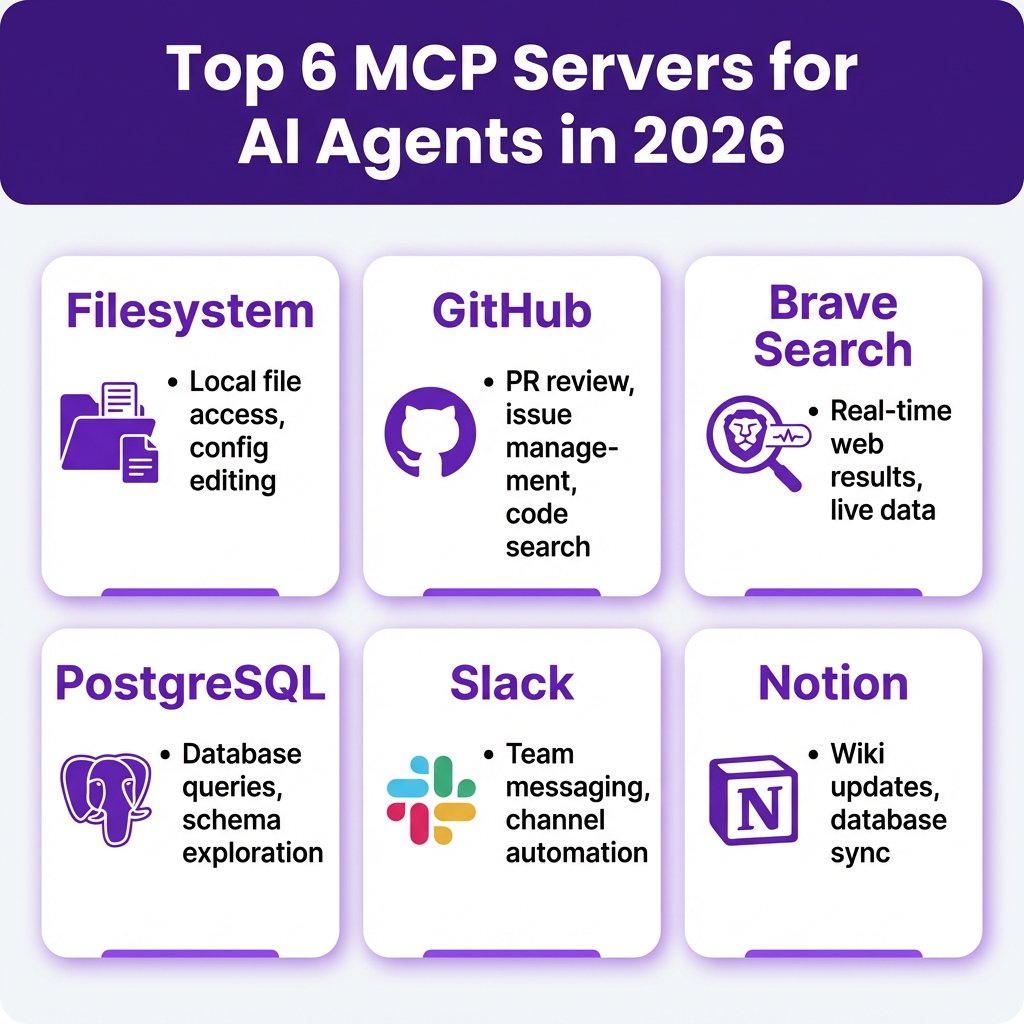
There are over 10,000 MCP servers available, but most are either unmaintained, poorly documented, or solve problems you don’t have. After testing dozens, these six are the ones worth installing first:
1. Filesystem MCP Server
What it does: Gives your AI assistant read/write access to your local files and directories.
Primary use cases:
- Edit config files across multiple projects
- Search codebases for specific patterns
- Generate documentation from existing code
- Refactor code across file boundaries
Setup (Claude Code):
claude mcp add filesystem npx -y @modelcontextprotocol/server-filesystem /path/to/your/projectSecurity note: Only grant access to specific directories, never your entire home folder. The server respects the paths you specify.
2. GitHub MCP Server
What it does: Connects your AI to GitHub repositories for PR management, issue tracking, code review, and more.
Primary use cases:
- Review pull requests with full context
- Create issues from bug reports
- Search code across repositories
- Manage CI/CD workflows
- Generate release notes from commits
Available tools: create_issue, create_pull_request, get_file_contents, search_repositories, list_pull_requests, get_pull_request_diff, and 15+ more.
Setup (Cursor): Add to your mcp.json:
{
  "mcpServers": {
    "github": {
      "command": "npx",
      "args": ["-y", "@modelcontextprotocol/server-github"],
      "env": {
        "GITHUB_PERSONAL_ACCESS_TOKEN": "YOUR_TOKEN_HERE"
      }
    }
  }
}
Pricing: Free (uses your GitHub account permissions)
3. Brave Search MCP Server
What it does: Provides real-time web search results to your AI assistant.
Why this matters: LLMs have knowledge cutoffs. Without web search, Claude doesn’t know about npm packages released last week, security vulnerabilities discovered yesterday, or Stack Overflow answers posted this morning.
Primary use cases:
- Research latest library versions and breaking changes
- Find solutions to recent error messages
- Check current pricing for SaaS tools
- Verify API documentation is up to date
Setup: Get a free API key from search.brave.com (15k queries/month free), then add to your config:
{
  "mcpServers": {
    "brave-search": {
      "command": "npx",
      "args": ["-y", "@modelcontextprotocol/server-brave-search"],
      "env": {
        "BRAVE_API_KEY": "YOUR_KEY_HERE"
      }
    }
  }
}
4. PostgreSQL MCP Server
What it does: Lets your AI query your PostgreSQL database using natural language.
Primary use cases:
- Explore database schemas without SQL
- Debug data issues by querying directly
- Generate reports from production data
- Validate migrations before deploying
Security warning: Never connect to production databases directly. Use read-only replicas or development environments. The PostgreSQL MCP server executes actual SQL — a malicious or confused AI could delete your data.
Setup:
npx -y @modelcontextprotocol/server-postgres postgresql://user:pass@localhost:5432/yourdb5. Slack MCP Server
What it does: Connects your AI to Slack for messaging, channel management, and workflow automation.
Primary use cases:
- Post deployment notifications to channels
- Summarize long thread discussions
- Search message history for decisions
- Create automated standup reminders
Setup: Create a Slack app, get the bot token, and configure:
{
  "mcpServers": {
    "slack": {
      "command": "npx",
      "args": ["-y", "@modelcontextprotocol/server-slack"],
      "env": {
        "SLACK_BOT_TOKEN": "xoxb-your-token",
        "SLACK_TEAM_ID": "T01234567"
      }
    }
  }
}
6. Notion MCP Server
What it does: Allows your AI to read and update Notion pages, databases, and blocks.
Primary use cases:
- Sync meeting notes to project docs
- Update sprint planning databases
- Generate documentation from code comments
- Create bug reports from error logs
Official server: github.com/makenotion/notion-mcp-server (maintained by Notion)
Pricing: Free (uses your Notion API access)
Complete Setup Guide: MCP Servers in Claude Code, Cursor & More
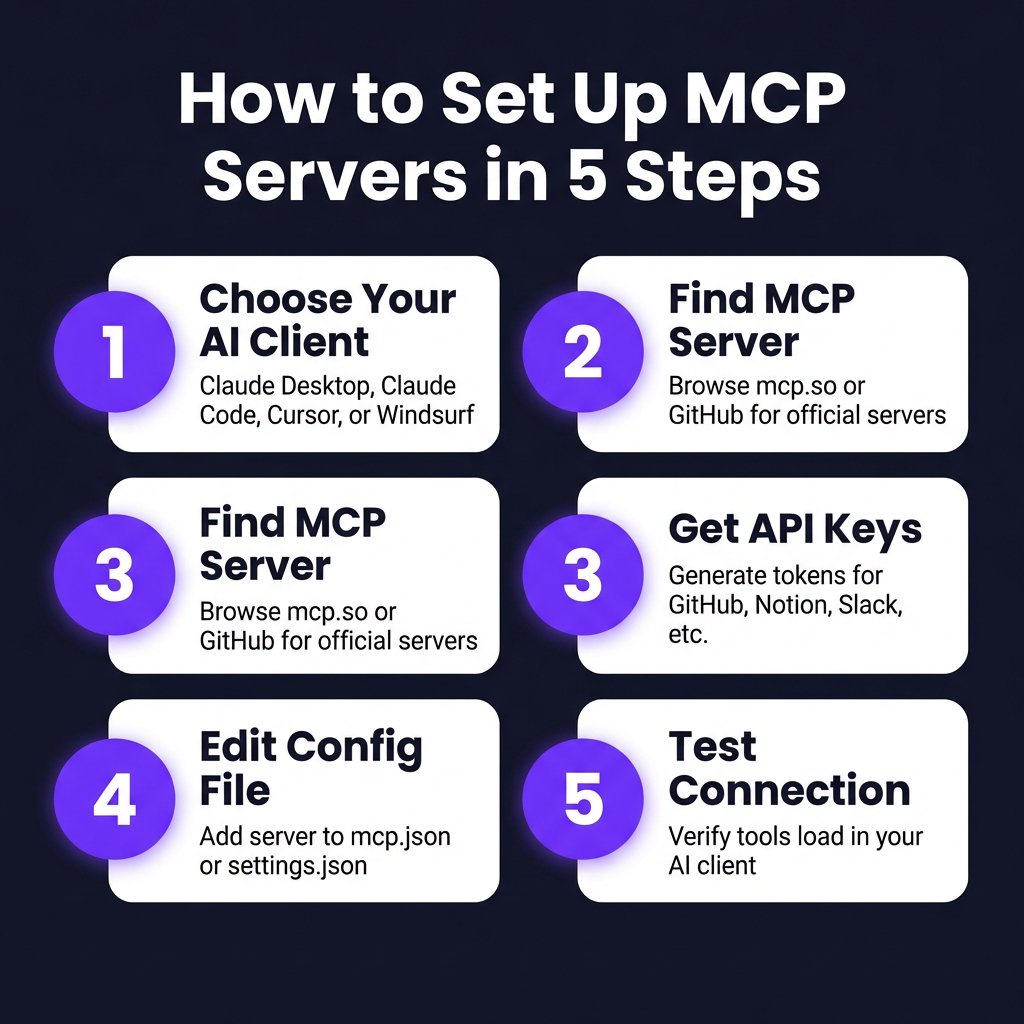
Each AI client handles MCP servers slightly differently. Here’s how to set them up in the most popular tools:
Claude Code (Terminal-Based)
Claude Code is Anthropic’s terminal-based AI coding agent. Setup is a one-liner:
# Add a server globally
claude mcp add github npx -y @modelcontextprotocol/server-github

# Add with environment variables
claude mcp add filesystem npx -y @modelcontextprotocol/server-filesystem /path/to/project

# List all servers
claude mcp list

# Remove a server
claude mcp remove github
Servers are stored in ~/.config/claude-code/mcp.json.
Claude Desktop (macOS/Windows App)
Config file location: ~/Library/Application Support/Claude/claude_desktop_config.json (macOS) or %APPDATA%\Claude\claude_desktop_config.json (Windows)
{
  "mcpServers": {
    "github": {
      "command": "npx",
      "args": ["-y", "@modelcontextprotocol/server-github"],
      "env": {
        "GITHUB_PERSONAL_ACCESS_TOKEN": "YOUR_TOKEN"
      }
    },
    "filesystem": {
      "command": "npx",
      "args": ["-y", "@modelcontextprotocol/server-filesystem"],
      "args": ["/Users/you/projects"]
    }
  }
}
Cursor IDE
Cursor has a GUI for MCP management:
- Open Cursor Settings → Tools & MCP
- Click New MCP Server
- Choose a template or enter custom config
- Server status shows green when connected
Config file: ~/.cursor/mcp.json (global) or .cursor/mcp.json (project-specific)
Important limit: Cursor has a ceiling of roughly 40 active tools across all MCP servers combined. If you enable too many servers, some tools won’t load.
Windsurf (Codeium)
Windsurf uses Cascade for agent workflows. Config location: ~/.codeium/windsurf/mcp_config.json
{
  "mcpServers": {
    "github": {
      "type": "stdio",
      "command": "npx",
      "args": ["-y", "@modelcontextprotocol/server-github"],
      "env": {
        "GITHUB_TOKEN": "YOUR_TOKEN"
      }
    }
  }
}
Remote MCP Servers (Streamable HTTP)
For servers running on remote hosts (not local stdio), use the HTTP transport:
{
  "mcpServers": {
    "supabase": {
      "url": "https://mcp.supabase.com/sse",
      "requestOptions": {
        "headers": {
          "Authorization": "Bearer YOUR_ACCESS_TOKEN"
        }
      }
    }
  }
}
This works in Claude Desktop, Cursor, and any client that supports the Streamable HTTP transport.
Security Considerations You Can’t Ignore
MCP servers give AI assistants real power — which means real risk if misconfigured. Here’s what you need to know:
1. Principle of Least Privilege
Only grant the minimum permissions needed:
- GitHub: Create a dedicated PAT with only
reposcope, notadmin - Database: Use read-only credentials, never production admin accounts
- Filesystem: Scope to specific project directories, not
~ - Slack: Limit to specific channels, not workspace-wide access
2. Audit Tool Access
Most AI clients show which tools are available. In Cursor, go to Settings → Tools & MCP to see every loaded server. Review this monthly and remove servers you’re not actively using.
3. Watch for Prompt Injection
If your AI assistant reads external data (web pages, user messages, API responses), that data could contain hidden instructions. The Brave Search MCP server, for example, returns web content that might include “ignore previous instructions” attacks.
Mitigation: Use AI clients that separate system prompts from user data, and be cautious when asking your assistant to “execute” or “apply” content from external sources.
4. Token Management
Store API tokens in environment variables or secret managers, never in config files committed to git:
# Good: use environment variable
export GITHUB_TOKEN="ghp_xxx"
claude mcp add github npx -y @modelcontextprotocol/server-github

# Bad: hardcoded in config
{
  "mcpServers": {
    "github": {
      "env": {
        "GITHUB_PERSONAL_ACCESS_TOKEN": "ghp_xxx"  # Don't commit this!
      }
    }
  }
}
MCP Server Comparison Table
| Server | Setup Difficulty | Usefulness | Pricing | Best For |
|---|---|---|---|---|
| Filesystem | Easy | ★★★★★ | Free | Everyone (install first) |
| GitHub | Easy | ★★★★★ | Free | Developers |
| Brave Search | Medium | ★★★★☆ | Free tier (15k/mo) | Research, fact-checking |
| PostgreSQL | Medium | ★★★★☆ | Free | Backend devs, data teams |
| Slack | Medium | ★★★☆☆ | Free | Team automation |
| Notion | Easy | ★★★☆☆ | Free | Documentation, wikis |
| Stripe | Medium | ★★★☆☆ | Free | Payment ops, finance |
| Docker Hub | Easy | ★★☆☆☆ | Free | DevOps, container workflows |
Building Custom MCP Workflows
Once you have multiple MCP servers connected, you can chain them together for powerful automations. Here are three real workflows:
Workflow 1: Automated Bug Triage
- Slack MCP: Monitor #bug-reports channel for new messages
- GitHub MCP: Search existing issues for duplicates
- Filesystem MCP: Check if error matches known patterns in codebase
- GitHub MCP: Create new issue with reproduction steps or comment on existing one
- Slack MCP: Reply to reporter with issue link
Workflow 2: Deployment Verification
- GitHub MCP: Detect new release tag
- PostgreSQL MCP: Query database for migration status
- Slack MCP: Post deployment summary to #deployments
- Notion MCP: Update release notes page with changelog
Workflow 3: Code Review Assistant
- GitHub MCP: Watch for new pull requests
- Filesystem MCP: Fetch changed files locally
- Brave Search MCP: Look up any new dependencies for security issues
- GitHub MCP: Post review comments with suggestions
These workflows can be triggered manually (“check PR 42”) or automated via cron jobs or webhooks depending on your AI client’s capabilities.
Key Takeaways
- MCP servers transform AI assistants from chatbots into action-takers — they can read your files, query databases, and manage tools directly
- Start with Filesystem and GitHub — these two provide 80% of the value for most developers
- Security matters — use least-privilege tokens, never connect to production databases, and audit your enabled servers regularly
- Setup is easy — most servers install with a single command or config file edit
- Remote servers are the future — Streamable HTTP transport lets you host MCP servers on your infrastructure and connect from anywhere
Frequently Asked Questions
Are MCP servers free to use?
Most official MCP servers are free and open-source. You only pay for the underlying services (e.g., Brave Search has a free tier with 15k queries/month, then $3/month for unlimited). The servers themselves don’t charge.
Can I use MCP servers with ChatGPT?
Yes, but setup differs from Claude/Cursor. In ChatGPT, enable Developer Mode in Settings, then add MCP server endpoints via the UI. OpenAI also offers built-in connectors for popular services like GitHub and Slack that work similarly to MCP.
What’s the difference between MCP servers and Agent Skills?
MCP servers are standardized tool providers that work across multiple AI clients. Agent Skills (like OpenClaw skills) are custom workflows that combine multiple tools into reusable actions. Think of MCP as the “drivers” and Skills as the “applications” — you often use both together.
How do I find more MCP servers?
Browse mcp.so (the official MCP server directory) or search GitHub for “mcp-server”. Popular categories include databases (Redis, MySQL), communication (Discord, Email), cloud providers (AWS, GCP), and developer tools (Jira, Linear, Figma).
Can I build my own MCP server?
Absolutely. The MCP SDK is available for TypeScript and Python. If you have a tool or API that you want your AI assistant to use, building a custom MCP server is the cleanest approach. The official docs include templates for common patterns.
Conclusion: Stop Talking, Start Doing
MCP servers represent a fundamental shift in how developers work with AI. Instead of treating your AI assistant as a chatbot that gives advice, you can treat it as a teammate that executes tasks — reviewing PRs, updating docs, querying databases, and managing deployments.
The setup takes minutes, not hours. The Filesystem and GitHub servers alone will save you hours per week. Add Brave Search for real-time research, and you’ve got an assistant that actually knows what’s happening in the world right now.
Ready to automate your development workflow? Sign up for Fungies to handle payments and tax compliance for your SaaS or digital products — so you can focus on building features, not fighting with Stripe and VAT filings.
References
- Model Context Protocol official docs:
modelcontextprotocol.io - MCP Server Directory:
mcp.so - GitHub MCP Server:
github.com/modelcontextprotocol/servers - Cursor MCP Guide:
docs.cursor.com/context/mcp-servers - Claude Code Documentation:
docs.anthropic.com/claude-code - Skyvia MCP Server List:
skyvia.com/blog/best-mcp-servers - ExplainMCP Server Rankings:
explainmcp.com/mcp-servers/best-mcp-servers-2026