Here’s a number that should get your attention: developers using AI coding assistants save a median of 5-8 hours per week. That’s according to survey data from thousands of engineers in 2026. Not hypotheticals. Real developers working real jobs.
But here’s the catch—not all AI coding tools deliver the same productivity gains. Some save you 8 hours weekly. Others barely move the needle. The difference comes down to context awareness, IDE integration, and how well the tool understands your codebase.
In this article, I’ll break down the 7 AI coding assistants that deliver measurable productivity improvements in 2026. I’m ranking them by real-world time savings, adoption rates, and ROI—not marketing claims.
What the 2026 Developer Surveys Actually Show
Before diving into the rankings, let’s look at the data. Multiple large-scale surveys have tracked AI coding assistant adoption and impact throughout 2026:
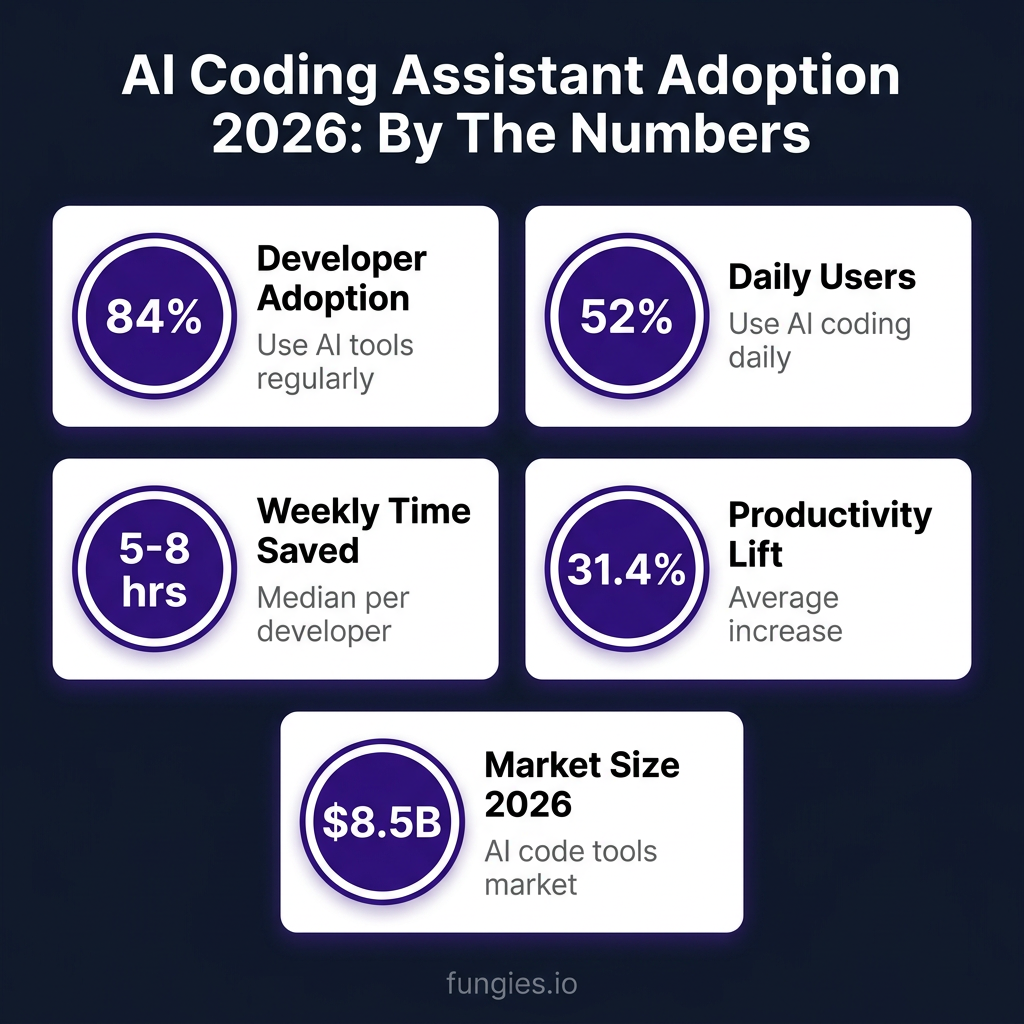
- 84% of developers now use AI coding tools regularly (Uvik Software, 2026)
- 52% use AI assistants daily, 28% weekly (JetBrains AI Pulse Survey, January 2026)
- 5-8 hours saved per week for daily users (Programming Helper Tech, 2026)
- 31.4% average productivity increase with AI-assisted development (Empirical Analysis study)
- 90% of developers using AI save at least 1+ hour per week (JetBrains 2025)
The AI code tools market hit $8.5 billion in 2026, and it’s not slowing down. But adoption doesn’t equal productivity. The real question is: which tools actually deliver on their promises?
The 7 Most Productive AI Coding Assistants in 2026
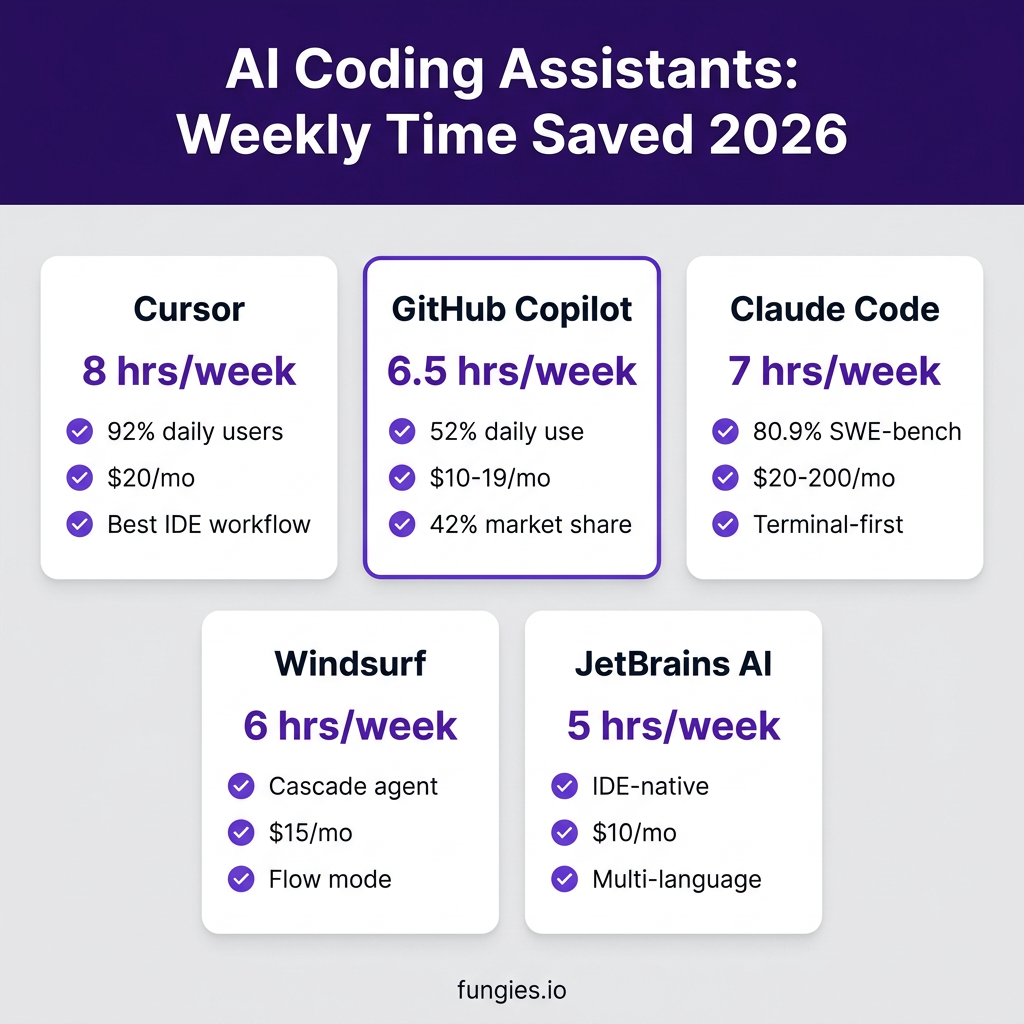
1. Cursor — 8 Hours Saved Per Week
Cursor tops the productivity rankings with developers reporting up to 8 hours saved weekly. It’s not just an AI plugin—it’s a complete AI-first IDE built on VS Code.
Why it wins on productivity:
- Tab-based autocomplete with 92% daily user engagement
- Composer agent for multi-file changes
- Deep codebase understanding and semantic search
- Context-aware suggestions based on your entire project
Pricing: $20/month (Pro), $40/month per user (Business)
Best for: Developers who want AI deeply integrated into their editing workflow
2. Claude Code — 7 Hours Saved Per Week
Anthropic’s terminal-based coding agent delivers serious productivity for developers comfortable with command-line workflows. It scored 80.9% on SWE-bench Verified—one of the highest marks for real-world coding tasks.
Productivity highlights:
- Autonomous file editing and terminal command execution
- 200K-1M token context window for large codebases
- Multi-file refactoring capabilities
- Strong performance on complex reasoning tasks
Pricing: $20/month (Pro), $100-200/month (Max for heavy usage)
Best for: Senior developers working on complex, multi-file refactoring projects
3. GitHub Copilot — 6.5 Hours Saved Per Week
With 4.7 million paid subscribers and 42% market share, Copilot remains the most widely adopted AI coding assistant. It doesn’t top the productivity charts, but its broad IDE support and consistent performance make it a safe choice.
Productivity factors:
- Works across VS Code, JetBrains, Vim, Neovim, and more
- GitHub-native integration for repository context
- Chat mode for explaining and refactoring code
- Code review suggestions
Pricing: $10/month (Individual), $19/month (Business)—note: switching to usage-based billing June 2026
Best for: Teams wanting broad IDE compatibility and GitHub integration
4. Windsurf — 6 Hours Saved Per Week
Windsurf (formerly Codeium) offers strong productivity gains at a lower price point. Its Cascade agent and Flow mode provide a polished experience that rivals more expensive competitors.
Key productivity features:
- Cascade agent for autonomous task completion
- Flow mode for maintaining context across sessions
- Free tier available for individual developers
- Good balance of capability and cost
Pricing: Free tier, $15/month (Pro), $200/month (Max)
Best for: Budget-conscious developers who still want agentic capabilities
5. JetBrains AI Assistant — 5 Hours Saved Per Week
JetBrains’ native AI integration delivers solid productivity gains, especially for developers already using IntelliJ IDEA, PyCharm, or WebStorm. The January 2026 AI Pulse survey shows strong satisfaction among daily users.
Productivity strengths:
- Deep IDE integration without plugins
- Multi-language support across JetBrains ecosystem
- Junie agent for more complex tasks
- Strong performance in Java and Kotlin
Pricing: $10/month
Best for: Developers committed to the JetBrains ecosystem
6. OpenAI Codex CLI — 5 Hours Saved Per Week
OpenAI’s terminal-based coding agent brings GPT-5-level capabilities to the command line. It scored 77.3% on Terminal-Bench and processes 240+ tokens per second.
Productivity notes:
- Fast token generation (240+ tokens/sec)
- Strong terminal command integration
- Good for scripting and automation tasks
- API-based pricing can scale with usage
Pricing: $20/month + API usage costs
Best for: Developers who prefer terminal workflows and need fast responses
7. Cline (VS Code Extension) — 4 Hours Saved Per Week
Cline is an open-source VS Code extension that delivers solid productivity gains for free (minus API costs). It’s a good entry point for developers wanting to experiment with AI coding assistants without committing to a subscription.
Productivity profile:
- Free and open source
- Good agent capabilities for a free tool
- Active community development
- Pay only for API tokens used
Pricing: Free (pay for API usage only)
Best for: Developers wanting to try AI coding without subscription costs
Productivity Comparison Table
| Tool | Weekly Hours Saved | Daily User Rate | Starting Price | Best For |
|---|---|---|---|---|
| Cursor | 8 hours | 92% | $20/mo | IDE-native workflow |
| Claude Code | 7 hours | N/A | $20/mo | Complex refactoring |
| GitHub Copilot | 6.5 hours | 52% | $10/mo | Broad IDE support |
| Windsurf | 6 hours | N/A | $15/mo | Budget-conscious |
| JetBrains AI | 5 hours | N/A | $10/mo | JetBrains users |
| OpenAI Codex CLI | 5 hours | N/A | $20/mo | Terminal workflows |
| Cline | 4 hours | N/A | Free | Entry-level |
The ROI Reality: Do AI Coding Assistants Pay Off?
Here’s where the rubber meets the road. A $20/month subscription saves 5-8 hours weekly. At a developer rate of $75-150/hour, that’s $375-1,200 in value per week for a $20 investment.
The math is straightforward:
- Average ROI: 2.5-3.5x for most organizations
- Top quartile ROI: 4-6x for teams with good adoption practices
- Break-even point: Less than 1 hour of productivity gain per month
But there’s a caveat. A 2026 controlled study by METR found that experienced developers actually took 19% longer to complete tasks when using AI tools poorly. The difference isn’t which tool you use—it’s how you use it.
What Separates High-Productivity Users from the Rest
Not everyone sees the same productivity gains. The developers saving 8 hours per week share common practices:
- They start with tests. Let AI write tests first, then implementation.
- They review every suggestion. Blind acceptance leads to technical debt.
- They provide context. Good prompts include file structure, conventions, and goals.
- They use IDE-native tools. Context switching kills productivity.
- They iterate. First draft from AI, refinement by human.
SonarSource’s 2026 survey revealed that 88% of developers report at least one negative impact of AI-generated code on technical debt. The productivity gains are real—but so are the risks if you don’t review what the AI produces.
The Technical Debt Warning
Here’s the productivity paradox: AI coding assistants speed up initial development but can slow down maintenance if used carelessly. The same survey data showing 31.4% productivity gains also shows:
- 40% of developers cite unnecessary or duplicative code from AI tools
- 88% report negative impacts on technical debt
- Only 29% fully trust AI-generated code
The lesson? AI assistants are force multipliers, not replacements. The developers seeing the best ROI treat AI output as a first draft, not a final product.
Key Takeaways
- Cursor leads on productivity with 8 hours saved weekly and 92% daily user engagement
- 5-8 hours saved per week is the realistic range for daily AI assistant users
- ROI is strong at 2.5-3.5x average, but requires disciplined usage
- Tool choice matters less than usage patterns—the best tool is the one you’ll actually use
- Technical debt is the hidden cost—always review AI-generated code
FAQ
Which AI coding assistant saves the most time?
Cursor leads in reported time savings at 8 hours per week, followed by Claude Code at 7 hours. However, the best tool for you depends on your workflow—terminal users may prefer Claude Code or Codex CLI, while IDE users get more from Cursor or Copilot.
How much do AI coding assistants cost per month?
Entry-level pricing ranges from free (Cline) to $20/month (Cursor, Claude Code, Codex CLI). Business tiers run $19-40 per user per month. Heavy usage with agentic features can reach $100-200/month per developer.
What percentage of developers use AI coding tools?
84% of developers use AI coding tools regularly in 2026, with 52% using them daily. Stack Overflow’s 2025 survey found 92.6% use an AI coding assistant at least once a month.
Do AI coding assistants actually improve productivity?
Yes—when used correctly. The average productivity increase is 31.4%, with daily users saving 5-8 hours per week. However, a METR study found experienced developers took 19% longer when using AI tools poorly. The gains depend on how you use the tools, not just which tools you use.
What’s the ROI on AI coding assistants?
Average ROI is 2.5-3.5x, with top-quartile teams seeing 4-6x returns. At $20/month saving 5-8 hours weekly, the break-even point is less than one hour of developer time saved per month.
Conclusion
The data is clear: AI coding assistants deliver measurable productivity gains in 2026. The median developer saves 5-8 hours per week. The best tools—Cursor, Claude Code, and GitHub Copilot—push that number even higher.
But the tool is only part of the equation. The developers seeing the best results treat AI as a collaborative partner, not an autopilot. They review suggestions, provide context, and maintain ownership of their code quality.
If you’re not using an AI coding assistant yet, you’re working harder than you need to. Start with a free trial of Cursor or Copilot. Track your time for a week. The productivity gains will speak for themselves.
And if you’re building a SaaS product that developers use, consider how you can integrate with these AI workflows. At Fungies.io, we help SaaS founders streamline their checkout and payment infrastructure—so you can focus on building the features that matter, with or without AI assistance.
References
- JetBrains AI Pulse Survey, January 2026 — blog.jetbrains.com
- Uvik Software — AI Coding Assistant Statistics 2026 — uvik.net
- Programming Helper Tech — AI Code Assistants 2026 Survey Data — programming-helper.com
- Second Talent — 84% of Developers Use AI Tools — secondtalent.com
- Trigi Digital — AI Coding Impact 2026 — trigidigital.com
- Faros AI — Best AI Coding Agents 2026 — faros.ai
- Builder.io — Best AI Tools 2026 — builder.io
- Aubergine — Top AI Coding Tools 2026 — aubergine.co