Here’s the reality: running a 70B parameter model locally in 2026 costs less than a year of GPT-4 API calls. But pick the wrong GPU and you’ll watch your tokens crawl at 2 per second. Pick the right one and you’ll hit 150 tokens per second on a 7B model without breaking a sweat.
VRAM is the only thing that matters. Not CUDA cores. Not tensor flops. If your model doesn’t fit in video memory, performance drops 5-20x instantly. An RTX 5090 running Llama 3.3 70B in VRAM hits 45+ tokens per second. Offload to system RAM? You’re down to 1-2 tokens per second—slower than reading speed.
This guide breaks down the 7 best GPUs for local LLM inference in 2026, ranked by real-world performance, VRAM capacity, and value. Whether you’ve got $250 or $3,000, there’s a card that fits your workflow.
How We Ranked These GPUs
Every GPU on this list was evaluated against four criteria that actually matter for local inference:
- VRAM capacity: The hard limit on model size you can run
- Inference speed: Tokens per second on standard benchmarks
- Price-to-performance: Cost per GB of VRAM and per token/sec
- Availability: Can you actually buy one in 2026
All benchmark data comes from real community tests on r/LocalLLaMA, PromptQuorum’s hardware guide, and Quantize Lab’s standardized tests. Prices reflect June 2026 market conditions—yes, the GDDR7 shortage is still causing chaos.
The 7 Best GPUs for Local LLMs in 2026
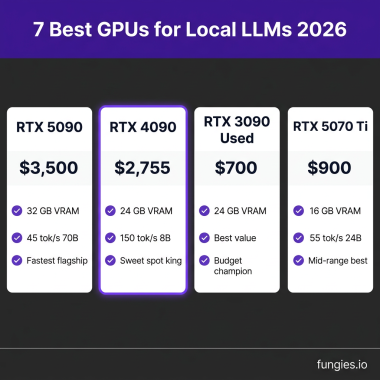
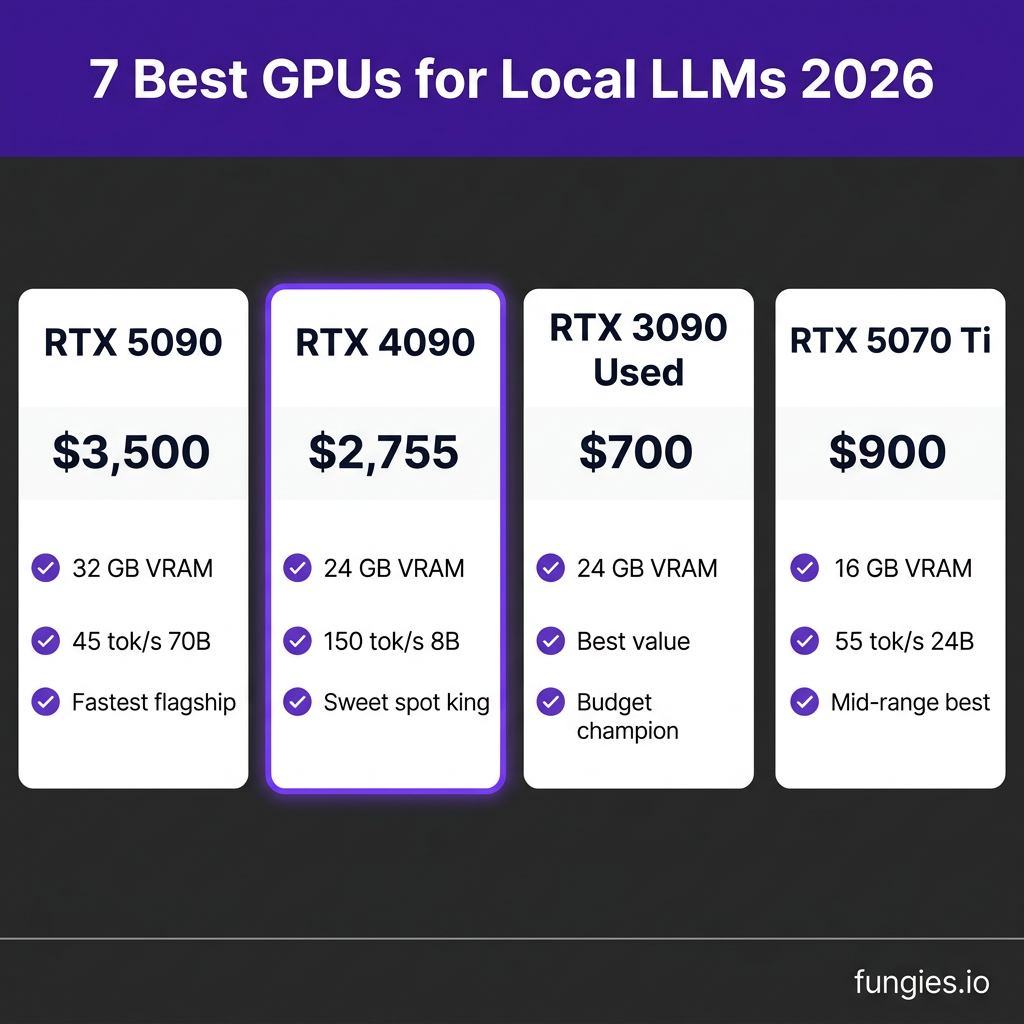
1. NVIDIA RTX 4090 — The Sweet Spot King
VRAM: 24 GB GDDR6X | Price: ~$2,755 (discontinued, rising) | Best for: Serious enthusiasts who want 70B models at Q4
The RTX 4090 remains the most balanced card for local LLMs despite being discontinued. With 24 GB VRAM, it handles Qwen3.6 27B and DeepSeek-R1 32B comfortably at 55-60 tokens per second. For 70B models, you’ll need quantization at Q4_K_M (~40 GB) which doesn’t fit—so you’ll run smaller models or use CPU offload.
Real benchmark: Llama 3.1 8B FP16 hits ~150 tokens/sec. Qwen 2.5 32B Q4 runs at ~60 tokens/sec. The 4090’s memory bandwidth (1,008 GB/s) keeps inference smooth even at high context lengths.
Why it ranks #1: 24 GB is the consumer ceiling, and the 4090 uses it efficiently. But prices are climbing as stock dries up—if you find one under $2,500, grab it.
2. NVIDIA RTX 5090 — The New Flagship
VRAM: 32 GB GDDR7 | Price: ~$3,500-5,000 (scarcity pricing) | Best for: Future-proofing and 70B models
The RTX 5090 brings 32 GB VRAM to the consumer market for the first time. That extra 8 GB over the 4090 means you can run Llama 3.3 70B Q4_K_M with room to spare—hitting 45+ tokens per second fully in VRAM. No CPU offload. No slowdowns.
The problem? GDDR7 shortages have pushed street prices to $5,000 in some markets. At MSRP ($2,300), this is an easy recommendation. At $5,000, you’re in used A100 territory.
Why it ranks #2: Best raw performance, but availability and pricing make it a tough sell unless you need 32 GB today.
3. Used RTX 3090 — The Budget VRAM Champion
VRAM: 24 GB GDDR6X | Price: ~$650-750 used | Best for: Maximum VRAM per dollar
Don’t sleep on the used market. A 3090 gives you the same 24 GB VRAM as a 4090 for roughly 25% of the price. Yes, it’s slower—expect 80-100 tokens/sec on Llama 3.1 8B versus the 4090’s 150. But for running 70B models at Q4 with CPU offload, the 3090 gets the job done.
Community tests show a 3090 runs Llama 3.3 70B Q4 at ~2 tokens/sec with 40/80 layers on GPU. Not fast, but functional. For smaller models (7B-13B), the speed difference between 3090 and 4090 is noticeable but not crippling.
Why it ranks #3: Best value for VRAM-hungry workflows. Two used 3090s ($1,400) beat a single 5090 ($5,000) for multi-GPU setups.
4. RTX 5070 Ti — The 16GB Sweet Spot
VRAM: 16 GB GDDR7 | Price: ~$900 | Best for: 24B-32B models without breaking the bank
At $900, the 5070 Ti hits a price-performance sweet spot. 16 GB VRAM runs Mistral Small 3.1 24B Q4_K_M (~14 GB) at ~55 tokens/sec with headroom. You can also run Qwen3.6 27B Q4 (~16 GB) for coding tasks.
The 5070 Ti won’t handle 70B models, but most developers don’t need them. A well-quantized 24B model beats a cramped 70B model running off CPU every time.
Why it ranks #4: The best “new” card for most users. Available, reasonably priced, and handles the models you’ll actually use.
5. RTX 5060 Ti 16GB — The Entry-Level Workhorse
VRAM: 16 GB GDDR6 | Price: ~$514 | Best for: First-time local LLM users
The 5060 Ti 16GB is the cheapest way to get serious about local LLMs. At ~$514 (when in stock), it runs Llama 3.1 8B Q8 (~9 GB) at 50-80 tokens/sec and handles Qwen3 14B comfortably.
What you sacrifice is headroom. 16 GB fills up fast with larger context windows or bigger models. But for 7B-14B workflows—which covers most coding, writing, and chat tasks—this card delivers.
Why it ranks #5: Best entry point for local AI. Skip the 8GB cards—they’re toys, not tools.
6. Mac Studio M4 Max (128GB) — The Apple Alternative
VRAM: 128 GB unified memory | Price: ~$3,999+ | Best for: Developers in the Apple ecosystem
Apple Silicon changed the game for local LLMs. The M4 Max with 128 GB unified memory runs Llama 3.3 70B Q4_K_M at 12-15 tokens/sec—slower than an RTX 4090, but completely silent and using a fraction of the power.
Real benchmarks from MacRumors forums: DeepSeek R1 Llama 70B hits 16.45 tokens/sec. Phi-4 14B runs at 71 tokens/sec. Qwen3 4B blazes at 168 tokens/sec.
The tradeoff is speed versus convenience. Macs “just work” for local inference via Ollama or llama.cpp with Metal backend. No CUDA setup. No driver headaches. But you’ll pay 2-3x per token compared to NVIDIA.
Why it ranks #6: Best non-NVIDIA option. If you’re already in the Apple ecosystem, this is your card.
7. RTX 3060 12GB — The Absolute Budget Option
VRAM: 12 GB GDDR6 | Price: ~$250 used | Best for: Experimenting on a tight budget
The RTX 3060 12GB is the cheapest viable entry point. It runs Llama 3.2 3B and Phi-4 Mini at usable speeds (40-60 tokens/sec) and can handle 7B models at Q4 with some context window limitations.
Don’t expect miracles. 12 GB is tight—you’ll be constantly managing model sizes and quantization levels. But for learning, prototyping, or running small specialized models, it works.
Why it ranks #7: Better than CPU-only inference, but you’ll outgrow it fast. Consider this a “trial” GPU before committing to something serious.
GPU Comparison Table: Specs and Real Performance
| GPU | VRAM | Price (2026) | Llama 3.1 8B | Qwen 2.5 32B | 70B Model |
|---|---|---|---|---|---|
| RTX 5090 | 32 GB | $3,500-5,000 | 180+ tok/s | 80 tok/s | 45 tok/s (Q4) |
| RTX 4090 | 24 GB | $2,755 | 150 tok/s | 60 tok/s | CPU offload |
| RTX 3090 (used) | 24 GB | $650-750 | 100 tok/s | 45 tok/s | 2 tok/s (offload) |
| RTX 5070 Ti | 16 GB | $900 | 120 tok/s | 50 tok/s | No |
| RTX 5060 Ti | 16 GB | $514 | 80 tok/s | 35 tok/s | No |
| Mac M4 Max | 128 GB | $3,999+ | 90 tok/s | 35 tok/s | 12-15 tok/s |
| RTX 3060 | 12 GB | $250 | 60 tok/s | No | No |
What Model Size Can You Actually Run?
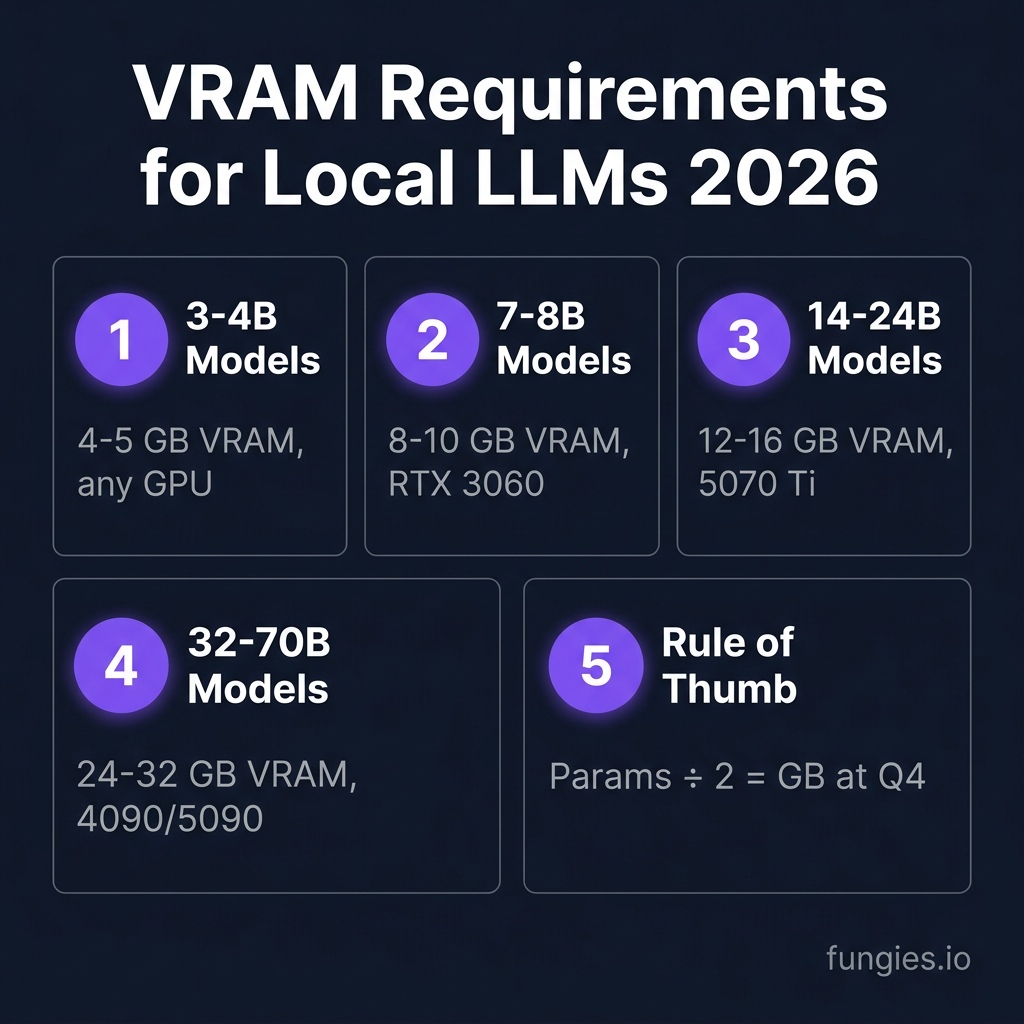
Here’s the VRAM math that determines what fits:
| Model Size | Q4_K_M VRAM | Q8 VRAM | Minimum GPU |
|---|---|---|---|
| 3-4B | 4-5 GB | 6-7 GB | Any 8 GB GPU |
| 7-8B | 5-9 GB | 9-10 GB | RTX 3060 12GB |
| 14B | ~9 GB | ~16 GB | RTX 5070 Ti |
| 24B | ~14 GB | ~26 GB | RTX 5070 Ti |
| 32B | ~19 GB | ~36 GB | RTX 4090/5090 |
| 70B | ~40 GB | ~72 GB | Dual GPU or Mac 128GB |
Rule of thumb: Divide parameter count by quantization level. A 70B model at Q4 (4-bit) needs roughly 70 ÷ 2 = 35-40 GB. At Q8, double it. FP16? Quadruple it.
Local LLM vs Cloud API: The Cost Reality
Let’s talk numbers. A mid-tier OpenAI API user burns through $100-300/month. At $3,600/year, that’s more than a used RTX 3090 ($700) plus electricity costs ($200/year).
Here’s the break-even math:
- Light user (50K tokens/month): Cloud is cheaper. Buy a 3060 12GB if you value privacy.
- Medium user (500K tokens/month): RTX 4090 pays for itself in 12-18 months.
- Heavy user (2M+ tokens/month): Local is dramatically cheaper. A 5090 or dual 3090 setup beats API costs within 6 months.
But cost isn’t the only factor. Local inference means:
- Zero latency (no network round-trip)
- Complete data privacy
- No rate limits
- No vendor lock-in
For businesses handling sensitive data—legal, medical, financial—local isn’t just cheaper. It’s the only viable option.
Key Takeaways: Which GPU Should You Buy?
- Budget ($250-500): RTX 3060 12GB or RTX 4060 8GB (if you must). Stick to 7B models.
- Entry-level ($500-800): RTX 5060 Ti 16GB. Best new card for 7B-14B workflows.
- Mid-range ($800-1,200): RTX 5070 Ti 16GB. Handles 24B models comfortably.
- Enthusiast ($1,500-3,000): Used RTX 3090 (24GB) or new RTX 4090 if you can find one.
- Power user ($3,000+): RTX 5090 (32GB) or Mac Studio M4 Max (128GB) for silent operation.
One final tip: always set --n-gpu-layers 99 in llama.cpp or Ollama. This single flag can double your tokens per second by forcing all layers into VRAM. On an RTX 4070 Ti, it jumps from 40 to 85 tokens/sec.
Frequently Asked Questions
Can I run a 70B model on a 24GB GPU?
Not fully in VRAM. A 70B model at Q4_K_M needs ~40 GB. On a 24GB card, you’ll offload 16+ GB to system RAM, dropping speed to 2-5 tokens/sec. For usable 70B performance, you need 32GB+ VRAM (RTX 5090), dual GPUs, or a Mac with 128GB unified memory.
Is 8GB VRAM enough for local LLMs?
Technically yes, practically no. 8GB fits 3-4B models comfortably and 7B models at Q4 with tight constraints. For serious work, 12GB is the minimum floor. 16GB+ is where local LLMs start feeling responsive.
AMD or NVIDIA for local LLMs?
NVIDIA dominates. CUDA is the standard, and tools like vLLM, Ollama, and LM Studio optimize for it. AMD cards (RX 9070 XT) work via ROCm but with more setup friction and lower performance per dollar. For hassle-free local LLMs, stick to NVIDIA.
Should I buy used or new?
Used RTX 3090s are the best value in 2026. At $650-750, they deliver 24GB VRAM that competes with $3,000+ new cards. Just verify the seller and check for mining wear. Avoid used cards with modified BIOS or missing fans.
How much does electricity cost for 24/7 local LLM hosting?
An RTX 4090 pulls ~450W under load. At $0.15/kWh, running 24/7 costs roughly $50/month. But most local LLM usage isn’t constant load—you’ll idle at 20-50W when not generating tokens. Realistic monthly cost: $10-30 depending on usage.
Conclusion: Start Local, Scale Smart
Running local LLMs in 2026 isn’t just for researchers with server racks. A $500 GPU gets you started. A $1,000 GPU handles most real-world tasks. And a $2,500 setup rivals cloud APIs at a fraction of the long-term cost.
The key is matching your hardware to your actual use case. Don’t buy a 5090 to run 7B models. Don’t buy a 3060 and expect 70B performance. Pick the right tool for the job, optimize your settings, and enjoy AI without the API bills.
Ready to build something with AI? Get started with Fungies—the no-code checkout and payment platform for developers selling digital products.
References
- PromptQuorum Local LLM Hardware Guide 2026
- Best GPUs for Running Local LLMs in 2026 — MayhemCode
- SitePoint: Local LLM Hardware Requirements Mac vs PC 2026
- Red Hat: Ollama vs vLLM Performance Benchmarking
- MacRumors: Mac Studio M3 Ultra LLM Performance
- r/LocalLLaMA: RTX 3090 vs 4090 Discussion
- Tom’s Hardware: GPU Price Tracking 2026