Building a dedicated website for your game is no longer optional — it’s essential for standing out in a crowded market. Whether you’re an indie developer launching your first title or a studio looking to establish a professional online presence, the right gaming website builder can make all the difference between obscurity and success.
In 2026, gamers expect more than just a basic landing page. They want instant access to demos, seamless purchasing experiences, and communities where they can connect with fellow players. This guide will walk you through everything you need to know about choosing and using a gaming website builder that actually converts visitors into players.
What Is a Gaming Website Builder?
A gaming website builder is a specialized platform designed specifically for game developers, publishers, and gaming content creators. Unlike generic website builders, these tools come pre-loaded with features that matter to the gaming industry: game embeds, screenshot galleries, trailer showcases, download management, and integrated payment processing for digital sales.
The global gaming market is projected to reach $268 billion by 2026, with indie games capturing an increasingly larger share. A professional website isn’t just about looking good — it’s about capturing that revenue directly instead of losing 30% to platform fees on Steam or the App Store.
Why You Need a Gaming-Specific Website Builder
Generic website builders like Wix or Squarespace can create beautiful sites, but they lack the specialized features that game developers need. Here’s what sets gaming website builders apart:
- Instant Game Embeds: Showcase playable demos or WebGL builds directly on your site without complex coding
- Digital Download Delivery: Automated file distribution with secure, expiring download links
- Payment Processing: Built-in checkout systems that handle global taxes (VAT, sales tax) automatically
- Community Features: Forums, comment sections, and newsletter integration to build your player base
- Analytics: Track which games, screenshots, or trailers drive the most conversions
Top Gaming Website Builders Compared
Not all platforms are created equal. Here’s how the leading options stack up for game developers in 2026:
| Platform | Best For | Game Features | Pricing |
|---|---|---|---|
| Fungies | Indie devs & studios | Full game store, payments, tax handling | Free tier + revenue share |
| WordPress + Plugins | Technical users | Highly customizable | $10-50/month + hosting |
| Wix | Beginners | Limited game-specific tools | $14-39/month |
| Squarespace | Visual portfolios | Beautiful galleries, no game sales | $16-49/month |
| Shopify | Physical + digital | Overkill for most games | $29-299/month |
How to Build Your Gaming Website: Step-by-Step
Step 1: Choose Your Platform
Start by evaluating your technical skills and budget. If you want to launch quickly without coding, a specialized platform like Fungies lets you go live in minutes. For maximum customization, WordPress with gaming themes gives you endless flexibility but requires more setup time.
Step 2: Secure Your Domain
Your domain is your brand. Choose something memorable that reflects your game or studio name. Avoid hyphens and numbers when possible — yourgame.com beats your-game-2026.com every time.
Step 3: Design for Conversion
Gaming websites need to do more than look pretty — they need to sell. Include these essential elements:
- A hero section with your best trailer or gameplay GIF
- Clear call-to-action buttons (“Buy Now,” “Download Demo,” “Wishlist”)
- Screenshot galleries with high-quality images
- System requirements prominently displayed
- Social proof (reviews, press quotes, player counts)
Step 4: Set Up Payments
If you’re selling your game directly, payment setup is critical. Look for platforms that offer:
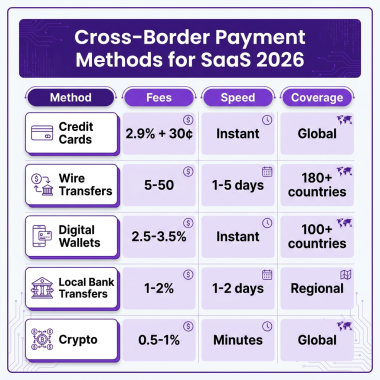
- Multiple payment methods (cards, PayPal, local options)
- Automatic tax calculation and remittance
- Secure download delivery
- Refund handling
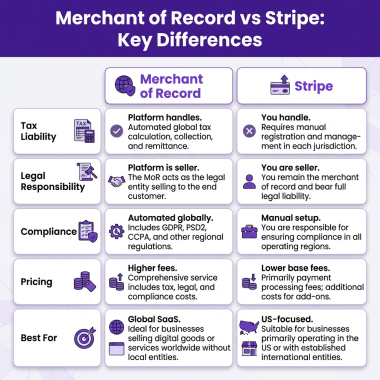
Handling taxes yourself is a nightmare — global VAT rules change constantly, and non-compliance can result in penalties. Modern gaming platforms handle this automatically as your Merchant of Record.
Step 5: Launch and Promote
Once your site is live, promotion is key. Share on Reddit (r/gamedev, r/indiegaming), Twitter/X gaming communities, Discord servers, and gaming forums. Your website becomes the hub that converts all that interest into sales.
SEO Tips for Gaming Websites
To rank well for terms like “gaming website builder” and attract organic traffic:
- Optimize your title tags: Include your primary keyword and game name
- Use structured data: Implement Game schema markup for rich snippets
- Create a press kit: Journalists love easy access to assets and information
- Start a dev blog: Regular updates about development improve rankings and build community
- Optimize images: Compress screenshots and use descriptive alt text
Common Mistakes to Avoid
We’ve seen hundreds of gaming websites. Here are the pitfalls that kill conversions:
- Auto-playing audio/video: Nothing makes visitors leave faster
- Missing system requirements: Players won’t buy if they don’t know if it will run
- No demo or trailer: Show, don’t just tell
- Complicated checkout: Every extra click loses potential customers
- Ignoring mobile: 60% of gaming site traffic comes from mobile devices
FAQ
What’s the best free gaming website builder?
Fungies offers a free tier specifically designed for game developers, with game store functionality, payment processing, and tax handling included. For simple portfolios without sales, Carrd and GitHub Pages are free alternatives.
Can I sell games directly from my website?
Yes! Direct sales let you keep more revenue (avoiding 30% platform fees) and own your customer relationships. Use a Merchant of Record service to handle global tax compliance automatically.
Do I need coding skills to build a gaming website?
Not with modern gaming website builders. Platforms like Fungies provide no-code solutions where you can launch a professional game store in minutes. For custom features, basic HTML/CSS knowledge helps but isn’t required.
How much does a gaming website cost?
Costs range from free (using platforms with revenue share) to $50+/month for premium hosting and features. Domain registration is typically $10-15/year. The real cost isn’t monetary — it’s the time invested in creating great content and maintaining your site.
Conclusion
Choosing the right gaming website builder is one of the most important decisions you’ll make as a game developer. Your website is your digital storefront, your community hub, and your marketing engine all in one.
For most indie developers and small studios, specialized platforms offer the best balance of features, ease of use, and cost. They handle the technical complexity — payments, taxes, download delivery — so you can focus on what you do best: making great games.
Ready to build your gaming website? Start with a platform that understands the unique needs of game developers, and you’ll be selling directly to players in no time.
Ready to Launch Your Game Store?
Join hundreds of game developers using Fungies.io — the gaming website builder with built-in payments, global tax compliance, and instant setup.
No credit card required • Launch in minutes