WooCommerce Payment Gateway: Accept Global Payments with Fungies for WooCommerce
Accept global payments in WooCommerce with Fungies — the merchant of record payment gateway that handles VAT, taxes, fraud, and compliance automatically. Install in minutes.
If you run a WooCommerce store and sell digital products, subscriptions, or software to customers outside your home country, you already know the pain: Stripe rejections, VAT compliance headaches, chargeback disputes, and the constant anxiety of “am I collecting the right tax for Germany? France? Australia?” It’s a full-time job on top of running your actual business.
That’s why we built Fungies for WooCommerce — a free plugin that connects your WooCommerce store to Fungies as your Merchant of Record (MoR), handling every layer of global payments so you don’t have to. VAT, sales tax, chargebacks, fraud, and compliance — all handled by Fungies. You focus on your product. We handle the payments infrastructure.
🔗 Get the plugin: wordpress.org/plugins/fungies-for-woocommerce
What Is a Merchant of Record — and Why Does It Matter for WooCommerce?
A standard WooCommerce payment gateway (like Stripe or PayPal) processes your payments — but you are still the merchant of record. That means:
- You’re responsible for collecting VAT in every country where it’s required
- You’re on the hook for chargebacks and disputes
- You need to register for VAT in the EU, UK, Australia, and other jurisdictions as you cross revenue thresholds
- Your Stripe or PayPal account can be terminated if your product category is considered high-risk
A Merchant of Record is fundamentally different. When you use Fungies, Fungies becomes the legal seller on every transaction. That means:
- Fungies collects and remits VAT and sales tax in 100+ countries — you don’t file anything
- Fungies absorbs chargebacks and fraud risk
- Fungies handles refunds, disputes, and compliance
- You receive your payout net of fees, clean and simple
For WooCommerce store owners selling digital goods, software, game keys, subscriptions, or creator content globally — this is a game-changer.
Installing the Fungies WooCommerce Plugin
Installation is identical to any standard WordPress plugin. No coding required.
Step 1: Install from the WordPress Plugin Directory
Go to Plugins → Add New in your WordPress admin, search for “Fungies for WooCommerce”, and click Install Now. Alternatively, download directly from wordpress.org/plugins/fungies-for-woocommerce and upload via Plugins → Upload Plugin.
Activate the plugin. You’ll see a new Fungies tab appear in your WooCommerce Settings.
Step 2: Activate Fungies Checkout in WooCommerce Payments
Navigate to WooCommerce → Settings → Payments. You’ll see Fungies Checkout listed alongside other payment providers. Enable it with a single click.
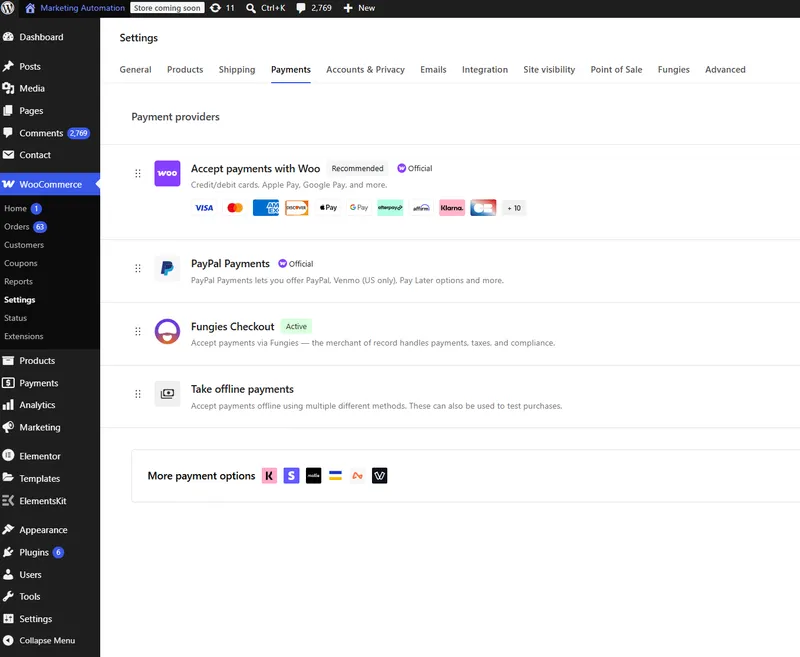
Once enabled, the Fungies tab in WooCommerce settings gives you access to full configuration.
Step 3: Configure Your API Keys
Navigate to WooCommerce → Settings → Fungies. You’ll need two keys from your Fungies dashboard:
- Secret API Key — starts with
sec_, found in Fungies Dashboard → Settings → Developers - Webhook Secret — generated in your Fungies webhook settings
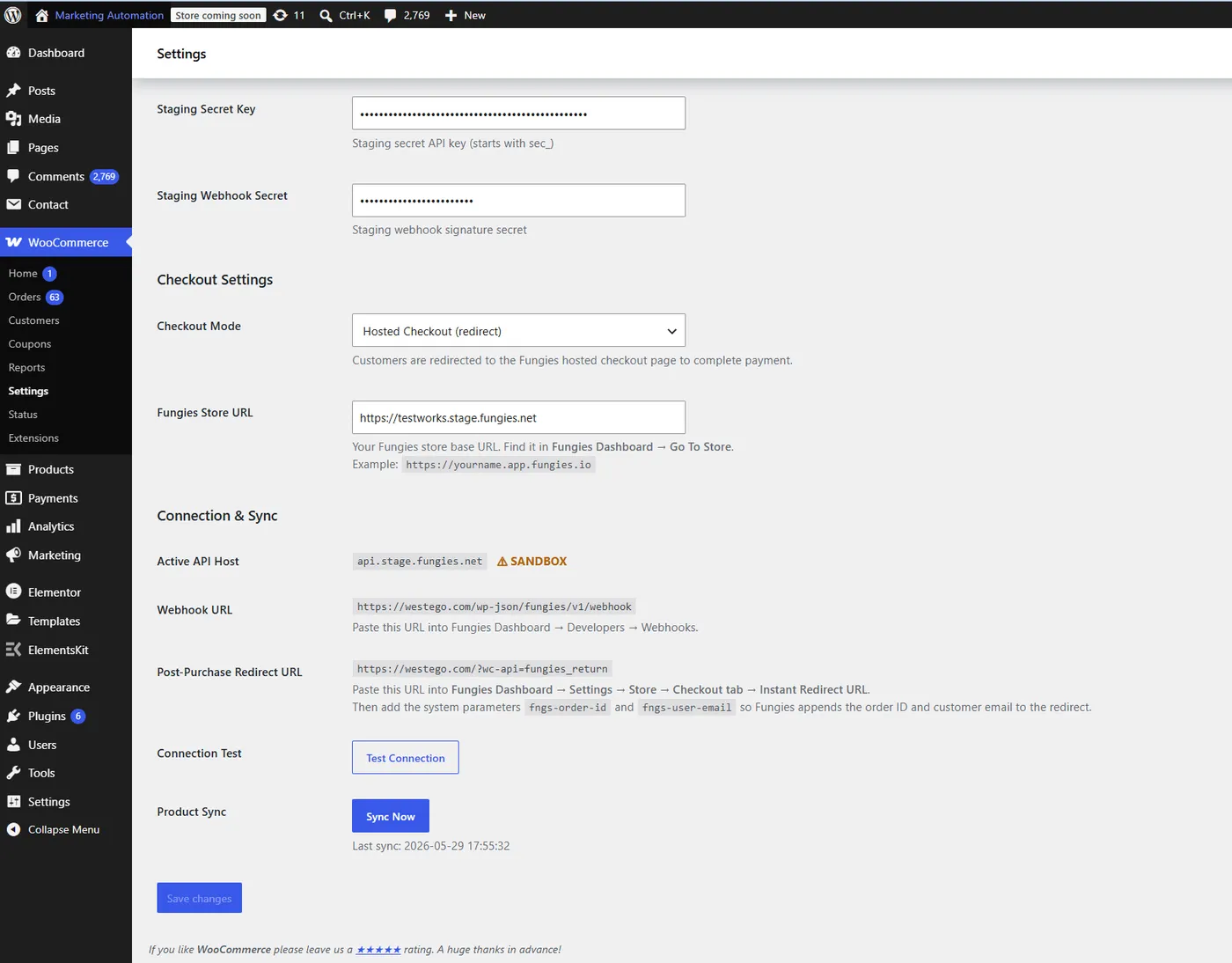
The settings panel also shows you:
- Checkout Mode: Choose between Hosted Checkout (redirect) or embedded checkout elements
- Fungies Store URL: Your store’s Fungies-hosted checkout URL
- Webhook URL: Auto-generated — paste this into your Fungies webhook settings
- Test Connection: Verify your API keys are working
- Product Sync: Sync your WooCommerce products to Fungies with one click
Once your keys are saved and connection tested, hit Sync Now to push your WooCommerce product catalog to Fungies.
What the Checkout Experience Looks Like
The Fungies checkout is designed for conversion. It’s clean, fast, and supports a wide range of payment methods out of the box — credit/debit cards, Google Pay, Apple Pay, PayPal, bank payments, Cash App Pay, Amazon Pay, Klarna, and crypto.
Customers see local pricing, local tax breakdowns, and familiar payment options. Two real-world examples from Fungies merchants:
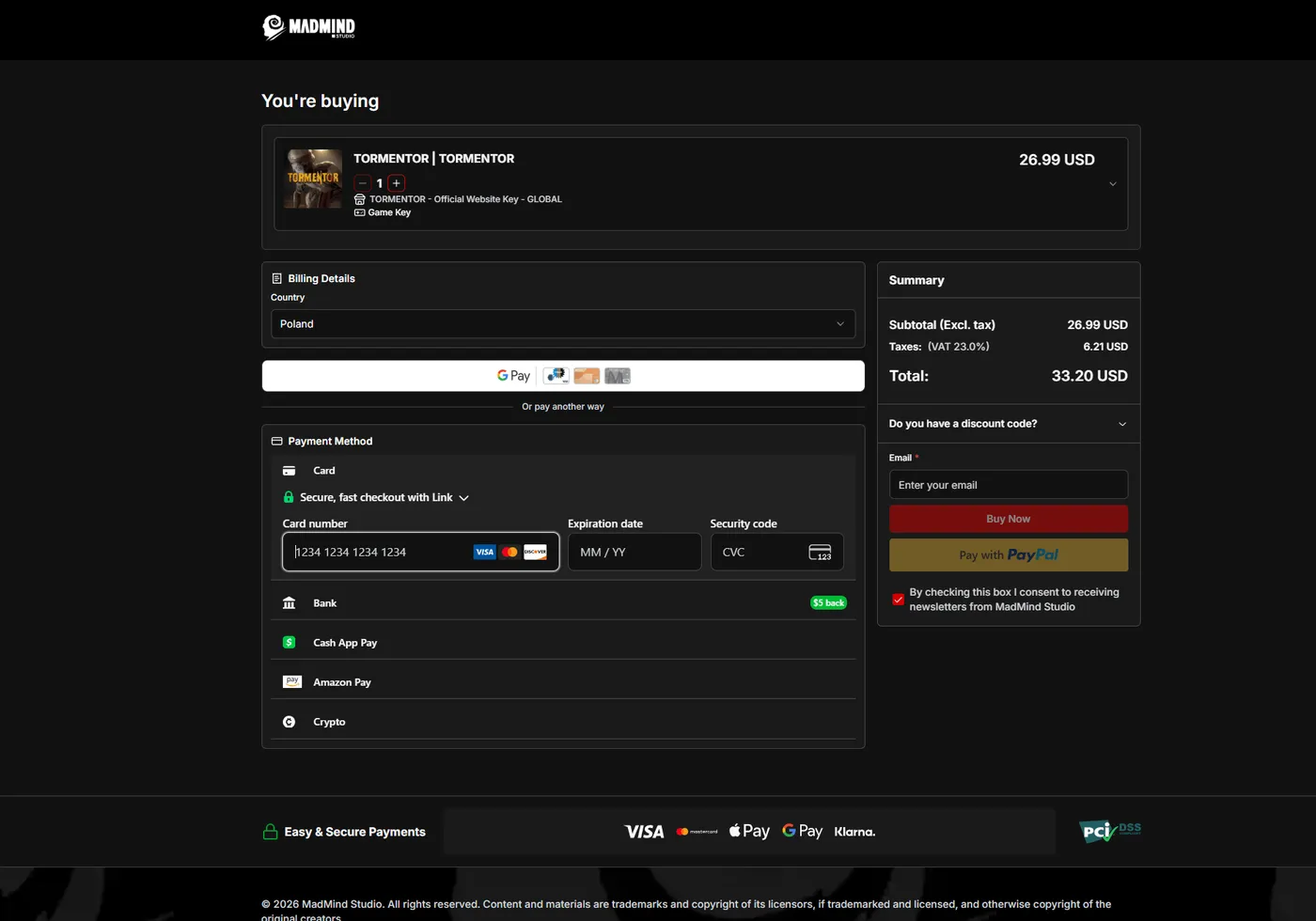
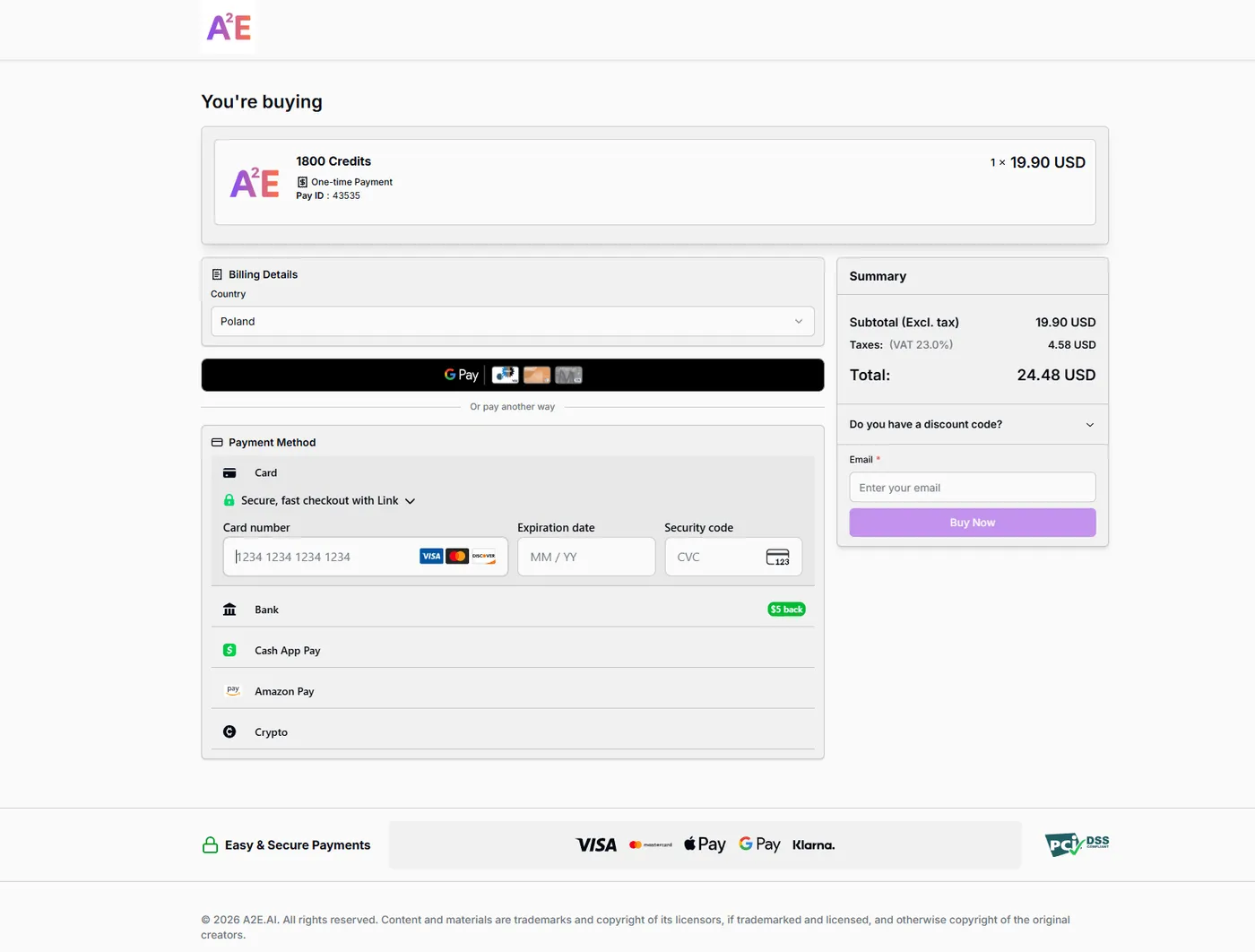
Notice the automatic VAT calculation based on the customer’s country. This is Fungies handling tax compliance in real time — you never touch it.
Managing Your Products in the Fungies Dashboard
After syncing, your WooCommerce products appear in the Fungies dashboard under Products → One-time Payments (or Subscriptions, Game Keys, Digital Downloads, etc. depending on product type).
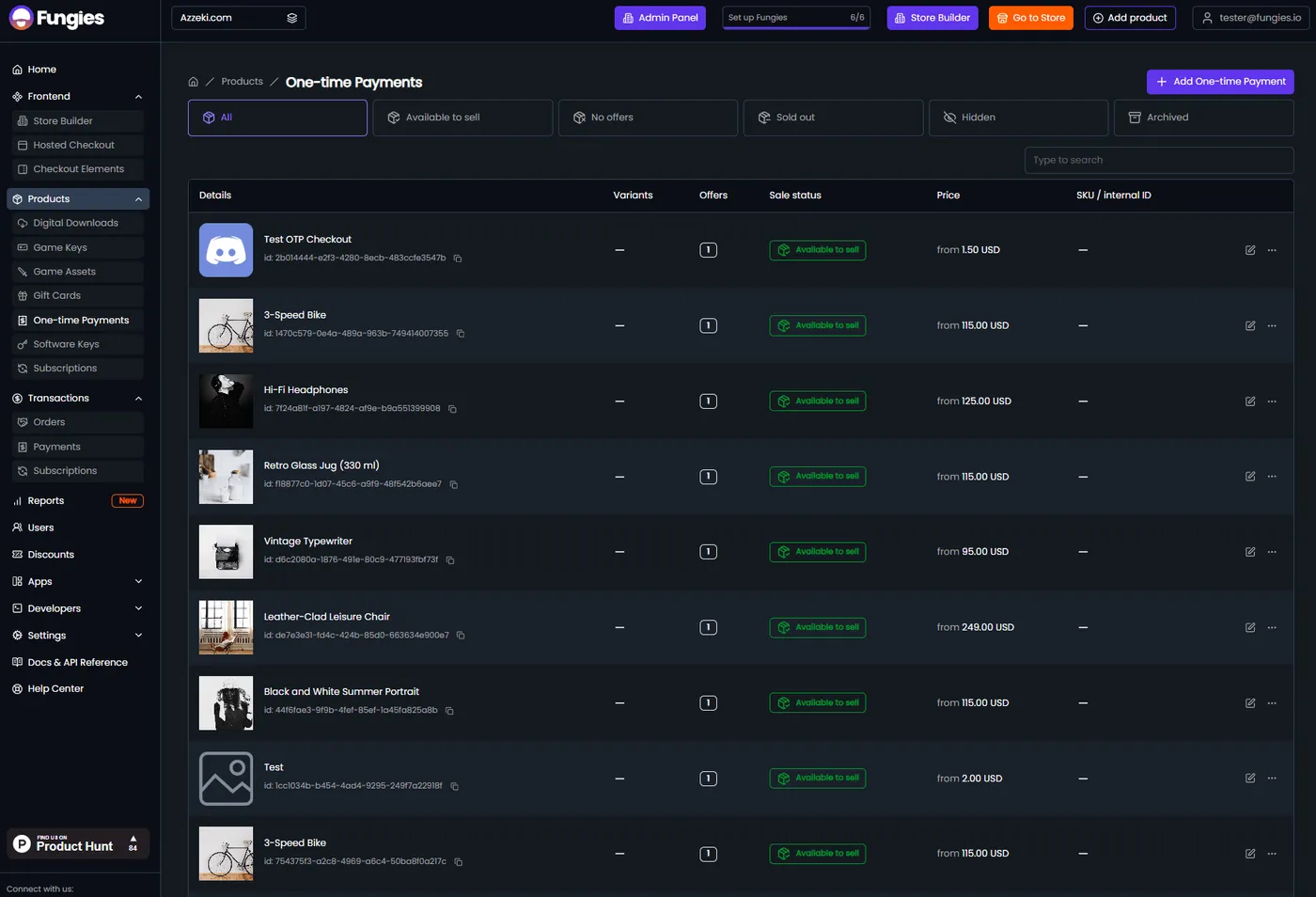
From the Fungies dashboard you can:
- Edit pricing, variants, and offers for each product
- Set up discount codes and promotional pricing
- Manage digital download files or game key delivery
- Configure subscription billing cycles
- Build a hosted storefront with the Store Builder
Revenue Analytics and Reporting
The Fungies dashboard gives you a full view of your payment performance — revenue, transactions, renewals, abandoned carts, and average order value — all in one place.
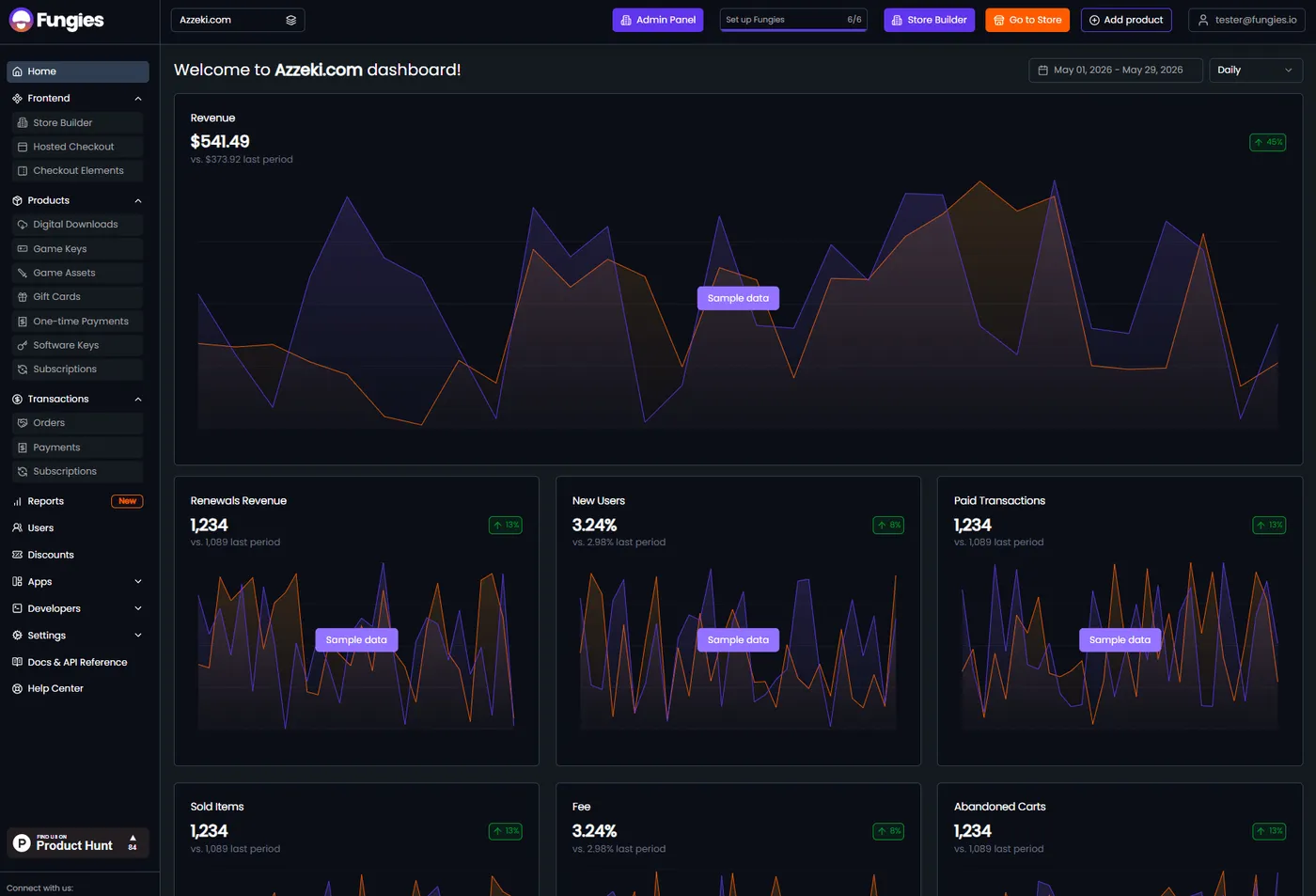
For WooCommerce store owners, this means you have two layers of reporting: WooCommerce’s native order management for store operations, and Fungies’ payment analytics for financial performance and tax reporting.
How Orders Appear in WooCommerce
Every Fungies transaction flows back into WooCommerce as a standard order — fully visible in your WooCommerce Orders list. The order detail page includes a dedicated Fungies Order Details section in the sidebar with all the payment-specific metadata.
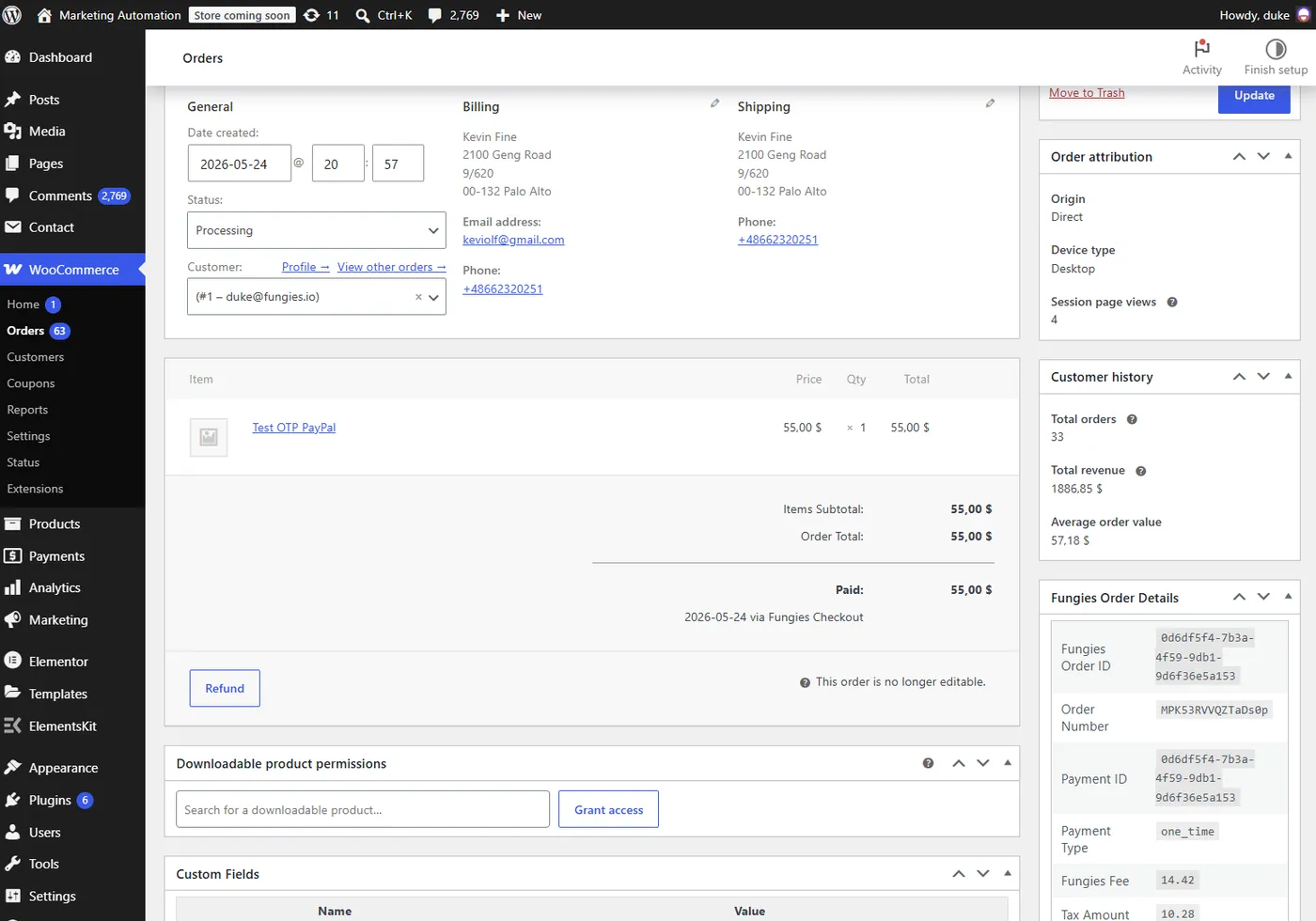
This means your existing WooCommerce workflows — order fulfillment, email notifications, customer management — all work exactly as they did before. Fungies plugs in underneath, handling the financial layer while WooCommerce handles the operational layer.
Who Is Fungies for WooCommerce Built For?
Fungies for WooCommerce is built specifically for stores that sell digital products globally. It’s particularly valuable for:
Digital Product Stores
Selling ebooks, courses, templates, presets, icon packs, UI kits, or any downloadable product? As soon as you have customers in the EU, you’re legally required to collect and remit VAT. Fungies handles this automatically — the moment a German customer buys from you, the 19% German VAT is collected, reported, and remitted by Fungies. You get your payout. You don’t file anything in Germany.
Game Developers and Studios
Game key resellers, indie studios selling direct, game asset marketplaces — all of these sit in a payment category that mainstream processors frequently flag. Fungies specializes in gaming payments, with support for game key delivery, digital download fulfillment, and high-volume transaction processing.
SaaS and Subscription Businesses
Recurring billing is notoriously complex: dunning management, failed payment retries, proration on upgrades, VAT on subscriptions in different jurisdictions. Fungies handles all of it. For WooCommerce stores using subscriptions (whether WooCommerce Subscriptions or a custom setup), connecting Fungies removes the compliance layer entirely.
Creator Economy and Content Businesses
If you sell memberships, exclusive content, digital access passes, or creator products through WooCommerce, Fungies ensures every transaction is tax-compliant regardless of where your buyer is located.
Fungies vs. Traditional WooCommerce Payment Gateways
| Feature | Stripe / PayPal (Standard Gateway) | Fungies (Merchant of Record) |
|---|---|---|
| Processes payment | ✅ | ✅ |
| VAT / sales tax collection | ❌ Your responsibility | ✅ Automatic, 100+ countries |
| Tax filing and remittance | ❌ | ✅ Fungies files on your behalf |
| Chargeback handling | ❌ Your dispute | ✅ Fungies absorbs |
| Fraud protection | Partial | ✅ Full MoR coverage |
| High-risk category support | ❌ Often terminated | ✅ Gaming, digital goods, subscriptions |
| Local payment methods | Limited | ✅ SEPA, iDEAL, Klarna, Crypto, and more |
| EU entity required to sell in EU | Yes (for full compliance) | ❌ Not needed — Fungies is your EU entity |
| WooCommerce integration | ✅ | ✅ Free plugin |
Getting Started: Step-by-Step Summary
- Create a Fungies account at fungies.io — free to start
- Install the plugin from WordPress.org or search “Fungies for WooCommerce” in your plugins dashboard
- Add your API keys from Fungies Dashboard → Settings → Developers
- Set your checkout mode (hosted redirect or embedded elements)
- Sync your products with one click
- Test the connection using the staging sandbox environment
- Go live — switch to production API keys when ready
Total setup time: under 15 minutes for most stores.
Frequently Asked Questions
Does Fungies for WooCommerce work with WooCommerce Subscriptions?
Yes. Fungies supports recurring billing natively. You can sync subscription products from WooCommerce, and Fungies handles the recurring charge logic, failed payment retries, and subscription VAT compliance.
What countries does Fungies support?
Fungies supports payments from customers in 100+ countries with automatic local tax compliance. This includes all EU member states, the UK, US, Canada, Australia, and more.
Will my existing WooCommerce workflows break?
No. Fungies works as a payment gateway layer under WooCommerce. Orders flow into WooCommerce normally. Your fulfillment, email, and CRM integrations continue working as-is.
Is the plugin free?
Yes — the plugin is free. Fungies charges a transaction fee as your Merchant of Record (starting from 5% per transaction, which covers payment processing, tax compliance, fraud protection, and chargeback handling). There are no monthly fees to start.
What’s the difference between hosted checkout and embedded checkout?
Hosted checkout redirects customers to a Fungies-hosted page to complete payment (similar to how PayPal works). Embedded checkout elements let you embed the payment form directly into your WooCommerce checkout page for a seamless on-site experience.
Do I need a separate Fungies account for each WooCommerce store?
Each WooCommerce store connects to one Fungies store. You can manage multiple Fungies stores from a single Fungies account.
Ready to Simplify Your WooCommerce Payments?
If you’re selling digital products, subscriptions, or software through WooCommerce, Fungies for WooCommerce removes the most painful parts of running a global business: tax compliance, chargeback risk, and payment processor fragility.
Install the plugin, connect your account, and let Fungies handle the compliance layer while you focus on building your product.
👉 Install Fungies for WooCommerce — Free on WordPress.org
Questions? Our support team is available at fungies.io — we typically respond within a few hours.