One developer on Reddit just got a bill that made them choke on their coffee: $1,400 for a single month of Cursor. What started as a $20 subscription turned into a mortgage payment because they didn’t read the fine print about compute-based overages.
Welcome to the wild west of AI coding tool pricing in 2026.
With 41% of global code now AI-generated and 84% of developers using or planning to use AI tools, choosing the right assistant isn’t just about features—it’s about not getting blindsided by your invoice. Some tools promise flat pricing. Others lure you in cheap, then charge based on how much you actually code.
In this guide, we’re cutting through the marketing fluff. You’ll get real pricing, real overage horror stories, and a clear ranking of which tools actually deliver value for money.
What Are AI Coding Tools? (And Why Pricing Models Matter)
AI coding tools are software assistants that use large language models to help you write, debug, refactor, and understand code. They integrate into your development workflow—whether that’s inside your IDE, as a terminal agent, or as a standalone application.
But here’s what the product pages don’t emphasize: pricing models vary wildly, and the wrong choice can cost you 10x more than expected.
- Flat pricing: You pay a fixed monthly fee regardless of usage. Predictable, safe.
- Credit-based: You get a monthly allowance of “credits” or tokens. Run over, and you’re either cut off or charged overages.
- Pay-as-you-go: Pure consumption model. Cheap at low usage, terrifying at scale.
Understanding this distinction is the difference between a $20 monthly bill and that $1,400 surprise.
The 5 Best AI Coding Tools Ranked by Value (2026)
We’ve ranked these tools based on real value—what you get for what you pay, with a heavy penalty for unpredictable costs.
#1 GitHub Copilot — Best Value at $10/Month
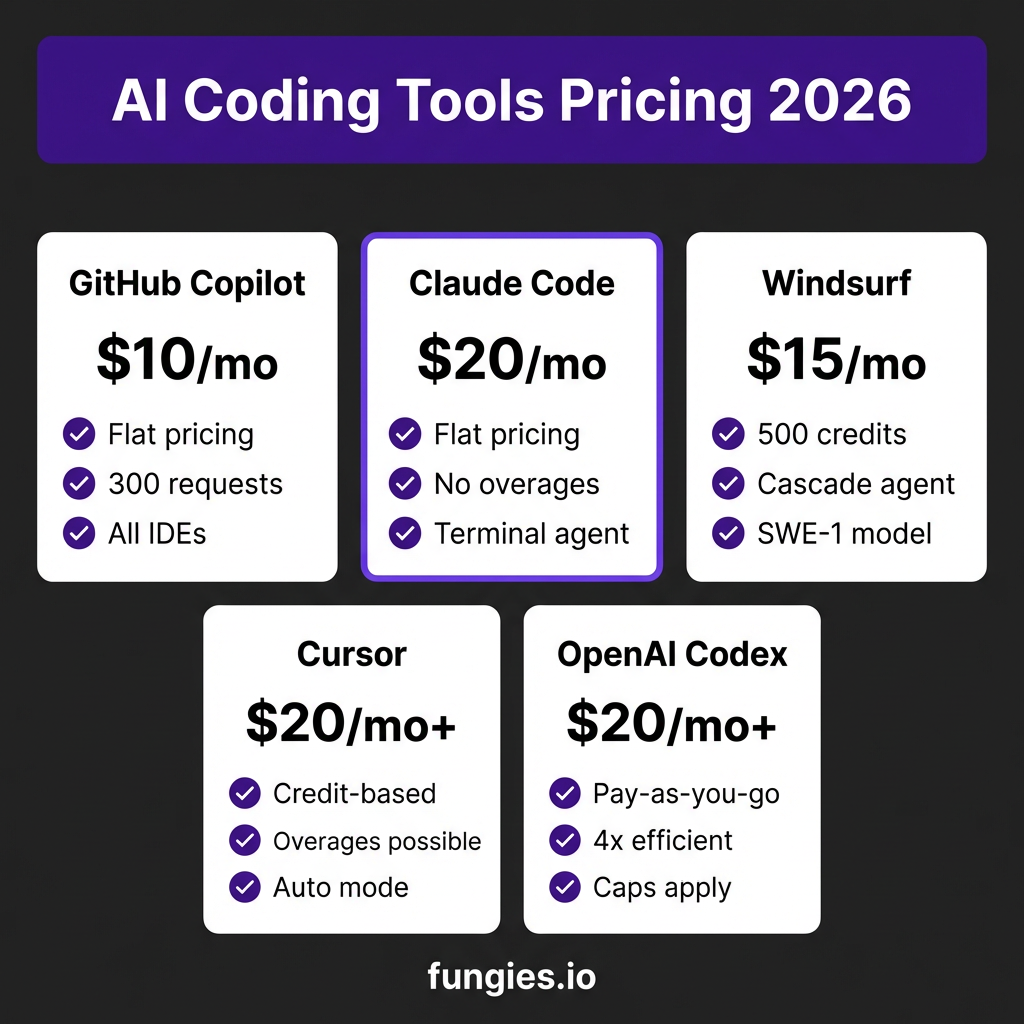
Pricing: $10/month individual | $19/month business
Model: Flat pricing — no overages, ever
GitHub Copilot remains the king of value in 2026. At just $10 per month for individuals, you get unlimited suggestions across all major IDEs—VS Code, JetBrains, Vim, Neovim, and even GitHub’s own Codespaces.
What you get:
- 300 AI requests per month (individual tier)
- Unlimited code completions (the “ghost text” as you type)
- Access to GPT-4o and Copilot’s own optimized models
- GitHub Copilot Chat for explaining code and debugging
- All IDE integrations included
The catch? There isn’t one, really. The 300-request limit only applies to explicit chat interactions. Code completions—which is what most developers use 90% of the time—are unlimited. For the vast majority of developers, you’ll never hit the limit.
Best for: Developers who want reliable, predictable costs and deep IDE integration. If you’re coding 40+ hours a week and don’t want to think about billing, Copilot is your safest bet.
#2 Claude Code — Best Flat Pricing for Power Users
Pricing: $20/month Pro | $100/month Max 5x | $200/month Max 20x
Model: Flat pricing — no overages, no surprises
Anthropic’s Claude Code takes a refreshingly honest approach to pricing: you pay a flat fee, and you get what you get. No compute calculations. No token counting. No “oops, you coded too hard this month” charges.
The value proposition is almost absurd: Claude Code Pro at $20/month delivers approximately $180 worth of API-equivalent usage. That’s not marketing fluff—that’s based on current Claude API pricing at $3/$15 per million tokens (input/output).
What you get at each tier:
- Pro ($20): Standard usage limits, perfect for most developers
- Max 5x ($100): 5x higher usage limits for power users
- Max 20x ($200): 20x limits for teams doing heavy AI-assisted development
Claude Code runs in your terminal and can read, edit, and execute code across your entire codebase. It’s particularly strong at understanding context—Claude’s 200K token context window means it can ingest entire projects and make coherent changes across files.
Best for: Developers who hate billing surprises and want a terminal-first workflow. The flat pricing makes budgeting trivial, and Claude’s reasoning capabilities are top-tier for complex refactoring tasks.
#3 Windsurf — Best for Cascade Agent Workflows
Pricing: $15/month Pro (500 credits) | $30/month Teams | $200/month Max
Model: Credit-based with daily/weekly quotas (changed March 19, 2026)
Windsurf (formerly Codeium) made waves with its Cascade agent—an AI that doesn’t just suggest code but actually executes multi-step development tasks. Need to add authentication to your app? Cascade can plan the changes, modify multiple files, and even run tests.
The pricing shifted in March 2026. Windsurf moved from a simple monthly credit allowance to a quota system with daily and weekly limits. Here’s what that means:
- Pro ($15): 500 credits per month, with daily quotas to prevent binge-and-bust usage
- Teams ($30): Shared credits for small teams
- Max ($200): Higher quotas for intensive agent workflows
The credit system is more complex than flat pricing, but Windsurf’s quotas prevent the worst overage scenarios. You can’t accidentally rack up a $1,000 bill—you’ll just hit your daily limit and have to wait.
Best for: Developers who want an agent that can execute complex multi-file tasks. The Cascade agent is genuinely impressive for boilerplate generation, API integrations, and repetitive refactoring.
#4 Cursor — Most Powerful, But Watch Your Wallet
Pricing: $20/month Pro | $60/month Pro+ | $200/month Ultra
Model: Credit-based with compute overages
Cursor is arguably the most feature-rich AI coding tool on the market. Composer mode, tab prediction, codebase-wide understanding, and the new “Auto” mode that chains multiple actions together—it’s genuinely impressive tech.
But that power comes with a pricing model that has burned many developers.
Here’s how Cursor’s pricing actually works:
- Base subscription ($20-200) includes a monthly credit allowance
- When you exceed those credits, you enter “overages”
- Overages are charged based on compute usage—how many tokens you actually consume
- There’s no hard cap. Use more, pay more.
The Reddit horror stories are real. Developers have reported bills ranging from $200 to over $1,400 in a single month. The worst part? It’s easy to burn through credits without realizing it. Auto mode, in particular, can chain dozens of expensive operations while you grab coffee.
Best for: Developers with expense accounts or those who carefully monitor usage. The features are genuinely best-in-class, but you need to treat Cursor like a cloud service with a budget alert—not a fixed subscription.
#5 OpenAI Codex — Pay-As-You-Go Risk
Pricing: $20/month Plus (with caps) OR pay-as-you-go for business
Model: Hybrid—subscription with limits, or pure consumption
OpenAI’s Codex agent launched with a pricing shakeup on April 3, 2026. The $20 Plus tier includes usage caps—fine for casual use, but you’ll hit walls on serious projects. For business use, OpenAI pushes you toward pay-as-you-go pricing.
Codex claims 4x better token efficiency than Claude Code, which sounds great until you realize it’s comparing against a tool that costs a fraction of the price at flat rates.
The math on pay-as-you-go:
- GPT-5: $1.25/$10.00 per million tokens (input/output)
- GPT-5 Pro: $15/$120 per million tokens
- A typical coding session can easily consume 10-50 million tokens
At those rates, heavy Codex users can easily spend $100-500+ per month. The efficiency claims help, but you’re still exposed to variable costs that scale with usage.
Best for: Teams already deep in the OpenAI ecosystem who want native integration with GPT-5. If you’re not already committed to OpenAI’s platform, the pricing uncertainty makes this a risky choice.
Complete Pricing Comparison Table
| Tool | Entry Price | Pricing Model | Overage Risk | Best For |
|---|---|---|---|---|
| GitHub Copilot | $10/mo | Flat (300 requests) | None | Predictable costs, IDE integration |
| Claude Code | $20/mo | Flat (no limits) | None | Terminal workflow, complex reasoning |
| Windsurf | $15/mo | Credit-based (500) | Low (hard caps) | Agent workflows, Cascade |
| Cursor | $20/mo | Credit + compute | High | Power users with budgets |
| OpenAI Codex | $20/mo | Subscription + PAYG | Medium-High | OpenAI ecosystem users |
Hidden Costs Nobody Talks About
Beyond the headline pricing, there are three hidden cost traps that can inflate your bill:
1. Context Bloat
Every time you send a request to an AI coding tool, it includes context—your current file, surrounding files, conversation history. Longer context = more tokens = higher costs on credit-based tools.
That 10,000-line file you’re working in? Every request includes chunks of it. Working across a 50-file project? The AI ingests summaries of all of them. These costs add up fast on pay-as-you-go models.
2. Token Waste from Bad Prompts
Vague prompts generate vague responses, which leads to follow-up prompts, which burns more tokens. A well-crafted prompt might cost $0.02. A “fix this” prompt followed by three clarifications might cost $0.50.
On flat pricing models, this doesn’t matter. On Cursor or Codex, it absolutely does.
3. Auto-Mode Runaway
Cursor’s Auto mode and similar agent features can execute dozens of operations without human intervention. If the AI goes down the wrong path—which happens—you’re paying for every wrong turn.
One developer reported Auto mode burning through $80 of credits in 20 minutes while trying to “optimize” a config file. The optimization didn’t work.
LLM API Pricing Context (Per 1M Tokens)
To understand why flat pricing tools are such a good deal, look at what you’d pay using these models directly via API:
| Model | Input | Output |
|---|---|---|
| GPT-5 | $1.25 | $10.00 |
| GPT-5 Pro | $15.00 | $120.00 |
| Claude Opus 4.6 | $5.00 | $25.00 |
| Claude Sonnet 4.6 | $3.00 | $15.00 |
| Gemini 3.1 Flash-Lite | $0.10 | $0.40 |
| Gemini 2.5 Flash | $0.15 | $0.60 |
| DeepSeek V3.2 | $0.25 | $0.38 |
DeepSeek V3.2 deserves special mention—at $0.25/$0.38 per million tokens, it’s roughly 100x cheaper than GPT-5. Several tools are now offering DeepSeek as a model option, which can dramatically reduce costs if you’re willing to trade some capability for savings.
Which Tool for Which Use Case?
Choose GitHub Copilot If:
- You want the simplest, most predictable pricing
- You code in multiple IDEs and want consistent experience
- You primarily need autocomplete and inline suggestions
- Budget certainty matters more than cutting-edge features
Choose Claude Code If:
- You work in the terminal and prefer CLI workflows
- You need to reason across large codebases (200K context window)
- You hate billing surprises and want true flat pricing
- You value Claude’s careful, thorough approach to code changes
Choose Windsurf If:
- You want an agent that can execute multi-step tasks
- You prefer hard usage caps over potential overages
- The Cascade agent’s workflow matches how you build
- You want a middle ground between power and predictability
Choose Cursor If:
- You want the most feature-rich experience available
- You’re willing to monitor and manage usage actively
- You have an expense account or can absorb variable costs
- Composer mode and tab prediction are worth the premium
Choose OpenAI Codex If:
- You’re already invested in the OpenAI ecosystem
- You want native GPT-5 integration
- You can work within usage caps or manage pay-as-you-go budgets
Frequently Asked Questions
Can I really get a $1,400 bill from Cursor?
Yes. Cursor’s compute-based overages have no hard cap. If you use Auto mode heavily or work on large projects with frequent requests, costs scale with usage. The $1,400 example is extreme but documented. More common are $100-300 monthly overages for active developers.
Is Claude Code actually unlimited?
Claude Code has usage limits, but they’re generous and clearly communicated. The Pro tier ($20) includes enough usage for most developers. If you hit limits, you know exactly what you’re paying for the next tier—no surprise overages.
What’s the best free AI coding tool?
GitHub Copilot has a 30-day free trial. Claude Code offers limited free usage. Windsurf has a free tier with 200 credits. For truly free, consider open-source alternatives like Continue.dev with your own API keys, or local models via Ollama.
Do AI coding tools actually save time?
According to Stack Overflow’s 2025 survey, AI assistants save a median of 5-8 hours per week for daily users. But there’s a learning curve—expect 2-4 weeks to integrate these tools into your workflow effectively.
Can I switch between tools easily?
Mostly yes. Your code remains yours, and switching tools is just a matter of installing a new extension or CLI. The main friction is relearning keyboard shortcuts and adapting to each tool’s specific interaction patterns.
Bottom Line: How to Choose Without Regret
The AI coding tool landscape in 2026 is a tale of two philosophies: flat pricing versus consumption-based models. Both have merit, but only one is predictable.
If you want zero billing anxiety, choose GitHub Copilot or Claude Code. Both offer genuine flat pricing with no overage traps. Copilot wins on price ($10 vs $20) and IDE integration. Claude Code wins on reasoning power and terminal workflow.
If you need agent capabilities and can tolerate some complexity, Windsurf offers the best balance of power and cost control. Its quota system prevents runaway bills while still enabling serious AI-assisted development.
Cursor and OpenAI Codex are powerful but require active cost management. Treat them like cloud infrastructure—set budgets, monitor usage, and know that your bill scales with your activity.
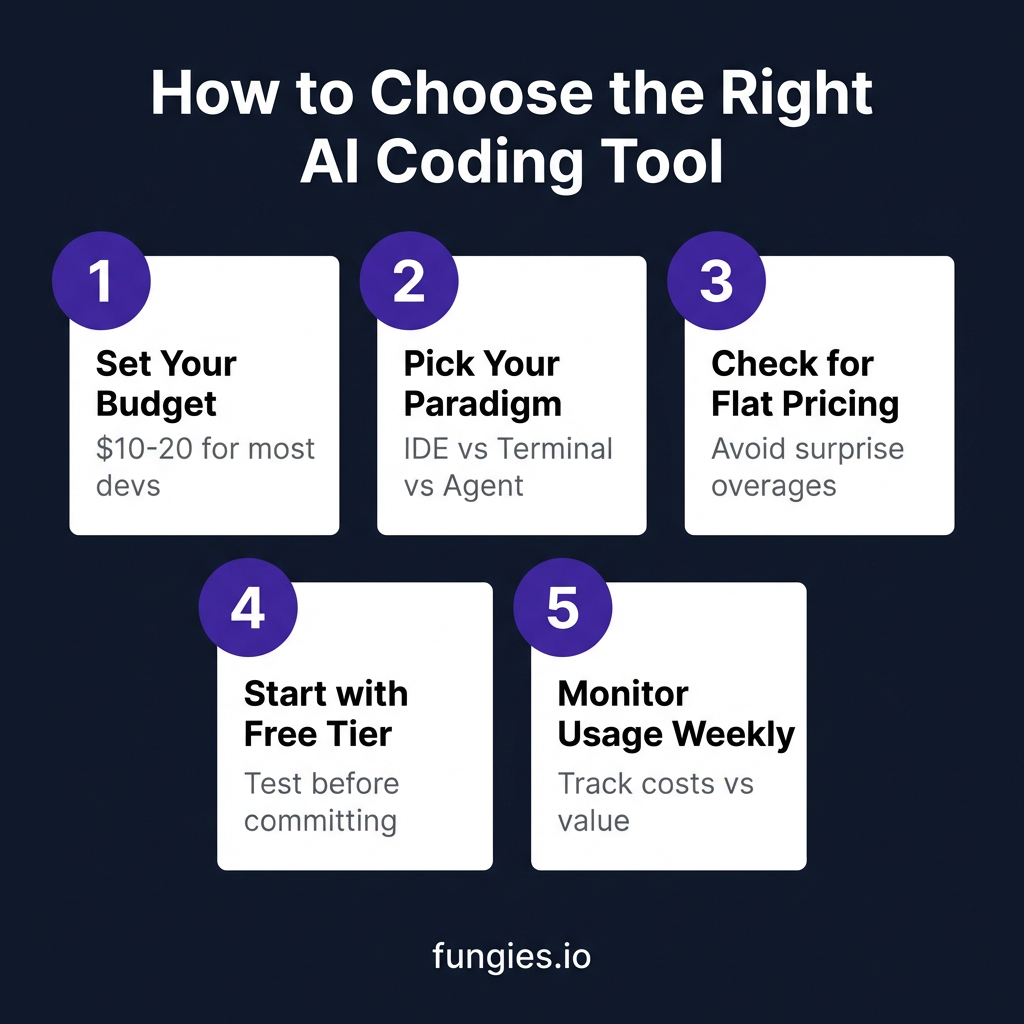
Whatever you choose, start with a free trial. All these tools offer some form of evaluation period. Test with your actual workflow, on your actual projects, before committing.
And remember: the best AI coding tool is the one you’ll actually use. A $10 subscription you use daily beats a $20 subscription you forget about.
Handling Payments for Your Dev Tools? Fungies Has You Covered
Real Developer Experiences: The Good, The Bad, and The $1,400 Bill
Numbers on a pricing page only tell part of the story. Here’s what developers are actually experiencing with these tools in 2026.
The Cursor Overage Crisis
The $1,400 Cursor bill wasn’t an isolated incident. In March 2026, a thread on r/cursor gained over 2,000 upvotes from developers sharing similar stories. One engineer at a mid-sized startup reported their team’s Cursor bill jumping from $400 to $2,800 in a single month after enabling Auto mode for a refactoring sprint.
Cursor’s response? They added better usage dashboards and email notifications when you hit 80% of your credit allowance. But the fundamental model—compute-based overages with no hard cap—remains unchanged.
The Claude Code Conversions
Meanwhile, Claude Code has become the refuge for developers burned by variable pricing. Multiple threads on Hacker News document migrations from Cursor to Claude Code specifically for cost predictability. One developer noted: “I switched from a $340/month Cursor habit to Claude Code Pro at $20. I lost some IDE polish, but I gained sanity.”
The trade-off is real: Claude Code runs in your terminal, not your IDE. There’s no ghost text as you type. But for developers who primarily want an AI pair programmer for complex tasks—not autocomplete—it’s a compelling value.
Copilot’s Quiet Dominance
GitHub Copilot doesn’t generate as much forum drama because it just works. Stack Overflow’s 2025 survey found Copilot maintaining a 67% market share among AI coding tools. The $10 price point, established years ago, has become a psychological anchor—anything significantly more expensive triggers scrutiny.
Microsoft’s strategy appears to be volume over margin. At $10/month with millions of subscribers, Copilot generates significant revenue while remaining the default choice for price-conscious developers.
The Future of AI Coding Tool Pricing
Looking ahead, expect three trends to shape pricing:
1. The Rise of Local Models
Tools like Ollama and LM Studio let developers run models locally for zero ongoing cost. While current local models (Llama 3, Mistral, Qwen) aren’t quite as capable as GPT-5 or Claude Opus for coding tasks, the gap is closing. By late 2026, expect viable local alternatives for developers willing to invest in GPU hardware upfront.
2. Enterprise Flat Pricing
As AI coding tools become standard developer infrastructure, enterprises are demanding predictable budgeting. Look for more tools to offer true unlimited enterprise tiers—expensive, but capped. The $50-100 per developer per month range will likely become the new standard for business plans.
3. Usage-Based Pushback
The backlash against Cursor-style overages is already forcing change. New entrants to the market are leading with flat pricing as a differentiator. Existing players may be forced to add hard caps or “maximum bill” guarantees to remain competitive.
How to Audit Your Current AI Tool Spending
If you’re already using AI coding tools, here’s a quick audit to ensure you’re not overpaying:
- Check your last 3 months of invoices. Are they consistent or creeping up?
- Calculate cost per coding hour. Divide your monthly bill by hours spent coding. Over $2/hour is worth questioning.
- Audit feature usage. Are you paying for premium tiers you don’t use?
- Consider splitting tools. Use Copilot for daily coding ($10) + Claude Code for complex tasks ($20) = $30 total, often cheaper than a single premium tool with overages.
Speaking of subscriptions—if you’re building a SaaS or selling digital products and need to handle global payments, taxes, and compliance without the headache, check out Fungies.io. We handle the Merchant of Record complexity so you can focus on building, not billing.
Flat pricing, no surprises. Sound familiar?