10 Best Payment SDKs for Developers in 2026: Complete Comparison
Compare the 10 best payment SDKs for developers in 2026. From Stripe’s flexibility to Fungies’ built-in tax compliance, find the right payment SDK for your SaaS or digital product with real pricing, setup times, and code examples.
Choosing the right payment SDK can make or break your checkout experience. Get it wrong and you’ll spend weeks wrestling with documentation, debugging cryptic errors, and explaining to your CEO why payments keep failing. Get it right and you’ll have payments running in hours, not days.
I’ve integrated dozens of payment systems over the years. Some SDKs feel like they were built by developers who actually ship code. Others feel like they were designed by committee. This guide cuts through the marketing fluff and compares the 10 best payment SDKs for developers in 2026 — ranked by real developer experience, not feature checklists.
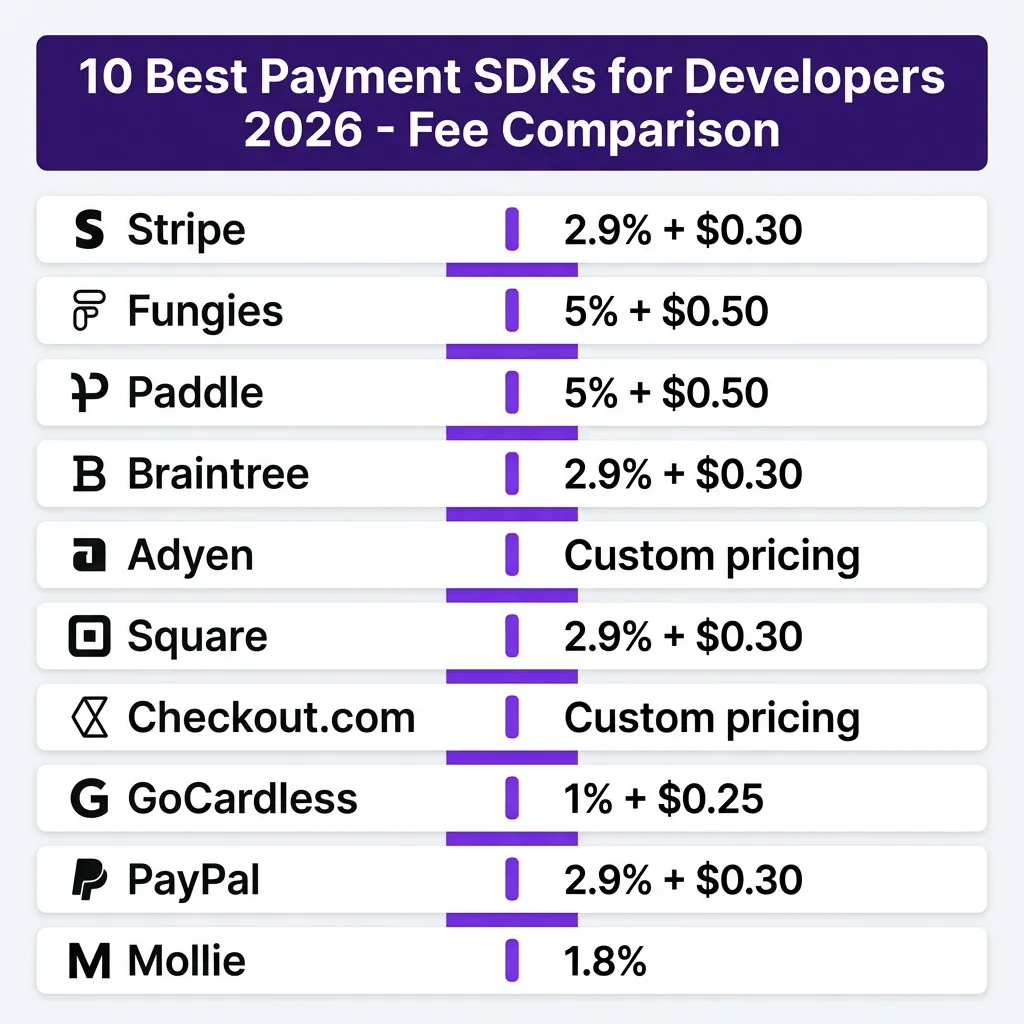
Quick Comparison: 10 Best Payment SDKs for Developers
| SDK | Best For | Transaction Fee | Setup Time | Languages |
|---|---|---|---|---|
| Stripe | Developer flexibility | 2.9% + $0.30 | 1-2 days | 20+ |
| Fungies | SaaS with global tax compliance | 5% + $0.50 | 2-3 hours | JS, Python, PHP |
| Paddle | B2C SaaS, global sales | 5% + $0.50 | 1 day | JS, Python, PHP |
| Braintree | Marketplaces, PayPal integration | 2.9% + $0.30 | 2-3 days | 8+ |
| Adyen | Enterprise global payments | Custom | 1-2 weeks | 10+ |
| Square | Omnichannel retail | 2.9% + $0.30 | 1-2 days | 7+ |
| Checkout.com | Unified global infrastructure | Custom | 3-5 days | 8+ |
| GoCardless | Recurring billing, ACH | 1% + $0.25 | 1-2 days | 6+ |
| PayPal | Consumer trust, express checkout | 2.9% + $0.30 | 1 day | 15+ |
| Mollie | European markets | 1.8% | 2-3 hours | 8+ |
What Makes a Great Payment SDK?
Before diving into the rankings, here’s what separates excellent SDKs from mediocre ones:
Documentation that actually helps. The best SDKs have clear, working examples. Not just reference docs — real integration guides with complete code samples.
Error messages that make sense. When a payment fails at 2 AM, you need to know why immediately. Good SDKs return descriptive errors. Bad ones return “payment_failed” with no context.
Webhook handling built-in. Payment state changes asynchronously. Great SDKs include webhook verification, signature validation, and event parsing out of the box.
Sandbox environments that work. Testing should mirror production. The best SDKs let you simulate failures, test edge cases, and iterate without touching real money.
Idempotency by default. Duplicate charges kill customer trust. Top-tier SDKs handle idempotency keys automatically or make them trivial to implement.
1. Stripe — The Gold Standard for Developer Experience
Stripe remains the benchmark against which all other payment SDKs are measured. Their developer experience isn’t just good — it’s the reason they’ve captured the market.
Key Features
- 20+ official SDKs covering JavaScript, Python, Ruby, PHP, Go, Java, .NET, iOS, Android, and more
- Stripe Elements for PCI-compliant hosted fields you can embed anywhere
- Stripe CLI for local webhook testing and API exploration
- Comprehensive test mode with test card numbers for every scenario
- Built-in idempotency with automatic retry handling
Developer Experience
Stripe’s documentation is legendary. Every endpoint has working code examples in multiple languages. Their error messages tell you exactly what went wrong and how to fix it.
const stripe = require('stripe')('sk_test_...');

const paymentIntent = await stripe.paymentIntents.create({
  amount: 2000,
  currency: 'usd',
  automatic_payment_methods: { enabled: true },
});
The Stripe CLI lets you test webhooks locally without deploying. This alone saves hours of debugging time.
Pricing
- 2.9% + $0.30 per transaction
- No monthly fees
- Additional 0.5% for Stripe Tax (if you need tax compliance)
Best For
Teams that want maximum flexibility, have the engineering resources to handle tax compliance themselves, and need advanced features like usage-based billing or complex subscription logic.
The Catch: You’re the merchant of record. That means handling VAT, sales tax, and compliance yourself — or paying extra for Stripe Tax and still managing registrations.
2. Fungies — Best Payment SDK for SaaS with Built-in Compliance
Fungies combines the developer-friendly approach of Stripe with the tax-handling benefits of a Merchant of Record. If you’re building SaaS and selling globally, this is the SDK that lets you focus on your product instead of tax registrations.
Key Features
- Drop-in checkout SDK with pre-built, customizable components
- Automatic global tax compliance — VAT, GST, sales tax handled for you
- Subscription management with dunning, upgrades, and proration
- Webhook system with signature verification included
- Multi-currency support with automatic conversion
Developer Experience
Fungies’ SDK follows Stripe’s patterns but adds the compliance layer most developers forget they need until it’s too late. The integration is straightforward:
import { FungiesCheckout } from '@fungies/checkout-sdk';

const checkout = new FungiesCheckout({
  apiKey: 'pk_live_...',
  environment: 'production'
});

checkout.mount('#checkout-container', {
  items: [{ priceId: 'price_123', quantity: 1 }],
  successUrl: 'https://yoursite.com/success',
  cancelUrl: 'https://yoursite.com/cancel'
});
The SDK handles tax calculation in real-time based on the customer’s location. No external tax service needed.
Pricing
- 5% + $0.50 per transaction (all-inclusive)
- No monthly fees
- No separate tax service costs
Best For
SaaS founders who want Stripe-like developer experience without the tax compliance headache. Especially valuable if you’re selling to customers in EU, UK, or US states with complex sales tax rules.
The Catch: Higher per-transaction fees than Stripe alone. But factor in the cost of tax services (Stripe Tax is 0.5% extra) and the time saved on compliance, and it’s often cheaper overall.
3. Paddle — Purpose-Built for B2C SaaS
Paddle has positioned itself as the Merchant of Record specifically for software companies. Their SDK reflects this focus with built-in features SaaS businesses actually need.
Key Features
- Complete MoR service — they handle taxes, compliance, and legal liability
- Subscription billing with trials, proration, and dunning management
- In-app checkout that feels native to your product
- Affiliate management built into the platform
- Global payment methods including local options in 200+ countries
Pricing
- 5% + $0.50 per transaction
- No monthly fees
- All tax compliance included
Best For
B2C SaaS companies selling globally who want a complete MoR solution with strong subscription features. The affiliate system is a nice bonus if you run partner programs.
4. Braintree — Best for Marketplaces and PayPal Integration
Owned by PayPal, Braintree offers the best of both worlds: modern developer tools plus access to PayPal’s massive user base and Venmo integration.
Key Features
- Drop-in UI for quick integration
- Vault storage for secure payment method storage
- Split payments for marketplace scenarios
- PayPal and Venmo integration out of the box
- Advanced fraud tools with Kount integration
Pricing
- 2.9% + $0.30 per transaction
- No monthly fees for standard processing
Best For
Marketplaces needing split payments, businesses wanting PayPal/Venmo options, and companies already in the PayPal ecosystem.
5. Adyen — Enterprise-Grade Global Processing
Adyen powers payments for Uber, Microsoft, and Netflix. Their SDK is built for scale, handling billions in transactions with unified global infrastructure.
Key Features
- Unified platform for online, in-app, and in-person payments
- 250+ local payment methods across major markets
- Intelligent routing for higher authorization rates
- RevenueAccelerate for optimizing payment success
- Direct card network connections for lower fees at scale
Pricing
- Custom pricing based on volume
- Interchange++ model for transparency
- Generally lower than Stripe at high volume
Best For
Enterprise companies processing $50M+ annually, businesses needing truly global coverage with local payment methods, and teams with dedicated payment engineering.
6. Square — Omnichannel Retail Done Right
Square started with in-person payments but their developer platform has evolved into a serious contender for omnichannel businesses.
Key Features
- Unified online and offline payment processing
- Square Online for quick storefront setup
- Developer-friendly APIs for custom integrations
- Inventory management across channels
- Instant transfers to Square Banking
Pricing
- 2.9% + $0.30 for online transactions
- 2.6% + $0.10 for in-person (with Square hardware)
Best For
Retailers selling both online and in-person, restaurants, and service businesses wanting unified reporting across channels.
7. Checkout.com — Unified Infrastructure with Modern APIs
Checkout.com has gained significant traction as a Stripe alternative for businesses wanting more control and better international support.
Key Features
- Unified payment platform across regions
- Advanced fraud detection with machine learning
- Comprehensive reporting and analytics
- Local acquiring in 50+ countries
- Flexible integration options from hosted to fully custom
Pricing
- Custom pricing based on volume and geography
- Generally competitive with Stripe
- Interchange++ pricing available
Best For
Businesses needing strong international presence, companies outgrowing Stripe’s feature set, and teams wanting more control over their payment stack.
8. GoCardless — Best for Recurring and ACH Payments
If your business relies on bank transfers, direct debit, or ACH, GoCardless is the specialized tool you need. They own this niche completely.
Key Features
- Direct debit in 30+ countries including SEPA, Bacs, and ACH
- Lower fees than card processing (typically 1% or less)
- Automatic retry logic for failed payments
- Real-time payment tracking and notifications
- Subscription management built for recurring billing
Pricing
- 1% + $0.25 per transaction (capped at $4)
- Significantly cheaper than cards for large transactions
Best For
Businesses with high average transaction values, subscription services in Europe (SEPA), and companies wanting to avoid card network fees.
9. PayPal — Consumer Trust and Express Checkout
PayPal’s developer platform has improved significantly. While not as developer-first as Stripe, the consumer trust factor is unmatched.
Key Features
- 400+ million active accounts worldwide
- One-click checkout for PayPal users
- PayPal Credit and buy-now-pay-later options
- Buyer and seller protection programs
- Multi-currency support with competitive FX rates
Pricing
- 2.9% + $0.30 for domestic transactions
- Additional 1.5% for international
- Micropayment rates available (5% + $0.05)
Best For
Businesses targeting consumers who prefer PayPal, international sellers wanting trusted brand recognition, and companies wanting built-in buyer protection.
10. Mollie — Developer-Friendly European Payments
Mollie is the European Stripe — simple, developer-focused, and with excellent local payment method support for EU markets.
Key Features
- Simple, clean API with excellent documentation
- Local payment methods including iDEAL, Bancontact, Giropay
- No minimums or fixed costs — pay only for transactions
- Test mode that actually works like production
- Webhook handling with clear event structure
Pricing
- 1.8% for most European cards
- Fixed fees for local methods (€0.29 for iDEAL, etc.)
- No monthly fees
Best For
European businesses, companies targeting EU customers with local payment preferences, and developers wanting Stripe-like simplicity with better European coverage.
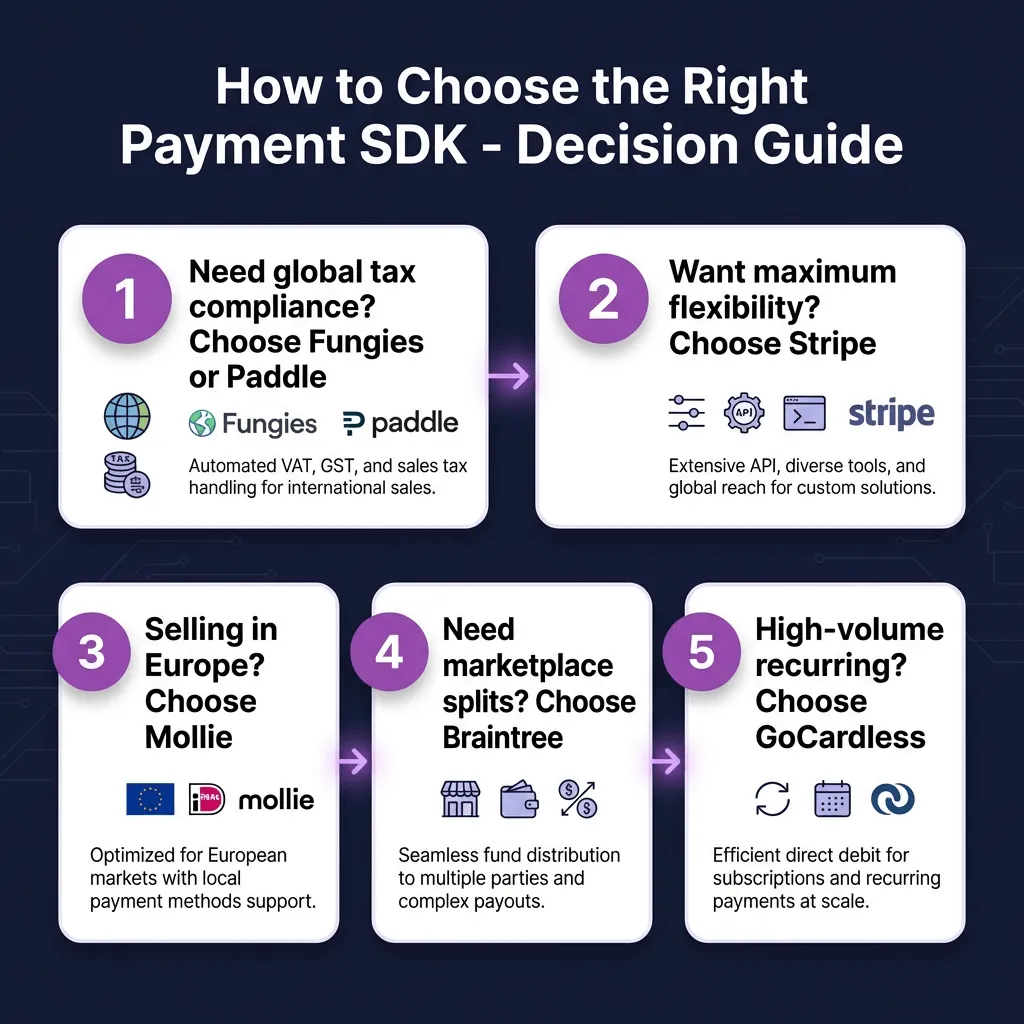
How to Choose the Right Payment SDK
With 10 solid options, here’s how to narrow it down:
Choose Stripe if: You want maximum flexibility, have engineering resources to handle compliance, and need advanced billing features.
Choose Fungies if: You’re building SaaS, selling globally, and want Stripe-like developer experience with automatic tax compliance.
Choose Paddle if: You’re B2C SaaS, want a complete MoR solution, and don’t need highly custom checkout flows.
Choose Braintree if: You need marketplace split payments or want PayPal/Venmo integration.
Choose Adyen if: You’re enterprise-scale, need 250+ local payment methods, and have dedicated payment engineering.
Choose Square if: You sell both online and in-person and want unified reporting.
Choose GoCardless if: You primarily do recurring billing and want to minimize fees on bank debits.
Choose PayPal if: Consumer trust is critical and your customers prefer PayPal checkout.
Choose Mollie if: You’re Europe-focused and want simple, clean integration.
Implementation Checklist
Whatever SDK you choose, follow this checklist for a smooth integration:
- Set up sandbox environment and test credentials
- Implement payment creation with idempotency keys
- Build webhook endpoint with signature verification
- Test all failure scenarios (declined cards, expired cards, network errors)
- Implement proper error handling with user-friendly messages
- Set up monitoring for payment success rates and webhook delivery
- Test the complete flow end-to-end before going live
- Document your integration for future developers
FAQ
What’s the difference between a payment SDK and a payment API?
An SDK (Software Development Kit) includes libraries, code samples, and tools that make it easier to integrate with a payment API. The API is the underlying interface; the SDK wraps it in language-specific code that handles authentication, error handling, and common patterns.
Do I need a Merchant of Record (MoR) or just a payment gateway?
If you’re selling globally, an MoR like Fungies or Paddle handles tax compliance, VAT registration, and legal liability. A payment gateway like Stripe just processes payments — you remain responsible for taxes and compliance. For most SaaS businesses selling internationally, an MoR saves significant time and risk.
How long does payment SDK integration typically take?
Simple integrations: 1-2 days. Full production implementations with webhooks, error handling, and testing: 1-2 weeks. Complex marketplace or subscription setups: 2-4 weeks.
Can I use multiple payment SDKs?
Yes. Many businesses use Stripe for card payments, GoCardless for bank debits, and PayPal for customers who prefer it. Just ensure you have a unified order management system to track payments across providers.
What’s the most important factor in choosing a payment SDK?
Developer experience. A well-documented SDK with clear error messages and working examples will save you more time than any feature difference. Look for SDKs with active communities, regular updates, and comprehensive testing tools.
Conclusion
The best payment SDK for your project depends on your specific needs. Stripe remains the gold standard for developer experience and flexibility. Fungies offers the best balance of developer-friendly integration and automatic compliance for SaaS businesses. Paddle excels for B2C SaaS with its complete MoR approach.
For most developers building SaaS or digital products in 2026, I’d recommend starting with either Stripe (if you want maximum control and can handle compliance) or Fungies (if you want to focus on your product and let someone else handle the tax complexity).
Whichever you choose, prioritize thorough testing in sandbox environments before going live. Payment integrations are too critical to ship untested.
Ready to accept payments without the compliance headache? Get started with Fungies and launch your payment integration in hours, not weeks.
Sources
- Stripe Documentation: https://stripe.com/docs
- Paddle Developer Docs: https://developer.paddle.com
- Braintree Developer Guides: https://developer.paypal.com/braintree/docs
- Adyen API Reference: https://docs.adyen.com
- Square Developer Platform: https://developer.squareup.com
- Checkout.com Documentation: https://www.checkout.com/docs
- GoCardless API Reference: https://developer.gocardless.com
- PayPal Developer Docs: https://developer.paypal.com
- Mollie API Documentation: https://docs.mollie.com
- Postman Payment APIs Report 2026: https://blog.postman.com/best-payment-apis-for-developers/