Best Game Website Makers 2026: How to Build Your Game Site (No Coding Required)
Discover the best game website makers for 2026. Compare Wix, WordPress, Squarespace, Webflow & GameMaker Site. Step-by-step guide to building your game website without coding.
Creating a professional website for your game is no longer optional — it’s essential. Whether you’re an indie developer launching your first title or a studio building a portfolio, a game website serves as your digital storefront, community hub, and marketing engine all in one. With over 3 billion gamers worldwide and the indie game market projected to reach $2.5 billion by 2027, having a dedicated online presence can make the difference between obscurity and success.
But here’s the challenge: most game developers aren’t web designers. You want to spend time crafting gameplay, not wrestling with CSS or debugging JavaScript. That’s where game website makers come in — specialized platforms that let you build stunning, functional game websites without writing a single line of code.
What Is a Game Website Maker?
A game website maker is a specialized platform or tool designed specifically for creating websites tailored to video games and game developers. Unlike generic website builders, these tools understand the unique needs of gaming content: showcasing trailers and screenshots, integrating with platforms like Steam or itch.io, building community features, and optimizing for game-related SEO.
The best game website makers offer pre-designed templates that speak the visual language of gaming — dark themes, dynamic layouts, media-rich galleries, and integration with gaming platforms. They handle the technical heavy lifting so you can focus on what matters: promoting your game and building your community.
Modern game website makers have evolved significantly. Today’s platforms offer drag-and-drop interfaces, responsive designs that look great on mobile (where 60% of gaming content is consumed), built-in analytics to track visitor engagement, and seamless integration with social media and streaming platforms. Some even include features specifically for game developers like press kit generators, beta signup forms, and Discord community integration.
Top 5 Game Website Makers Compared
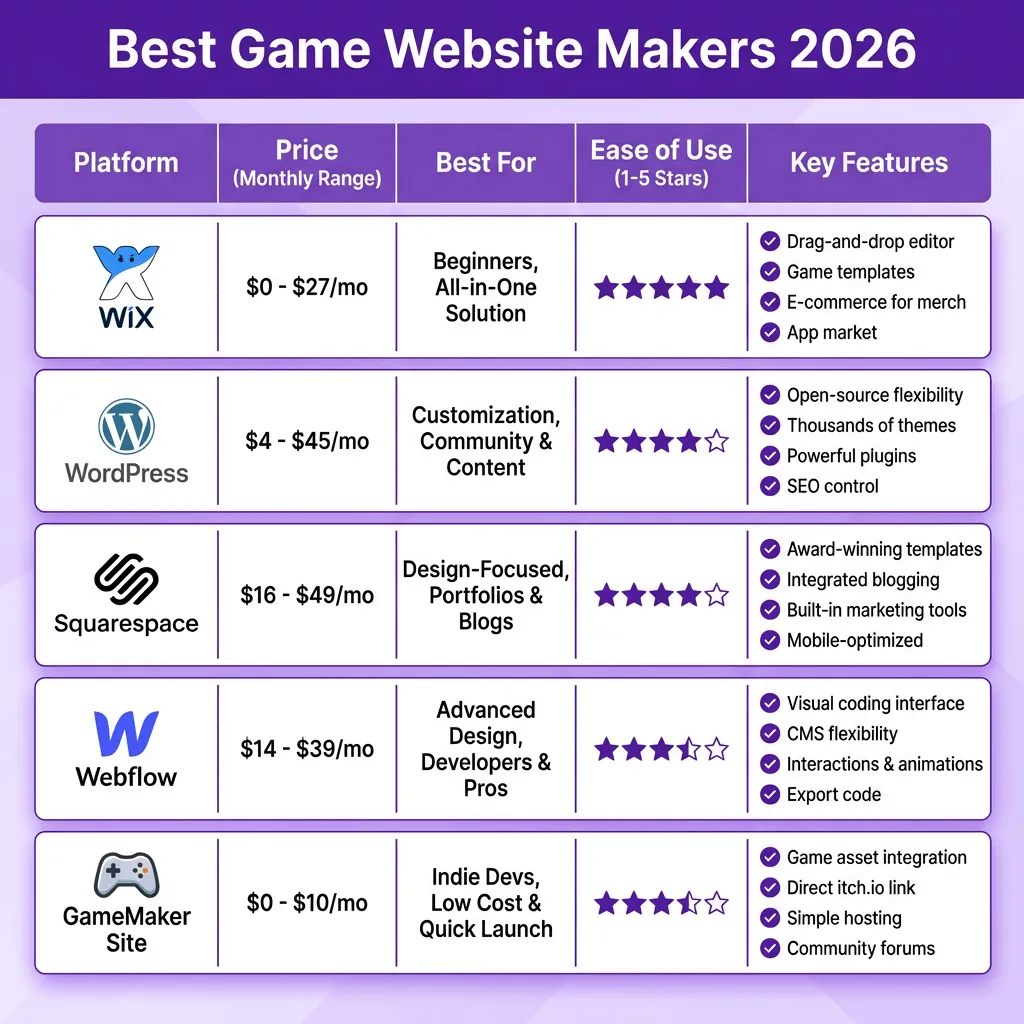
After testing dozens of platforms, we’ve identified the five best game website makers for developers in 2026. Each excels in different areas, so your choice depends on your specific needs, technical comfort level, and budget.
1. Wix — Best for Beginners
Wix dominates the beginner-friendly space with over 200 million users worldwide. For game developers, Wix offers gaming-specific templates with dark aesthetics, video backgrounds, and gallery layouts perfect for showcasing screenshots and trailers. The drag-and-drop editor requires zero coding knowledge, and you can have a professional game site live in under an hour.
Pricing: Free plan available (with Wix ads), Premium plans from $16-$27/month
Best for: Indie developers, first-time website builders, rapid prototyping
Standout feature: ADI (Artificial Design Intelligence) can build your site automatically based on your answers to a few questions
2. WordPress.com — Best for Flexibility
WordPress powers 43% of all websites on the internet, and for good reason. The platform offers unmatched flexibility through thousands of themes and plugins. For game developers, themes like “Game Addict” and “Youplay” provide gaming-specific layouts, while plugins can add Steam integration, game review systems, and community forums.
Pricing: Free plan available, Premium from $4-$45/month
Best for: Developers wanting full control, sites with blogs or complex features
Standout feature: WooCommerce integration for selling games, merchandise, or DLC directly
3. Squarespace — Best for Visual Design
Squarespace is renowned for its stunning, designer-quality templates. While not gaming-specific, their visual-focused approach works beautifully for game portfolios and studio sites. The platform excels at showcasing high-quality imagery and video content — perfect for game trailers and screenshots.
Pricing: $16-$49/month (no free plan)
Best for: Studios prioritizing aesthetics, portfolio sites, artist-focused games
Standout feature: Industry-leading template designs with sophisticated typography and spacing
4. Webflow — Best for Customization
Webflow bridges the gap between visual builders and professional web development. It offers pixel-perfect control over every design element while remaining code-free. For game developers with a specific vision, Webflow delivers unmatched creative freedom. The platform also generates clean, semantic HTML that’s excellent for SEO.
Pricing: Free plan for staging, paid from $14-$39/month
Best for: Design-conscious developers, unique branding requirements
Standout feature: Advanced animations and interactions without JavaScript
5. GameMaker Site — Best for GameMaker Studio Users
Operated by the creators of GameMaker Studio, this platform is purpose-built for game developers. It offers seamless integration with GameMaker projects, automatic game embedding, and a community that understands game development. If you’re already in the GameMaker ecosystem, this is the obvious choice.
Pricing: Free tier available, premium from $5-$10/month
Best for: GameMaker Studio developers, hobbyist game makers
Standout feature: Native GameMaker integration and built-in game hosting
How to Create Your Game Website: Step-by-Step
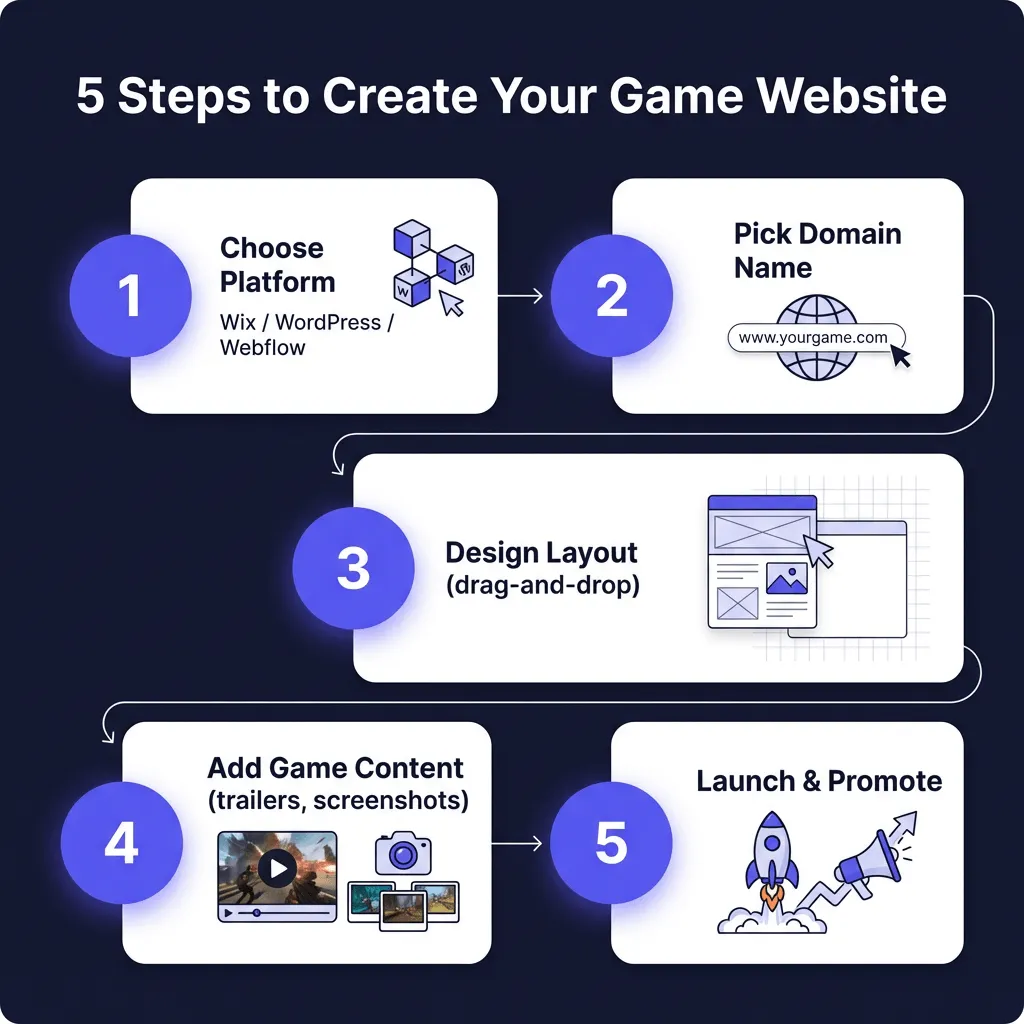
Building your game website doesn’t have to be overwhelming. Follow these five steps to go from idea to live site:
Step 1: Choose Your Platform
Based on our comparison above, select the platform that matches your technical skills and goals. Beginners should start with Wix or GameMaker Site. Those wanting more control should consider WordPress or Webflow. Sign up for a free trial to test the interface before committing.
Step 2: Secure Your Domain Name
Your domain is your address on the web. Choose something memorable, easy to spell, and relevant to your game or studio. If your game is called “Cyber Quest,” consider cyberquestgame.com or playcyberquest.com. Most platforms offer domain registration, or you can use registrars like Namecheap or Google Domains.
Step 3: Design Your Layout
Start with a gaming-focused template, then customize it to match your game’s aesthetic. Key pages every game website needs: Home (hero section with trailer), About (your story and team), Game (features, screenshots, trailers), Press Kit (for journalists), and Contact. Keep navigation simple — no more than 5-7 menu items.
Step 4: Add Your Game Content
Content is king. Include a compelling trailer (keep it under 90 seconds), high-quality screenshots (at least 6-8), a clear description of your game, key features with icons, and system requirements. Add social proof if available: quotes from beta testers, early reviews, or awards. Include clear calls-to-action: “Wishlist on Steam,” “Join Discord,” or “Buy Now.”
Step 5: Launch and Promote
Before going live, test your site on mobile devices (60% of traffic will be mobile), check all links work, optimize images for fast loading, and set up Google Analytics. When ready, publish and start promoting: share on social media, post to relevant subreddits (r/gamedev, r/indiegaming), add to your email signature, and include in your press outreach.
Essential Features Every Game Website Needs
Beyond basic information, successful game websites include specific features that drive engagement and conversions:
- Media Gallery: High-quality screenshots and gameplay videos are non-negotiable. Use lightbox galleries for the best experience.
- Press Kit: Journalists need easy access to logos, screenshots, and fact sheets. Tools like presskit() or dopresskit simplify this.
- Mailing List Signup: Email marketing consistently outperforms social media for game launches. Offer an incentive (wallpaper, beta access) for signups.
- Social Integration: Embed your Twitter feed, Discord widget, or Steam community links directly on the site.
- Store Links: Prominently display buttons linking to Steam, Epic Games Store, itch.io, or your direct sales page.
- SEO Optimization: Use descriptive page titles, meta descriptions, and alt text for images to help players find you through search.
Frequently Asked Questions
Do I need coding skills to use a game website maker?
No. Modern website builders like Wix, Squarespace, and Webflow are designed for non-technical users. They offer drag-and-drop interfaces that require zero coding knowledge. However, basic HTML/CSS knowledge can help with advanced customizations.
Can I sell my game directly through my website?
Yes. Platforms like WordPress with WooCommerce, Webflow, and dedicated solutions like Fungies.io allow direct game sales. Selling directly gives you higher margins (no platform fees) and direct customer relationships, though you’ll need to handle payment processing and tax compliance.
How much does it cost to build a game website?
Costs range from free (with ads and limitations) to $50/month for premium features. Most indie developers spend $10-20/month on hosting and domain. Custom development can cost $2,000-$10,000+ but is rarely necessary with modern builders.
Should I use a free or paid plan?
Free plans work for hobby projects and early development. For commercial releases, invest in a paid plan to remove ads, use a custom domain, and access premium features like e-commerce and analytics. The professional appearance pays for itself.
How do I drive traffic to my game website?
Combine organic and paid strategies: optimize for SEO (target keywords like your game name + “download” or “trailer”), share on social media and gaming forums, reach out to gaming journalists and influencers, run targeted ads on Facebook/Reddit, and build an email list for direct communication with interested players.
Conclusion
Creating a professional game website has never been more accessible. With the right game website maker, you can build a stunning, functional site in a weekend — no coding required. Whether you choose Wix for simplicity, WordPress for flexibility, or Webflow for design control, the key is getting your game in front of players.
Remember: your website is often the first impression potential players have of your game. Invest time in compelling visuals, clear messaging, and easy navigation. And once your site is live, don’t forget the ultimate goal — converting visitors into players and players into paying customers.
Ready to Monetize Your Game?
Join hundreds of game developers using Fungies.io — sell globally with automated tax compliance, 50+ payment methods, and zero headaches.
No credit card required