Digital Product Delivery Automation: The Complete Guide for SaaS and Digital Product Sellers in 2026
Learn how to automate digital product delivery in 2026. This complete guide covers platform comparisons, security best practices, implementation steps, and metrics to track for SaaS and digital product sellers.
Here’s a number that should stop you in your tracks: the global digital products market hit $9.8 billion in 2025 and is projected to reach $18.3 billion by 2033. Yet most creators and SaaS founders are still handling deliveries manually—sending files via email, generating download links by hand, and responding to “where’s my purchase?” messages at 11 PM.
I’ve been in the digital product space long enough to know that delivery friction kills conversions. When a customer clicks “buy,” they want instant access. Not in an hour. Not tomorrow. Right now. Every second of delay increases the chance they’ll request a refund or worse—chargeback.
In this guide, I’ll walk you through digital product delivery automation—the technology that transforms your fulfillment from a time-consuming chore into a seamless, hands-free system that works while you sleep. Whether you’re selling ebooks, software licenses, online courses, or SaaS subscriptions, you’ll learn exactly how to implement automation that delights customers and scales with your growth.
What Is Digital Product Delivery Automation?
Digital product delivery automation is a technology-driven system that automatically fulfills orders for digital goods immediately after purchase. When a customer completes their transaction, the automation system instantly generates secure download links, sends confirmation emails with access credentials, and manages the entire delivery process without manual intervention.
Unlike physical product fulfillment that requires warehouses, shipping carriers, and logistics coordination, digital product delivery happens entirely online. The automation handles everything from payment verification to file access management, creating a seamless experience that takes seconds instead of hours or days.
Why Manual Delivery Is Costing You Sales
Before we dive into automation solutions, let’s be honest about the problems with manual delivery. I’ve seen too many founders underestimate the hidden costs:
- Time drain: Every manual delivery takes 5-10 minutes. At 50 sales per day, that’s 4-8 hours of repetitive work.
- Human error: Wrong files, broken links, missed emails—these mistakes damage your reputation and trigger refunds.
- Delayed gratification: Customers expect instant access. Manual processing creates a gap between payment and delivery that breeds anxiety.
- No scalability: Your time is finite. Manual delivery caps your growth at whatever you can personally handle.
- Support ticket overload: “Where’s my download?” emails flood your inbox, pulling focus from growth activities.
The reality? Manual delivery might work for your first 10 customers. But it’s a growth ceiling you can’t afford to ignore.
How Automated Digital Delivery Works
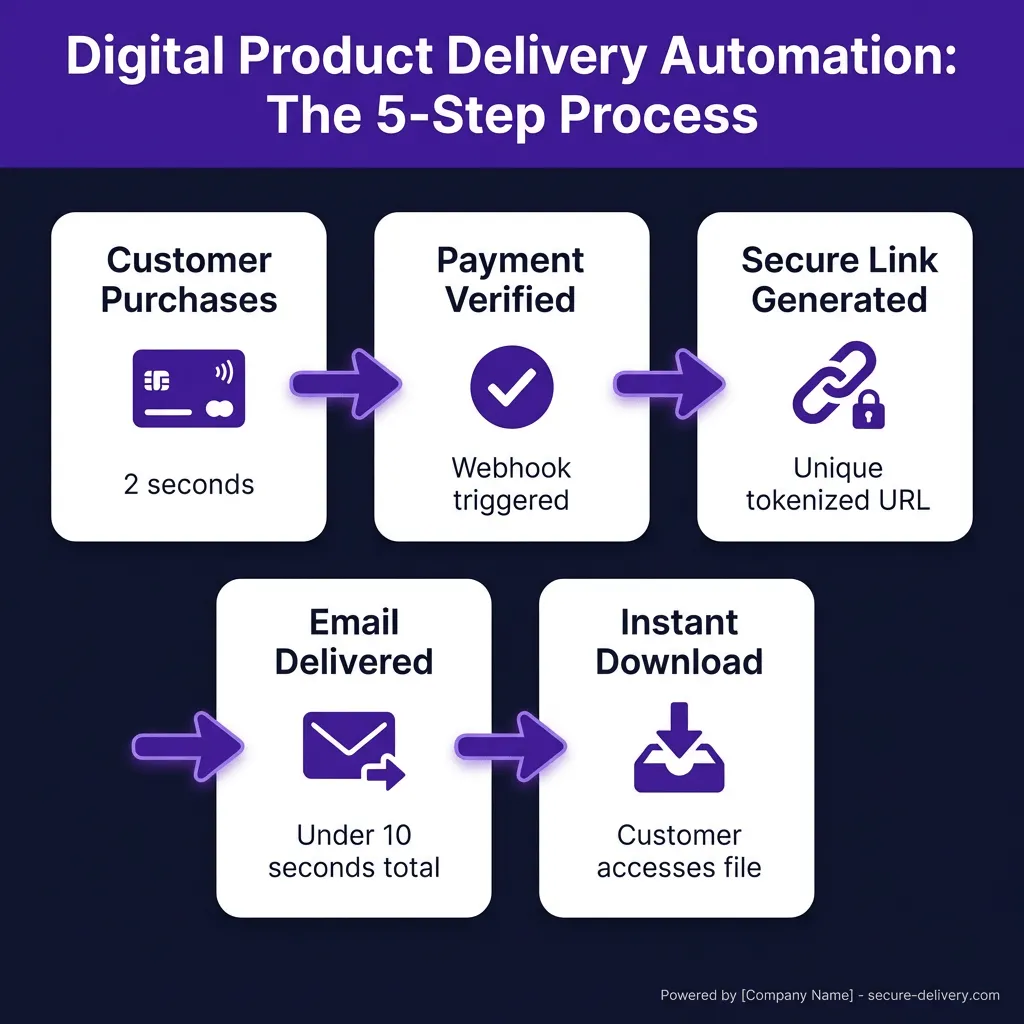
Here’s what happens behind the scenes when you implement digital product delivery automation:
Step 1: Payment Verification
The process begins when your customer clicks “purchase.” Your payment processor (Stripe, PayPal, or a Merchant of Record platform) verifies the transaction and sends a confirmation webhook to your automation system. This happens in milliseconds.
Step 2: Secure Link Generation
Your automation platform immediately generates a unique, secure download link specific to that customer and transaction. This isn’t a generic Dropbox link—it’s a tokenized URL with built-in security features like expiration dates, download limits, and IP restrictions.
Step 3: Instant Customer Notification
Simultaneously, the system triggers an automated email sequence. Your customer receives a professionally formatted message containing their download link, product information, license keys if applicable, and any relevant instructions. The entire process—from payment confirmation to product access—happens in under 10 seconds.
Step 4: Access Management
The automation system tracks download activity, enforces access limits (e.g., “5 downloads per purchase”), and expires links after a set timeframe. If a customer needs a refresh, most systems offer one-click re-delivery without manual intervention.
Key Features of Modern Delivery Automation Systems
Not all automation platforms are created equal. Here’s what to look for when evaluating solutions:
| Feature | Why It Matters | Best For |
|---|---|---|
| Unique Download Links | Prevents unauthorized sharing; each link is tied to a specific purchase | All digital products |
| Download Limits | Controls how many times a customer can access their purchase | Software, templates |
| Link Expiration | Creates urgency and reduces long-term security exposure | Courses, time-sensitive content |
| PDF Stamping | Embeds customer info into PDFs to discourage piracy | Ebooks, guides |
| Drip Content | Releases content gradually over time | Memberships, courses |
| License Key Generation | Auto-generates and delivers software licenses | SaaS, software |
| Webhook Integrations | Connects with your existing tech stack | Tech-savvy sellers |
| Analytics Dashboard | Tracks downloads, identifies issues | Growth-focused businesses |
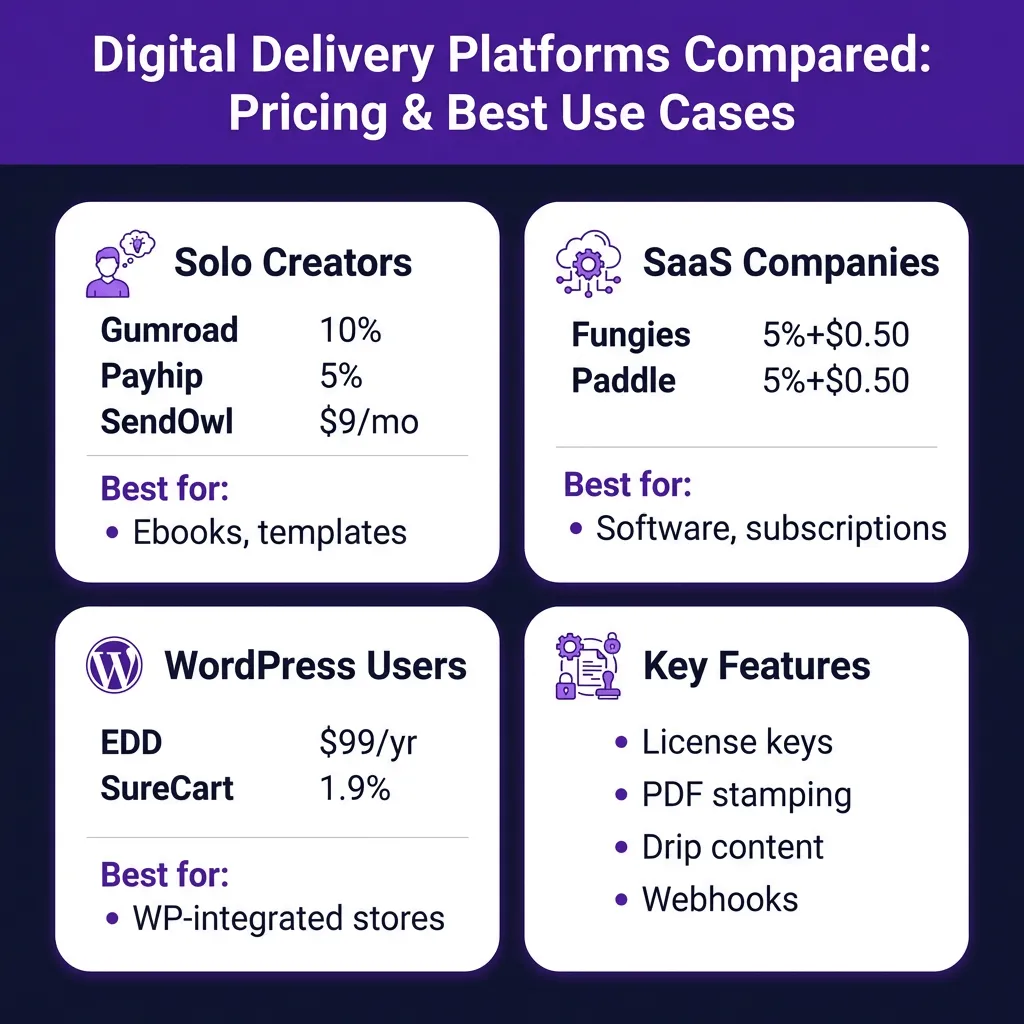
Top Digital Delivery Automation Platforms Compared
I’ve evaluated dozens of platforms. Here are the standout options for different use cases:
For Solo Creators and Small Teams
| Platform | Pricing | Key Strength |
|---|---|---|
| SendOwl | Starts at $9/month | Drip content, bundling, affiliate management |
| Gumroad | 10% per transaction | Social media integration, zero setup |
| Payhip | 5% per transaction | Memberships, affiliate tools |
| Sellfy | $19/month | Marketing tools, customizable storefront |
For SaaS and Software Companies
| Platform | Pricing | Key Strength |
|---|---|---|
| Fungies | 5% + $0.50 per transaction | Merchant of Record, global tax compliance, license management |
| Paddle | 5% + $0.50 per transaction | Subscription billing, global payments |
| Lemon Squeezy | 5% + $0.50 per transaction | Software-focused, license keys |
| Stripe + Custom | 2.9% + $0.30 + dev costs | Full control, requires development |
For WordPress Users
| Platform | Pricing | Key Strength |
|---|---|---|
| Easy Digital Downloads | $99.50/year | Deep WordPress integration, extensible |
| WooCommerce + Plugins | Free + extensions | Full ecommerce flexibility |
| SureCart | Free plan available | Modern architecture, 1.9% transaction fee |
Implementation: Setting Up Your Automated Delivery System
Let’s walk through a practical implementation using a Merchant of Record platform (my recommendation for most SaaS and digital product sellers). I’ll use Fungies as the example, but the principles apply to most modern platforms.
Step 1: Upload Your Digital Products
Log into your dashboard and navigate to the Products section. Create a new product and upload your files. Most platforms support:
- PDFs, ebooks, and guides
- Video files (MP4, MOV)
- Audio files (MP3, WAV)
- Software packages (ZIP, DMG, EXE)
- Template files (PSD, AI, Figma)
Set your file size limits and storage preferences. Most platforms offer secure cloud storage with CDN delivery for fast downloads globally.
Step 2: Configure Delivery Settings
This is where automation magic happens. Configure:
- Download limit: How many times can a customer download? (I recommend 3-5 for most products)
- Link expiration: How long until the link expires? (30 days is standard)
- PDF stamping: Embed customer email/name into PDFs to discourage sharing
- License keys: Enable auto-generation for software products
Step 3: Customize Email Templates
Your delivery email is part of the customer experience. Most platforms let you customize:
- Subject line (keep it clear: “Your [Product Name] download is ready”)
- Email body with merge tags for personalization
- Branding (logo, colors)
- Additional instructions or next steps
Step 4: Test Your Flow
Never go live without testing. Make a test purchase (most platforms offer test mode or sandbox environments). Verify:
- Payment processes correctly
- Delivery email arrives promptly
- Download link works
- File downloads completely and opens properly
- Download limits are enforced
Security Best Practices for Digital Delivery
Automation doesn’t mean ignoring security. Here’s how to protect your digital assets:
1. Use Expiring Download Links
Set links to expire after 30 days. This reduces the window for unauthorized sharing and keeps your CDN costs predictable. Customers who need re-access can request a fresh link—most platforms handle this automatically.
2. Implement Download Limits
Cap downloads at 3-5 per purchase. This prevents customers from sharing their link with friends while giving legitimate buyers enough attempts if they encounter technical issues.
3. Enable PDF Stamping
For ebooks and guides, enable PDF stamping. This embeds the customer’s email or order ID visibly into the document. If the file appears on piracy sites, you can trace the source.
4. Consider DRM for High-Value Content
For premium courses or software, consider DRM (Digital Rights Management) solutions. These restrict copying, printing, or screen recording. Be warned: DRM can frustrate legitimate customers, so weigh the trade-offs carefully.
Advanced Automation: Beyond Basic Delivery
Once you’ve mastered basic automation, consider these advanced strategies:
Drip Content for Courses
Instead of delivering everything at once, release content gradually. This reduces overwhelm, prevents binge-and-refund behavior, and keeps customers engaged longer. Most platforms let you schedule releases based on purchase date or specific intervals.
License Key Management for Software
SaaS companies need license key generation and validation. Modern platforms auto-generate unique keys, deliver them via email, and provide API endpoints for your software to verify activation. Some even handle deactivation when customers cancel.
Webhook Integrations
Connect your delivery system to your broader tech stack:
- Add customers to your email marketing platform (ConvertKit, Mailchimp)
- Trigger onboarding sequences in your CRM
- Grant access to membership communities (Circle, Discord)
- Update customer records in your database
Measuring Success: Key Metrics to Track
Automation isn’t “set and forget.” Monitor these metrics to optimize your delivery:
| Metric | Target | What It Tells You |
|---|---|---|
| Delivery Success Rate | >99% | Percentage of purchases that receive successful delivery |
| Average Time to Delivery | <60 seconds | Speed from payment to email receipt |
| Download Completion Rate | >85% | Percentage of customers who successfully download |
| Support Tickets per 100 Sales | <2 | Delivery-related support burden |
| Refund Request Rate | <3% | Customer satisfaction with delivery experience |
If your delivery success rate drops below 99%, investigate immediately. Failed deliveries directly correlate with refunds and chargebacks.
Common Pitfalls to Avoid
I’ve seen founders make these mistakes repeatedly. Don’t be one of them:
Pitfall 1: Choosing Price Over Reliability
The cheapest option isn’t always the best. A platform that saves you $20/month but delivers emails to spam folders or has frequent downtime will cost you far more in lost sales. Prioritize deliverability and uptime over saving a few dollars.
Pitfall 2: Ignoring Mobile Experience
Mobile commerce accounts for nearly 60% of online sales in 2026. Test your entire delivery flow on mobile devices. Are download buttons easy to tap? Do files open correctly on phones? Is the email readable on a small screen?
Pitfall 3: Over-Restricting Access
Security matters, but don’t punish legitimate customers. Setting download limits to 1 or link expiration to 24 hours creates friction. I’ve seen founders lose repeat customers because someone couldn’t re-download a file they purchased six months ago.
Pitfall 4: Neglecting Email Deliverability
Your delivery email is useless if it lands in spam. Use a platform with good sender reputation, authenticate your domain (SPF, DKIM, DMARC), and avoid spammy language in your email templates.
FAQ: Digital Product Delivery Automation
How much does digital product delivery automation cost?
Costs vary by platform. Transaction-based models (like Fungies, Paddle, or Gumroad) typically charge 5-10% per sale with no monthly fees. Subscription models (like SendOwl or Sellfy) range from $9-$149/month. For most sellers, transaction-based pricing aligns costs with revenue—you only pay when you make money.
Can I automate delivery for large files (1GB+)?
Yes, but check platform limits. Most support files up to 5GB. For larger files, consider cloud storage integration (AWS S3, Google Cloud) with expiring signed URLs. Some platforms offer this natively; others require custom development.
What happens if a customer loses their download link?
Modern platforms handle this automatically. Customers can request a re-send via self-service portals, or you can generate new links from your dashboard in one click. This eliminates the “where’s my purchase?” support burden.
Is automated delivery secure against piracy?
No system is 100% piracy-proof, but automation adds security layers: unique links, download limits, expiration dates, and PDF stamping. For high-value content, consider DRM. Remember: your goal is to deter casual sharing, not stop determined pirates—that’s a losing battle for any creator.
Can I use my own email domain for delivery?
Most platforms support custom sender domains. This improves deliverability and reinforces your brand. You’ll need to add DNS records (SPF, DKIM) to authenticate your domain. It’s worth the 10-minute setup.
Conclusion: From Manual to Automated
Digital product delivery automation isn’t a luxury—it’s a competitive necessity in 2026. The $9.8 billion digital products market is growing fast, and customers expect instant, frictionless access to their purchases.
By implementing automated delivery, you’ll eliminate hours of manual work, reduce errors and refunds, and create a customer experience that drives repeat sales. More importantly, you’ll remove the operational ceiling that limits your growth.
Start by evaluating your current delivery process. How many hours per week are you spending on manual fulfillment? How many support tickets relate to delivery issues? What’s the real cost of delayed gratification on your refund rate?
The numbers probably tell a clear story. Automation pays for itself quickly—not just in time saved, but in improved customer satisfaction and scalable growth.
Ready to automate your digital product delivery? Get started with Fungies and handle payments, tax compliance, and automated delivery in one platform—with flat 5% + $0.50 pricing and no monthly fees.
Sources
- HTF Market Insights – Global Digital Products Market Report 2026
- Cartmango – Top 10 Digital Delivery Systems for Solo Creators (2025)
- ReferralCandy – Digital Product Delivery Automation Guide
- Flowlu – E-commerce Statistics 2026
- Crealo – Essential Guide to Protect Digital Products from Piracy
- Swell – Digital Product Sales Statistics 2026